Toll Free 1-800-443-5542 HERE TO HELP
[
19
]
Einstein™ and CyberSync™ EXISTING SETUPS: Use these instructions to set up the Einstein™ unit
as part of an existing setup with ash units that have already been programmed and specied
in the Cyber Commander™ unit - already programmed lights will remain unaltered.
1. Using the FUNCTION and ADJUST buttons on the Einstein
TM
unit’s back panel, ensure that the
unit is set to a unique channel not shared by any other light / CyberSync
TM
receiver, and set
to the same frequency as your Cyber Commander
TM
remote.
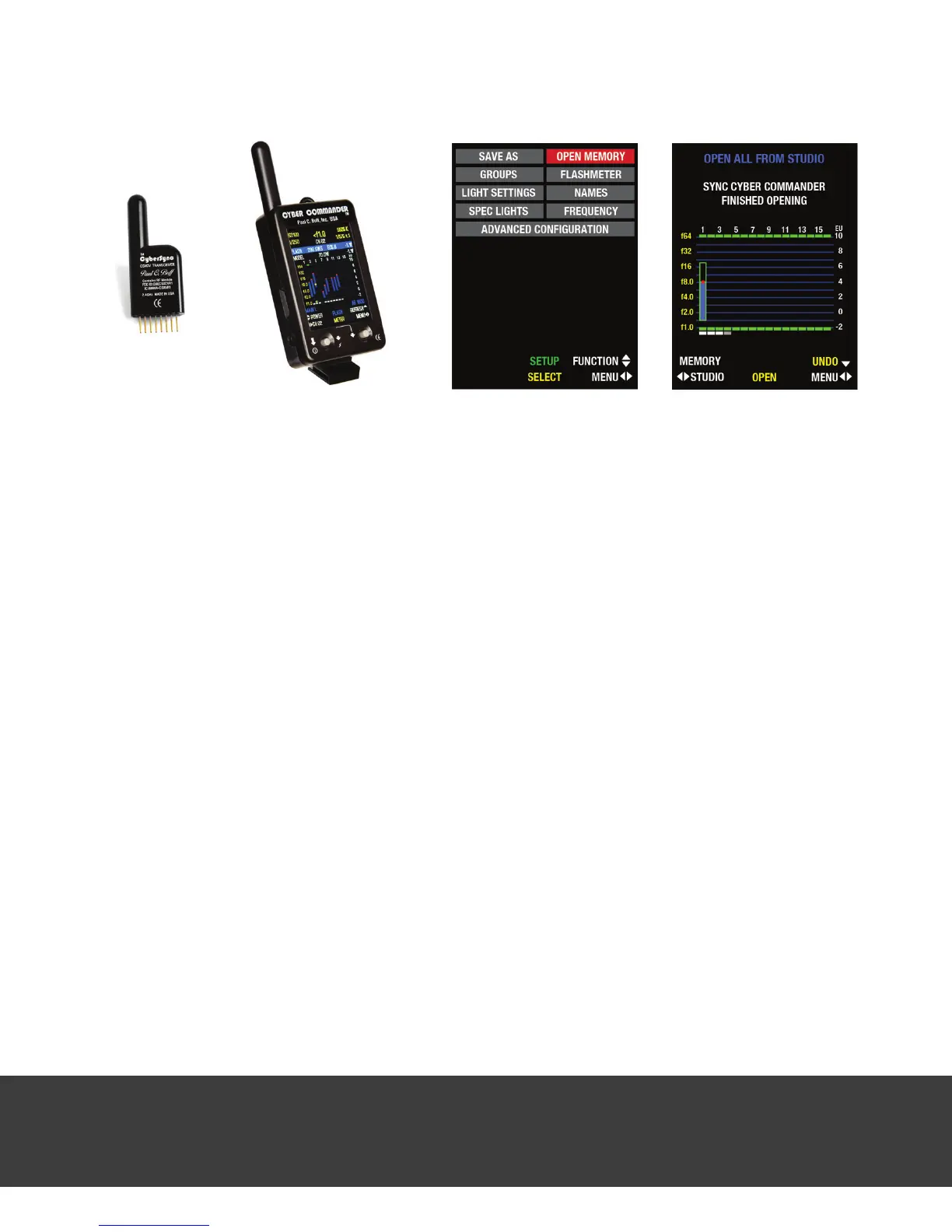
2. Enter the Cyber Commander
TM
remote’s setup menu by scrolling to the right with the right
joystick. In the setup menu, use the right joystick to highlight and select OPEN MEMORY.
3. Using the left joystick, select the CHANNEL corresponding to the channel number you
have set on the new Einstein™ unit that you are about to recognize. By opening new lights
individually, one light channel at a time (instead of using OPEN FROM STUDIO), you will avoid
losing any programming already performed for existing lights. Your screen should now read
OPEN CH(XX) FROM STUDIO, followed by SYNC CYBER COMMANDER FROM STUDIO CHANNEL (XX).
4. Using the right joystick, press in. Almost immediately, SYNC CYBER COMMANDER FINISHED
OPENING should appear.
5. Repeat steps 3 and 4 to add other new Einstein™ ash units to the existing setup.
6. Each Einstein
TM
unit is now dened as an Einstein 640 and the remote is set with all parameters
for each unit as they appear on each back panel. No further action is required. Any parameter
changes should now be made with the Cyber Commander™ remote as any changes made
on the back panel(s) will be overridden by the settings in the Cyber Commander™ remote.
Note:
Once you have completed the process of adding new lights, it’s always a good idea to
store the new or revised setup to one of the 52 available storage locations for future reference.
See your Cyber Commander™ manual for details on storage locations and saving setups.
USING EINSTEIN
™
WITH THE CYBERSYNC
™
SYSTEM
For complete wireless ring and full parameter adjustment, the Einstein™ unit can be used with
the CyberSync™ CSXCV Transceiver and the Cyber Commander™ remote control. With this
setup, the Cyber Commander™ unit can also be used to remotely power on an Einstein™ unit
that is plugged into a power source. For complete information about the optional CyberSync™
system, visit our website (www.paulcbuff.com/cybersync.php).
Setting up the Einstein™ unit with the Cyber Commander™ remote: Unlike setting up vintage Buff™
lights in the Cyber Commander™ remote, it is not necessary to perform the tedious “Spec
Lights” and “Light Settings” steps required by lights that communicate via CSR+ or CSRB+
receivers. The Einstein
TM
/ CSXCV combination allows all of the Einstein
TM
unit’s back panel
settings to automatically be transferred to the Cyber Commander
TM
remote. Acquiring this
information and recognizing Einstein
TM
units is accomplished by using one of the methods
detailed below.
Note:
Below, there are two instruction sets for setting up Einstein
TM
ash units
with the Cyber Commander™ remote. The rst set (NEW SETUPS) starts the setup process from
scratch, erasing any programming already made in the Cyber Commander™ remote. Any
information erased will have to be reprogrammed, including light specications and names. To
keep existing light information programmed in your Cyber Commander
TM
remote, please follow
only the steps in the second section (EXISTING SETUPS).
Einstein™ and CyberSync™ NEW SETUPS: Use these instructions to set up the Einstein™ unit as
part of a new setup with no existing lights - this will erase any information already programmed
in the Cyber Commander™ remote!
1. Using the FUNCTION and ADJUST buttons on the Einstein
TM
unit’s back panel, ensure that the
unit is set to a unique channel not shared by any other light / CyberSync
TM
receiver, and set
to the same frequency as your Cyber Commander
TM
remote.
2. Enter the Cyber Commander
TM
remote’s setup menu by scrolling to the right with the right
joystick. In the setup menu, use the right joystick to highlight and select OPEN MEMORY.
3. Using the left joystick, select STUDIO in the lower left corner. Your screen should now read
OPEN ALL FROM STUDIO, followed by SYNC CYBER COMMANDER FROM STUDIO LIGHTS.
4. Press in on the right joystick. SYNC CYBER COMMANDER FINISHED OPENING should appear.
5. The Einstein
TM
unit is now dened as Einstein 640 and the remote is set with all parameters
for the unit as they appear on its back panel. No further action is required. Any parameter
changes should now be made with the Cyber Commander™ remote as any changes made
on the back panel will be overridden by the settings in the Cyber Commander™ remote.
Note:
All non-digital Paul C. Buff™ ash units (White Lightning
TM
, AlienBees
TM
, and Zeus™
units) will require the specication process as outlined in the Cyber Commander
TM
manual.


 To Next Page
 Loading...