Toll Free 1-800-443-5542 HERE TO HELP
[
7
]
7. The Fuse Holder takes a user-replaceable SR5-F type 8A fuse. A backup is provided in the
event of a blown fuse. See page 20 for more details.
8. The POWER button turns the ash unit ON or OFF.
9. The Power Cord Jack is the connection point for the power cord. The unit arrives with a stan-
dard US cord (IEC connector to 3-prong North American plug), but you can use the unit in
countries with different outlet congurations by purchasing a standard IEC power cord with a
suitable plug for your location.
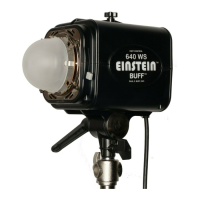
10. The Stand Mount Tightening Knob twists clockwise to secure your light stand’s top coupler
inside the stand mount. Twisting counter-clockwise releases the hold.
11. The Stand Mount accepts any light stand with a top coupler up to 5/8-inch in diameter.
12. The Ratchet Handle allows you to swivel the ash unit up or down, loosening for adjustment
and tightening to hold the desired position.
Note:
Pulling out on the handle allows you to alter its
position in order to make adjustments without hitting the housing.
13. The Quick-Release Levers (two spring-loaded levers, one on each side of the unit) cause the
faceplate holding ngers to contract so that accessories can be added or removed. The ngers
expand to hold accessories securely in place when the levers are released.
14. Four Holding Fingers (one in each corner of the faceplate) are used to securely hold compat-
ible faceplate-mounted accessories in place on the ash unit.
15. The Frosted Pyrex Dome ts over the ashtube and modeling lamp. It equalizes their effective
size and shape for modeling previews and also serves to reduce UV emission.
16. Four Spring Clips hold the frosted pyrex dome in place on the faceplate.
17. The CyberSync™ CSXCV Transceiver (optional, sold separately) drops into the receptacle on
the top side of the unit, allowing the unit to be remotely controlled by the Cyber Commander™
remote control (also sold separately). All of the Einstein™ parameters can be adjusted remotely
with the Cyber Commander™ and Transceiver setup.
18. The Umbrella Tightening Knob is used to hold an umbrella pole in place on the unit. The shaft
accepts umbrella poles up to 3/8-inch in diameter.
19. The Micro SD Card Slot is used for rmware updating. Updates can be downloaded from our
website and installed via a standard Micro SD Card plugged into this slot. See the Einstein™
page on our website (www.paulcbuff.com/e640.php) for rmware updates.


 To Next Page
 Loading...