Issuing tokens
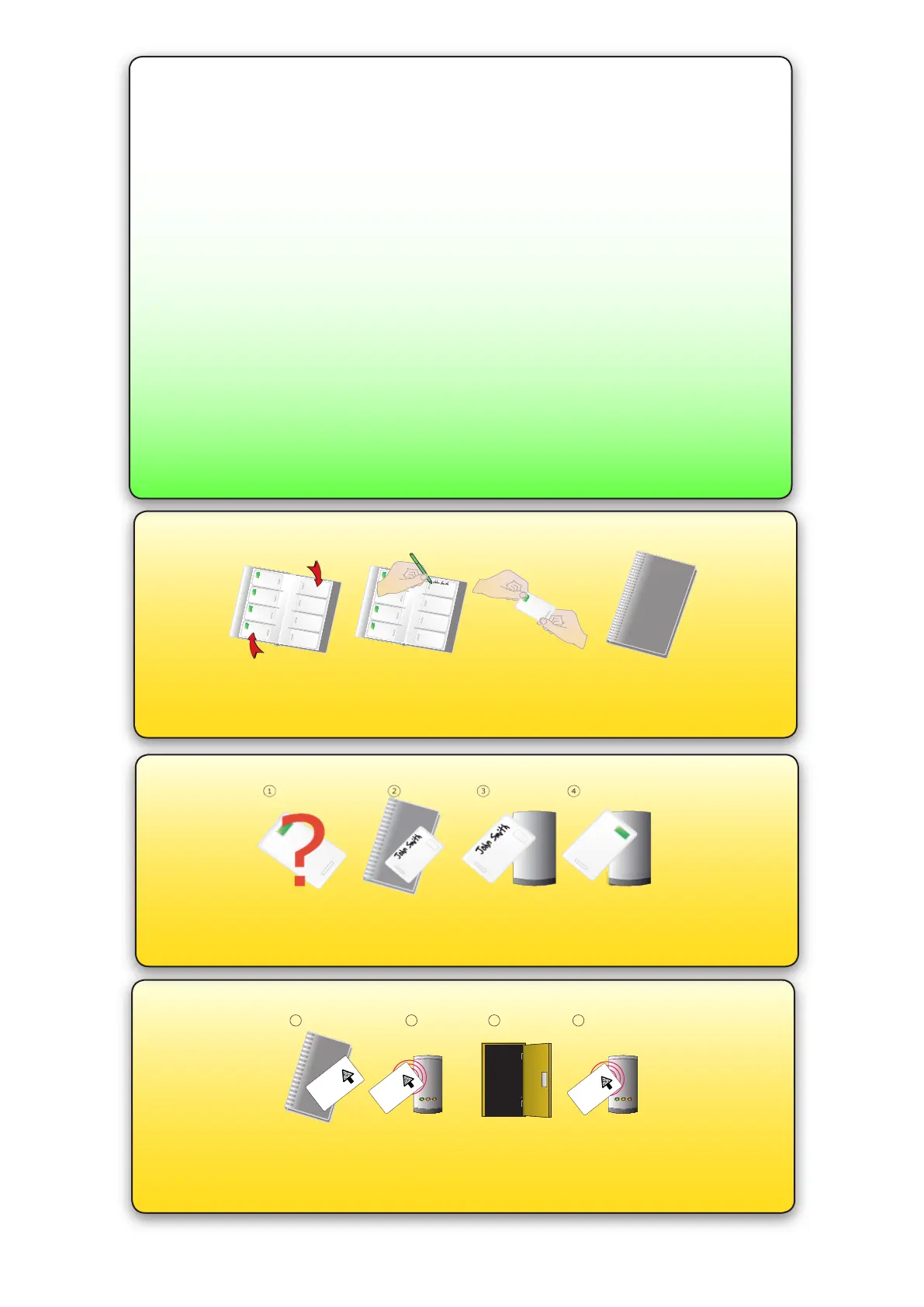
1. Across each double page there are ‘pairs’ of cards - a ‘User card’ and a corresponding ‘Shadow card’.
2. Write the name of the user on the shadow card.
3. Take the user card from the opposite pouch and issue to the user.
4. Keep the card pack containing the shadow cards in a safe place.
Bar a user
1. When a card is lost or stolen it is important to bar the card from your system to avoid unauthorized access.
2. To bar a card or token take it’s corresponding shadow card from the card pack.
3. Present the shadow card to the reader. This will remove the lost card or token from your system.
4. A barred card can re-validated by presenting the enrolment card followed by the user card to the reader.
Door held open
A button on the inside allows the internal handle to be held in the unlocked position.
NOTE: The Fail Open release card has the same function as a door held open card.
1. Take the fail open release function card from the starter pack
2. Present the card to the reader. The reader will beep for about a second
3. The door is now set to be permanently open.
4. To relock the door, present the card again, the reader will bleep once.
1 2 3 4
BEEP!
BEEP!
Fail open release card
This card is used with
systems where a fail open
electric release is used for
safe operation in the event of
a fire. Swipe the card through
the reader to drive a fail open
release or maglock. Swipe
the card again to revert to fail
closed operation.
Fail open release card
This card is used with
systems where a fail open
electric release is used for
safe operation in the event of
a fire. Swipe the card through
the reader to drive a fail open
release or maglock. Swipe
the card again to revert to
fail
closed operation.
Fail open release card
This card is used with
systems where a fail open
electric release is used for
safe operation in the event of
a fire. Swipe the card through
the reader to drive a fail open
release or maglock. Swip
e
the card again to revert to
fail
closed operation.
The inside handle is permanently engaged with the latch. The external handle is free to
move and is only engaged once access has been granted.
Presenting a valid user card to the unit will cause the Green LED to ash briey and
the handle will then engage (default 4 seconds). The unit will bleep during this time to
advise the user that access has been permitted. This default time can be changed with
the program cards.
Presenting an invalid or barred card will cause the Red LED to ash rapidly and a low
tone to be heard. No access will be granted.
If activity around the reader is sensed but no card read takes place (e.g. a non Paxton
card) the Red LED will ash 3 times.
ALARMS - The handle must be horizontal to operate the latch. If it is not horizontal
when a valid card is presented, the LED will ash Amber until the handle is again
horizontal when the latch will then release.
If the handle is held down after use, stopping the latch disengaging correctly, the LED
will ash Red until the handle is again horizontal.
Normal Operation - LED Indications


 To Next Page
 Loading...