0 m
3m
15m
20m
30m
50ft
65ft
100ft
10ft
0 ft
≤ 50000
4 x AA Alkaline
IEEE 802.15.4
3m - 15m
-20°C +55°C
≤ 10 mm
10 ft - 50 ft
-4°F +131°F
-0°C +49°C
+32°F +120°F
35 - 60 mm
6V
800mA
2
Paxton
1
Paxton
Paxton
FUNCTION CARD
Enrolment card
1. At installation, present this card to the
reader to validate the tokens in this pack
2. To re-validate a user token present this
enrolment card to the reader followed by the
user token
1.At installati
reader to v
2.To re-v
user token
More info:
6
5
4
3
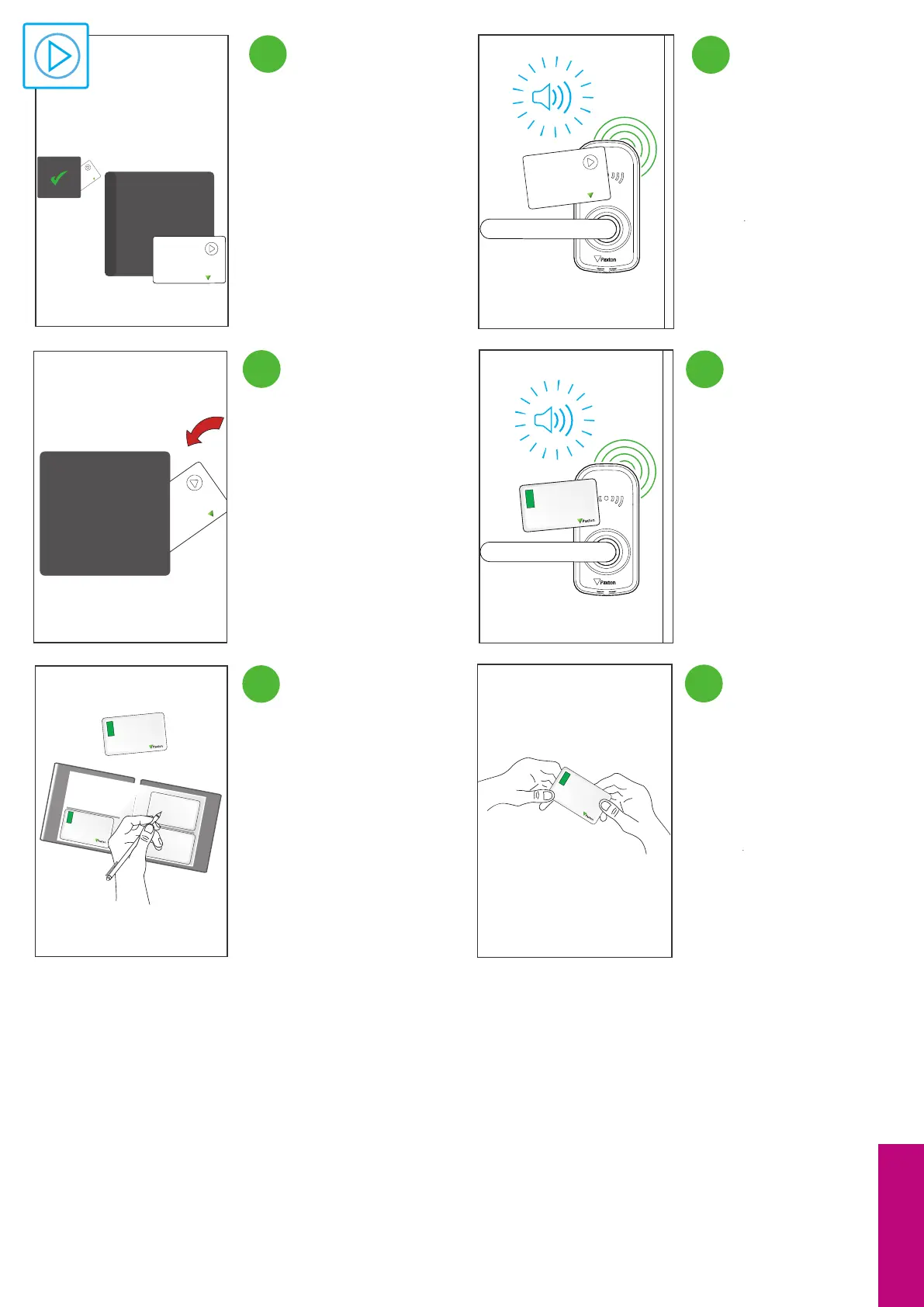
To put the unit in Standalone mode,
take out the enrolment card from
the card pack.
Present the enrolment card to the
PaxLock Pro, you will hear a beep
and the LEDs will ash green once.
Issue the token to the user.Write the recipient of the tokens
name on the corresponding shadow
card.
Store the enrolment card back in the
pack for later use.
Standalone
When presenting a token to the
PaxLock Pro the LEDs will ash green
once and it will not beep.
8 9


 To Next Page