EasyManua.ls Logo

Paxton Net2 PaxLock - User Manual

Paxton Net2 PaxLock
2 pages
Print Icon
To Next Page IconTo Next Page
Loading...
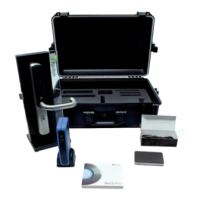
The Net2 PaxLock demo case is the ideal sales tool to show customers the
true capabilities of Net2 PaxLock.
What's in the box?
Net2 PaxLock Demo Case
Quick Start Guide
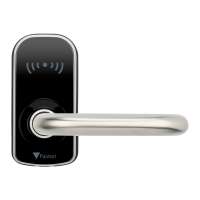
• Net2 PaxLock (Paxton token, key override version)
• Demo stand with Euro prole 72mm lock case
• Net2Air bridge - USB
• Net2 desktop reader
• Net2 software - Pro DVD
• Net2 token selection
• 2 x USB cables
• 1 x security Allen key 3mm
• Robust travel case
• Euro prole locking cylinder and 3 x keys
Insert batteries into the Net2 PaxLock.
The unit will power up and run an
audible self-diagnostic check.
Step 1

Other manuals for Paxton Net2 PaxLock

Question and Answer IconNeed help?

Do you have a question about the Paxton Net2 PaxLock and is the answer not in the manual?

Paxton Net2 PaxLock Specifications

General IconGeneral
BrandPaxton
ModelNet2 PaxLock
CategoryDoor locks
LanguageEnglish

Summary

Whats in the Box

Installation Steps

Step 1: Insert Batteries

Insert batteries into the Net2 PaxLock unit to power it up and initiate a self-diagnostic check.

Step 2: Secure Backplate

Firmly push the backplate into position and secure the handle using the provided Allen key.

Step 3: Connect and Install

Connect the desktop reader and Net2Air bridge to PC, then install the Net2 software.

Step 4: Add User Details

Open Net2 software, present user token to the reader to access the Add User interface.

Step 5: Bind to Database

Add user details, present token to PaxLock unit to bind it to the database.

Related product manuals