Perform Time Job Aid:
Course Overview and Installation
Page 10 Copyright © Paycor Inc. All Rights Reserved Updated: 5/26/15
Biometric Enrollment
Once the employees are loaded into the clock follow the procedure below to enroll the
employee’s fingerprint.
Adding a password on an Employee will disable the Biometric Reader on the clock for
that employee.
1. Press the Menu Key .
2. Select User Mng, and press the Menu Key.
3. Select Manage, and press the Menu Key.
4. Select the Employee, and press the Menu Key.
5. Select Edit, and press the Menu Key.
6. Select Enroll FP, and press the Menu Key.
7. The Employee will verify the fingerprint three times. Then the clock will display Enroll
Success.
8. Press ESC.
9. Repeat Steps 3-8 for each Employee.
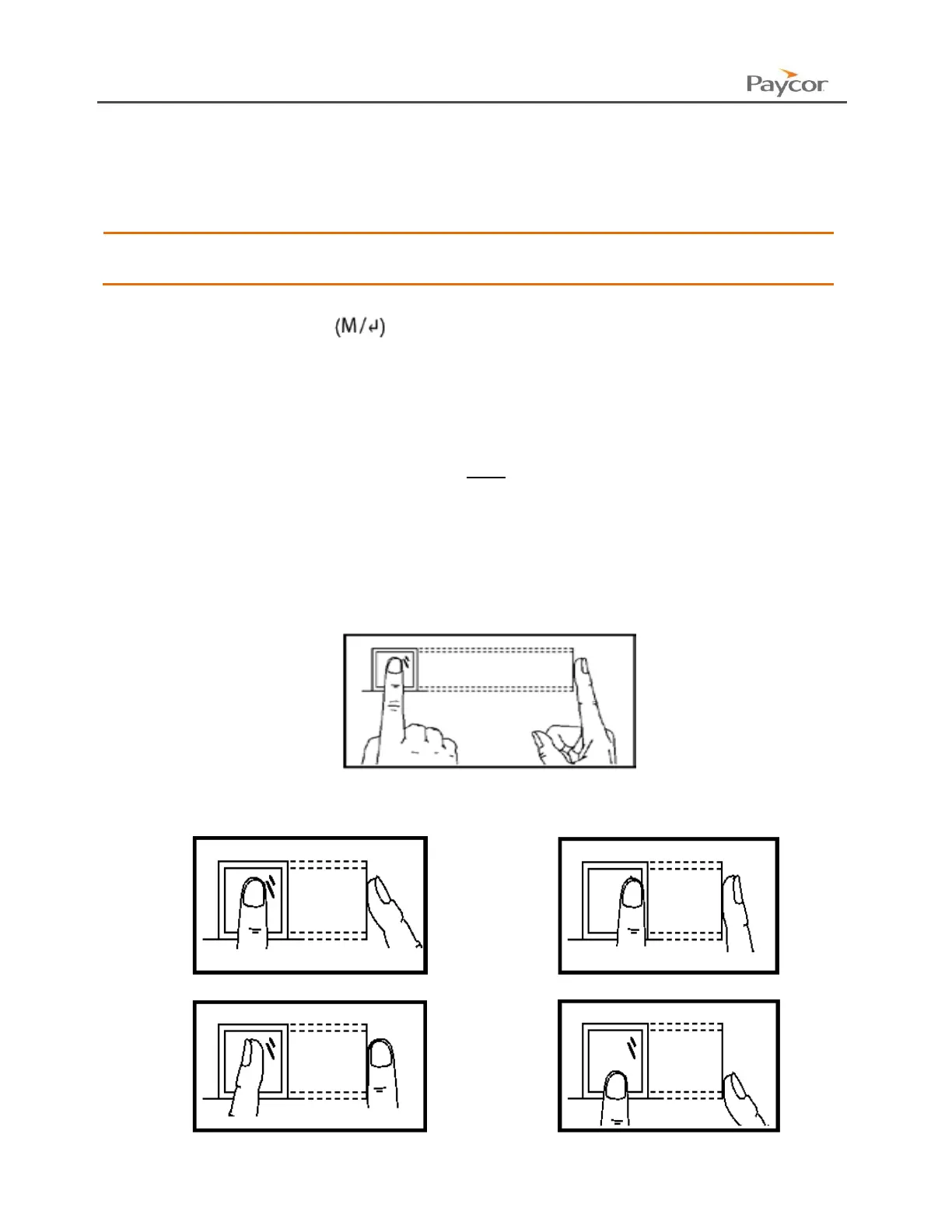
Proper Press Example
Place finger firmly and flat in the center of the sensor window.
Improper Press Examples
Not firm, finger is too elevated
Not flat (do not use the side of your finger)
Off Center, and not full finger print



 To Next Page