

EasyManua.ls Logo

Paycor PT100 - User Manual

Paycor PT100
12 pages
Print Icon
To Next Page IconTo Next Page
Loading...
Copyright © Paycor Inc. All Rights Reserved
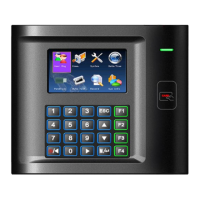
PT100 and PT100W
Ethernet Clock with Proximity Badge Reader
Menu/Enter Key
Function Keys
Proximity Badge Reader
Main Display Screen
Note:
PT100W includes WiFi
Capability.
PT100F and PT100FW
Ethernet Clock with Proximity Badge Reader and Biometric Fingerprint Reader
Menu/Enter Key
Function Keys
Proximity Badge Reader
Main Display Screen
Biometric Reader
Note:
Question and Answer IconNeed help?

Do you have a question about the Paycor PT100 and is the answer not in the manual?

Summary

Clock Overview

Installing the Perform Time Clock

Details on mounting the clock to the wall with provided hardware.

Mount to the Wall

Steps for determining position and securing the clock device to the wall.

Connecting the Time Clock

Connect the Clock to Power

Procedure for powering up the clock using the provided 12V power adapter.

Connect to the Internet

Connecting the time clock to the internet via an Ethernet Port.

Network Setup

Static Communication Setup

Manually entering network information for static IP configuration on the clock.

Wi-Fi Setup

Guidance for setting up Wi-Fi capability on compatible Paycor time clocks.

Wi-Fi Password Setup

Steps to prepare a USB drive with a text file for Wi-Fi password enrollment.

Setting the Wi-Fi Network

Load and Save Wi-Fi Password

Steps to load the Wi-Fi password from USB and save it to the device.

Confirm Wi-Fi Connection and Save

Navigating menus to save Wi-Fi settings after successful connection.

WI-FI Static Information Setup

Enrolling Employees

Proximity Badge Enrollment

Process for enrolling employee proximity badge numbers through the Paycor portal.
Biometric Enrollment

Password Enrollment (Manual Punching)

Managing the Clock

Paycor PT100 Specifications

General IconGeneral
BrandPaycor
ModelPT100
CategoryClock
LanguageEnglish

Related product manuals