EasyManua.ls Logo

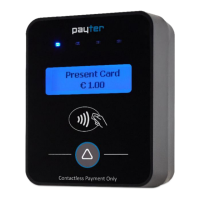
Payter P66 - User Manual

Default Icon
50 pages
Print Icon
To Next Page IconTo Next Page
Loading...
Copyright © 2010 Payter..
All rights reserved. No part of this document may be reproduced in any form by print, photo print, microfilm, electronic copy or any other
means without written permission by Payter BV.
P6X User Manual
Document version : 3.0
Document status : Release
Date : 30-01-2017
Document ID : PTR-40-10-ML-C-0003-03
NOTICE
This manual contains intellectual property, including but not limited, to trade
secrets and know-how, operating procedure and production procedures that
belong solely to Payter B.V.
Disclosure and/or use and/or reproduction of any part of this document strictly
forbidden, except under a written license from Payter B.V.
Payter B.V.
Rozenlaan 115
3051 LP Rotterdam
The Netherlands
P6X User Manual

Table of Contents

Question and Answer IconNeed help?

Do you have a question about the Payter P66 and is the answer not in the manual?

Summary

3. P6 X Terminal Overview

4. Basic Connectivity Features

4.1 Host Machine Interface

Details available interface modes for connecting the P6X terminal to host machines.

4.3 Terminal Configuration

Covers essential configuration aspects including files, settings, SAM, and data SIM.

5. Payment Flow

6. Modes of Operation

6.1 MDB Mode

Explains the Multi Drop Bus (MDB) mode for vending machines, including connection and settings.

6.2 Executive Mode

Covers the Executive Protocol (PROTOCOL A) and its use with the Payter VendBox.

6.3 Potential Free Pulse Contact (Autoscan Mode)

Details the Autoscan mode using potential free pulse contacts for payment and control.

7. Setting Up Internet

7.1 LAN Connection

Explains connecting the terminal to the internet via LAN using the Ethernet port.

7.2 GPRS;EGDE;3 G;HSPA Modem

Details setup and use of the optional 3G/HSPA modem for mobile internet connectivity.

8. Terminal Configuration

10. Technical Specifications

11. Troubleshooting

11.1 Result Codes

Lists and categorizes result codes for diagnosing terminal errors and issues.

11.2 LAN Troubleshooting

Provides checks and solutions for establishing and maintaining a LAN connection.

11.3 Mobile Internet Troubleshooting

Offers solutions for common issues with GPRS/GSM signal and mobile internet connectivity.

12. Warnings

14. Installation Guide

15. FCC Compliance Statement (P68 only)

16. CE Declaration of Conformity

Payter P66 Specifications

General IconGeneral
BrandPayter
ModelP66
CategoryPayment Terminal
LanguageEnglish

Related product manuals