PC-EFTPOS Overview
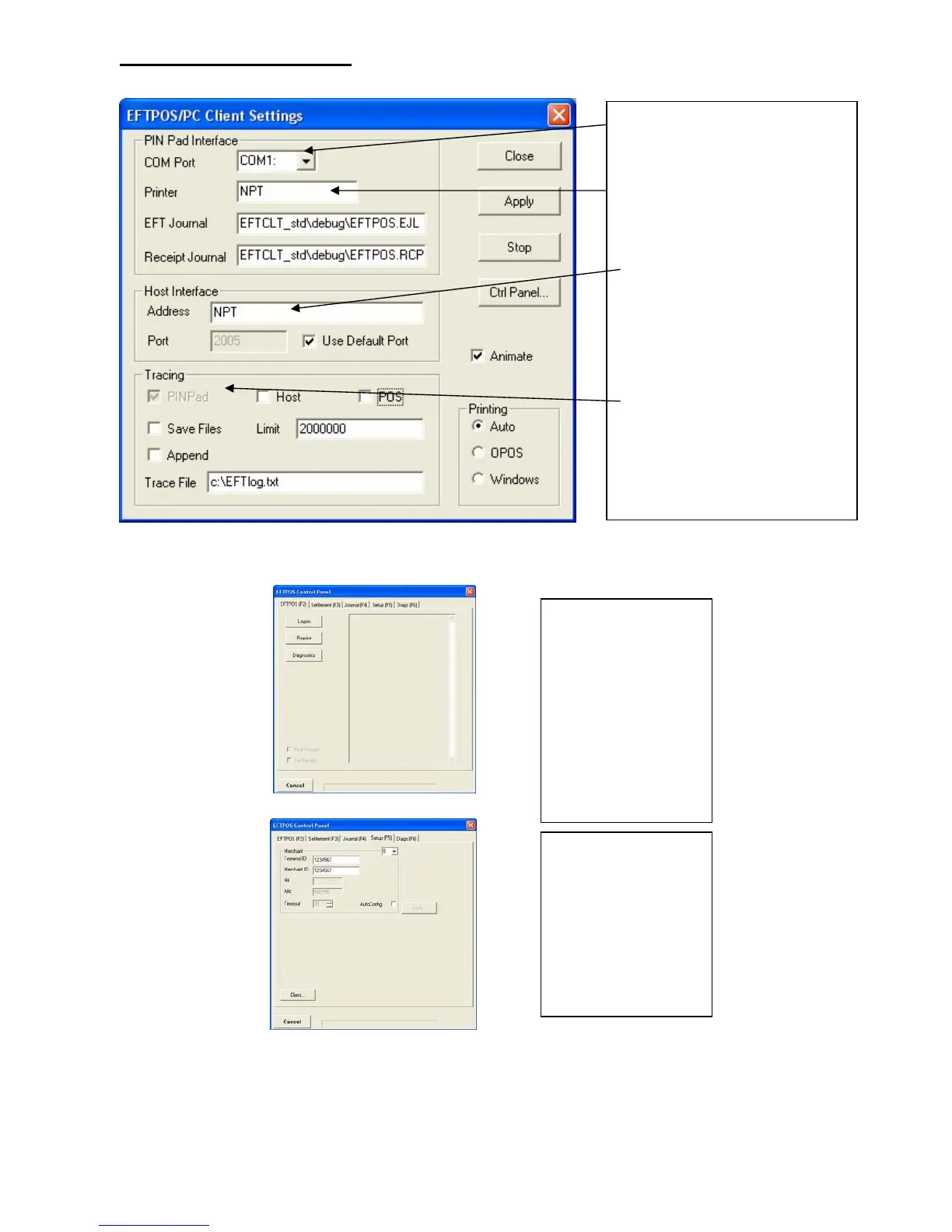
EFT-Client Settings:
COM port: that the pinpad is
plugged into.
Printer: (Not used when POS is
printing). NPT denotes using
the internal printer of NPT
Host Interface: This is
normally blank. It is the IP
address of the EFTSRV which
is normally on this machine.
NPT indicates to use the
internal NPT modem.
Tracing: This is enabled by
default and records information
on the hard-drive to help us
track down any issues.
Eftpos Control Panel
Press the control panel button on the Client settings page (above) to activate the control panel.
Logon: Performs a
logon to the host
Reprint: reprints
last receipt
Diagnostics:
Provides reports on
s/w configuration
and version
Setup Page:
Enter terminal
details.
Press APPLY and
then 7410 as the
password
Confidential Page 4 5/23/2007



 To Next Page