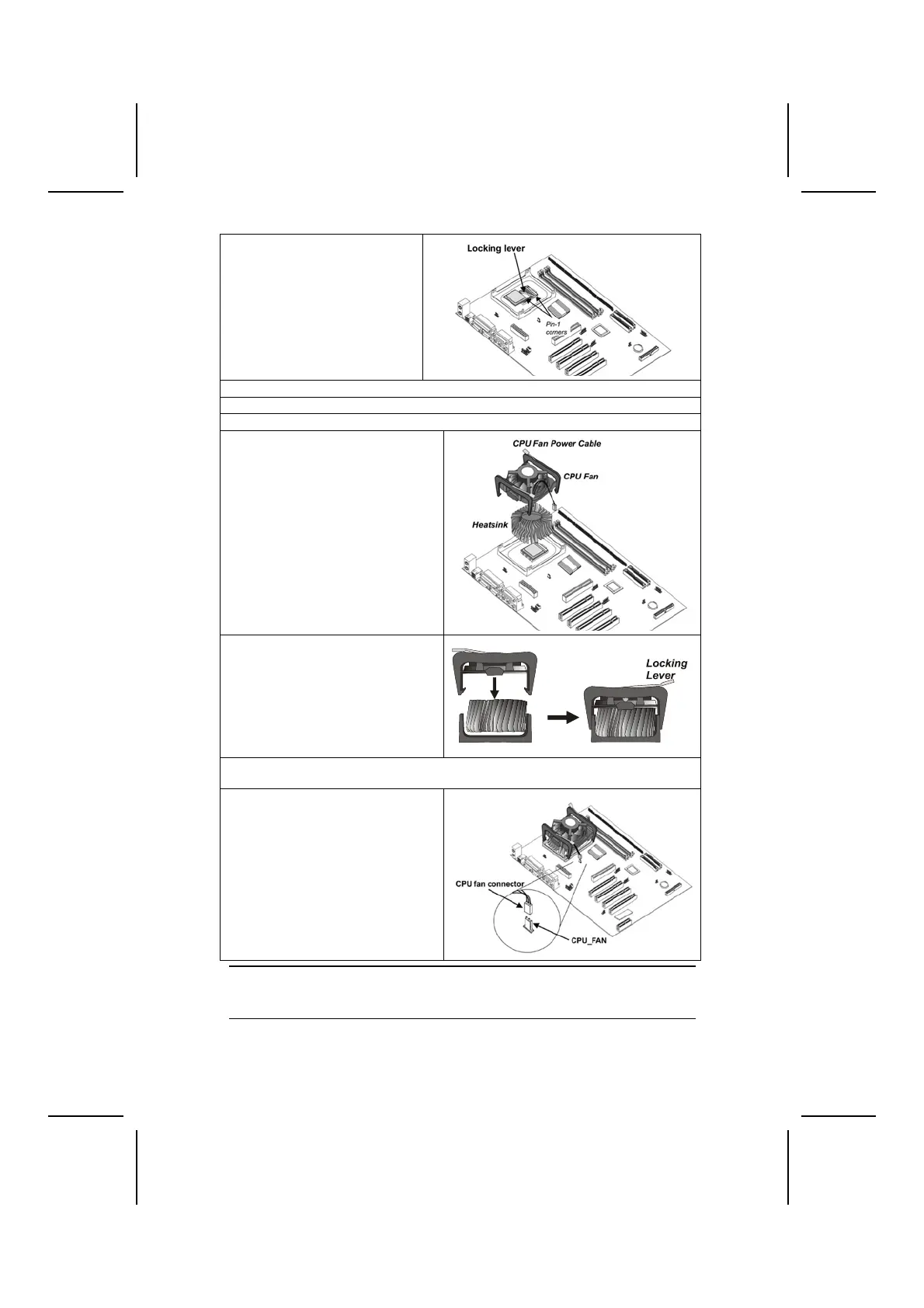
2. Match the corner on the
CPU marked with an arrow
with pin-1 on the CPU
socket (the corner with the
pinhole noticeably missing).
Insert the processor into the
socket. Do not use force.
3. Lower the heatsink over the CPU.
4. Lower the CPU cooling fan onto the heatsink.
5. Apply thermal grease to the top of the CPU.
6. Swing the locking lever down
and hook it under the latch on
the edge of the socket.
7. Snap the four retention legs of
the cooling fan into place (see
diagram below).
Cooling Fan
R
n
i
n M
l
Heatsink
8. Swing both lock levers on top of the cooling fan to their opposite sides to se-
cure the cooling fan on top of the heatsink.
9. Connect the CPU Cooling Fan
power cable to the CPUFAN1
connector.
Note: CPU fan and heatsink installation procedures may vary with the type of
CPU fan/heatsink supplied. The form and size of fan/heatsink may also
vary.
12



 To Next Page