Section 4
USER I NSTRUCTI ONS
1. STANDARD WEI GH MODE
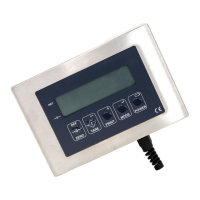
ZERO: references the display to zero
TARE: the first press of t his key tares the display the second press clears the tare. A symbol in the far left of
the display indicates if a tare is present.
MODE: allows access for preset tare input.
PRINT: initiates a printout if option fitted. The printout is selectable for nett or gross/ nett/tare and for units
and linefeeds. A time and date print will also occur if installed. Note the printout will only occur when the
unit is steady and further printouts are inhibited until the load is removed.
POWER: used to switch on the unit, if this key is pressed when the unit is working the display will indicate
the supply voltage, this is useful for battery operation.
2. WEI GH COUNT MODE
Ensure that the indicator displays zero
ZERO: clears any container weights.
Count 10 items onto the platform then press the MODE key. The display should now indicate a count of 10
and further components added will be counted. The ZERO or TARE may be used if required. To return to
weigh mode press the MODE key.
PRINT: initiates a printout of weight or count depending on mode selection.
Note the sample quantity is default to 10 however if you wish too alter this value press the POWER key and
input the desired quantity (1 to 100).
3. SI LO MODE
This mode inhibits inadvertent zero selection. To zero the display press the ZERO and then MODE key
toget her. Release the ZERO key and then the MODE key
4. PEAK HOLD
To select peak hold mode press the MODE key. Peak weight will then be displayed until the MODE key is
pressed again, the unit will then return to normal weighing.
The PRINT key initiates a printout of weight or peak weight depending on the mode.
Press POWER to view supply voltage.
5. TOTALI SI NG
Press the PRINT key to add an indicated weight value to the store. Further additions are inhibited until the
display returns to zero. To view the total press the MODE key, press the PRI NT key to clear the total or the
MODE key to exit .
If a printer is connected then printout of running number, weights and total will occur. Press POWER to view
supply voltage.
6. FREEZE MODE ( Useful for Fork Lift and Animal Weighing Applications)
When a weight above 50 displayed divisions is indicated the unit will initiate a stabilise routine followed by a
locking of the indicated weight value. The display will unlock below 50 indicated divisions. To initiate a re-
weigh in lock mode press the TARE key and when the display shows zero re-press this key. Press the PRI NT
key to add an indicated weight value to the store. Further additions are inhibited until the display returns to
zero. To view the total press the MODE key, press the PRINT key to clear the total or the MODE key to exit.
USER NOTE: BATTERY LOW I NDI CATOR
A small dot illuminates in the far left region of the display if the battery voltage is low.
USER NOTE: Display I ndicates “DATA”
To return back to normal weighing mode press the “MODE” key (Version C software onwards).


 To Next Page
 Loading...