2.
DESCRIPTION
2.1
Instrument Familiarization
a
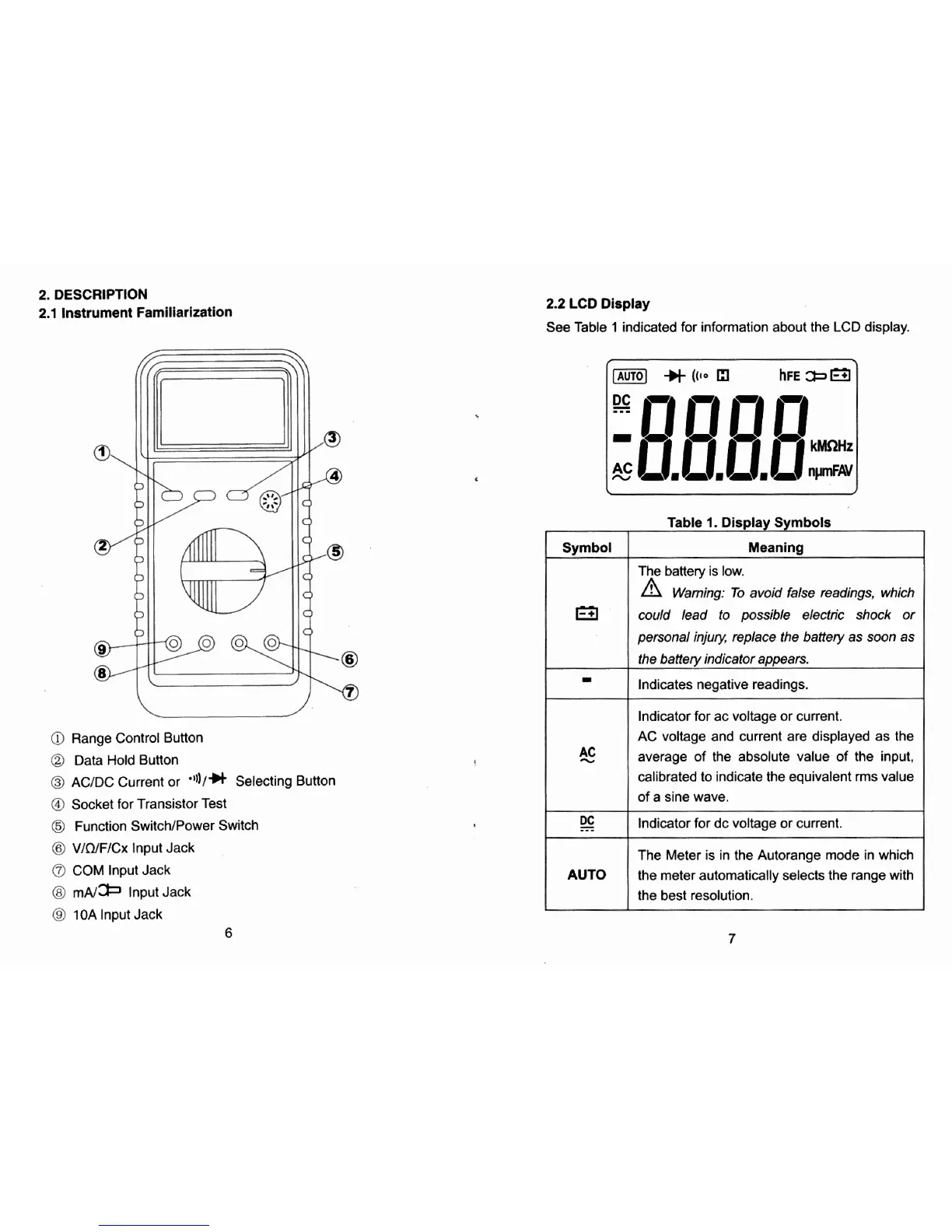
Range Control Button
Q
Data Hold Button
@
ACIDC Current or
'I))/*
Selecting Button
@
Socket for Transistor Test
@
Function SwitcWPower Switch
@
V/n/F/Cx
lnput Jack
COM lnput Jack
@
m~/* lnput Jack
@
10A
lnput Jack
2.2
LCD
Display
See Table
1
indicated for information about the LCD display.
Indicator for ac voltage or current.
AC voltage and current are displayed as the
average of the absolute value of the input.
calibrated to indicate the equivalent
rms value
of a sine wave.
---
Indicator for dc voltage or current.
Table
1.
Display Symbols
Symbol
Meaning
The battery is low.
Warning: To avoid fake readings, which
wuld lead to possible electric shock or
personal injury, replace the battery as soon as
the
baffery indicator appears.
Indicates negative readings.
AUTO
The Meter is in the Autorange mode in which
the meter automatically selects the range with
the best resolution.


 To Next Page