PDi Communication Systems, Inc. ▪ 40 Greenwood Ln ▪ Springboro, Ohio 45066 USA ▪ www.pdiarm.com and www.mymedTV.com ▪ Phone 800.628.9870
Android Device Settings
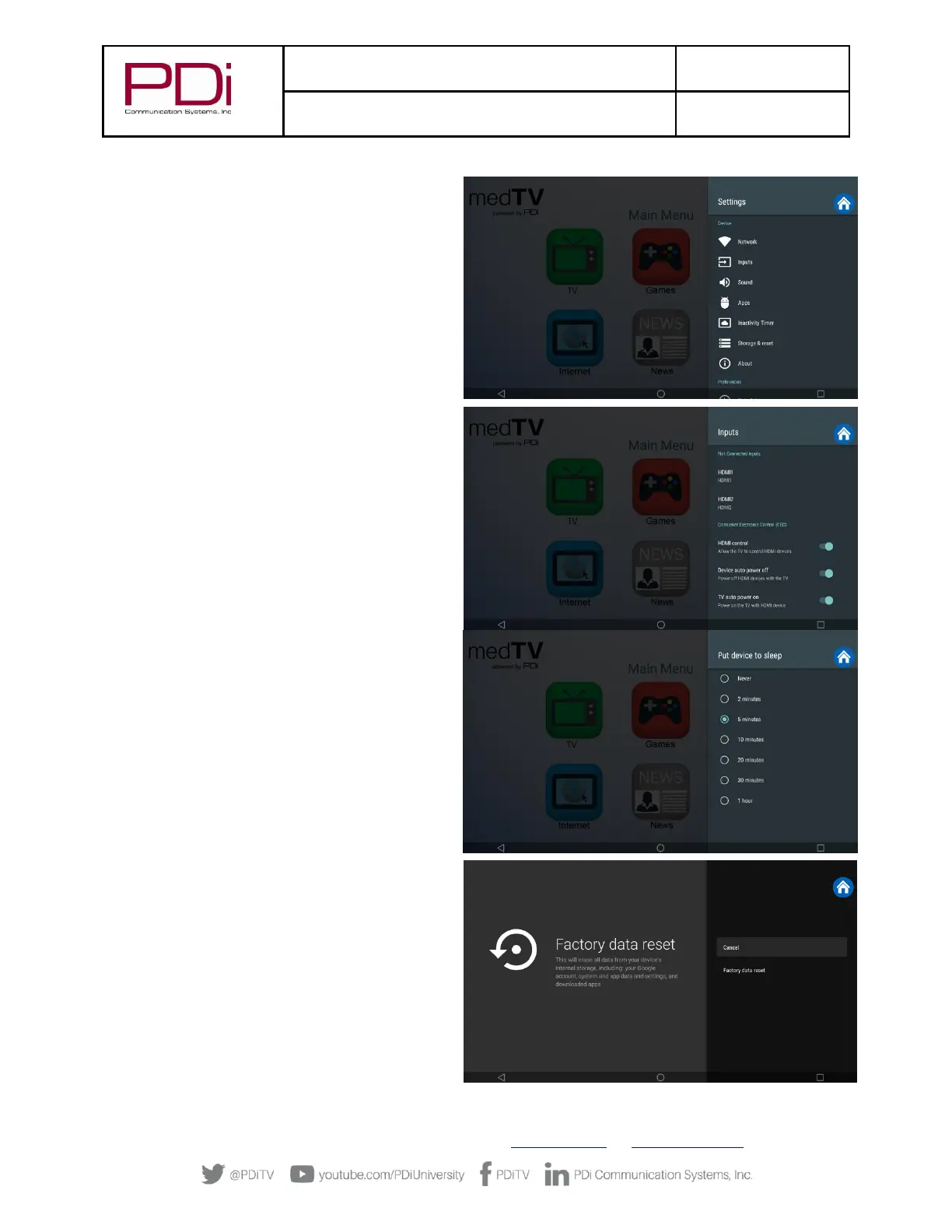
1. Settings – Network. Connect to the internet via
WIFI or Ethernet. Verify network settings here. To
search for WIFI networks, simply touch the word
Wi-Fi or slide the Wi-Fi toggle to the right/ON. If
the device finds a network previously used, it will
reconnect to it. Touch the network name to see
more details or enter WIFI password to connect to
the network. Connect to Ethernet or view IP
Settings.
2. Settings – Inputs. Identify your HDMI input
sources from a list of common names. You can also
enable/disable CEC controls (Consumer Electronic
Controls) such as allow the TV to control HDMI
devices, and power off/on controls with the TV.
3. Settings – Apps. Set App permissions, and review
system app settings.
4. Settings - Inactivity Timer. Choose when to put
device into Sleep mode: Never – 2 min – 5 min – 10
min – 20 min – 30min – 1hour. Default setting is 5
min.
5. Settings – Storage & reset. View shared storage
space or reset device to factory settings.


 To Next Page