6
2
2
7
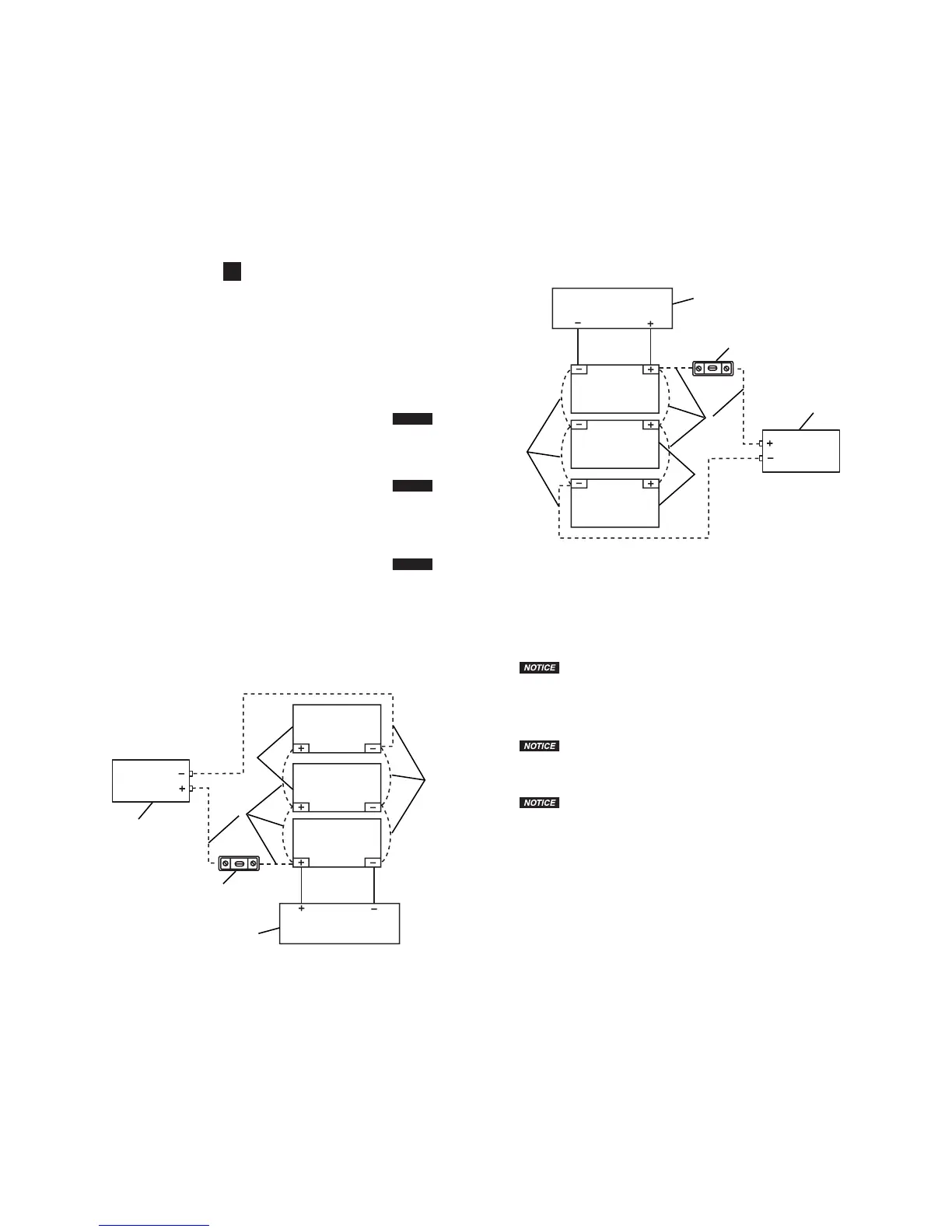
Leyenda
1. Fuente de Carga de las Baterías
2. Baterías de 12 voltios
3. Fusible de 300 amperios ANL
4. Inversor de Energía
5. Cable Negativo (–) (consulte las ESPECIFICACIONES para obtener los requisitos de cable)
6. Cable Positivo (+) (consulte las ESPECIFICACIONES para obtener los requisitos de cable)
7. Baterías Adicionales Conectadas en Circuito Paralelo
Operación del Tomacorriente de Energía USB
AVISO
La salida de energía USB no apoya las comunicaciones de datos. La salida tiene un
máximo de 5 voltios/2.1 A.
1. Enchufe el dispositivo energizado por USB dentro de la salida de energía USB.
2. Asegúrese de que el Inversor esté conectado correctamente a la batería.
3. Encienda el dispositivo accionado por USB.
4. Al apagar, apague primero el dispositivo USB, luego desconecte el Inversor.
5. Desenchufe el dispositivo USB de la salida de energía USB.
AVISO
La salida de energía USB es una salida sin interruptor. Siempre que el Inversor esté
conectado a una batería, habrá energía en la salida USB. El interruptor ON/OFF o el botón
ON/OFF del interruptor remoto no necesitan estar encendidos para que haya energía en la
salida USB.
Operación del Interruptor Remoto
AVISO
El interruptor ON/OFF del Inversor tiene que estar en la posición OFF cuando se usa
el interruptor remoto. Si el interruptor ON/OFF está en la posición ON, el interruptor remoto no
operará.
1. Asegúrese de que el interruptor ON/OFF del Inversor está en la posición OFF.
2. Enchufe el conector del interruptor remoto en la toma del interruptor remoto en el Inversor.
3. Oprima el botón ON/OFF del interruptor remoto. La luz verde en el interruptor remoto y en el
Inversor deberán estar encendidas.
4. Una vez que el Inversor ha sido encendido usando el interruptor remoto, la operación del
Inversor será controlada usando el interruptor remoto.
5. Apague el Inversor usando el interruptor remoto antes de desconectar el conector del interruptor
remoto del Inversor.
6
2
2
7
Legend
1. Battery Charging Source
2. 12-volt Batteries
3. 300-amp ANL Fuse
4. Power Inverter
5. Negative (-) Cable (see SPECIFICATIONS for cable requirements)
6. Positive (+) Cable (see SPECIFICATIONS for cable requirements)
7. Additional Batteries Connected in Parallel Circuit
USB Power Outlet Operation
The USB power outlet does not support data communications. The outlet has a
maximum of 5 volts/2.1 A.
1. Plug the USB-powered device into the USB power outlet.
2. Make sure the Inverter is correctly connected to the battery.
3. Turn on the USB-powered device.
4. When shutting down, turn off the USB device first, then disconnect the Inverter.
5. Unplug the USB device from the USB power outlet.
The USB power outlet is an unswitched outlet. Whenever the Inverter is connected to
a battery, there will be power to the USB outlet. The ON/OFF switch or the remote switch ON/
OFF button does not need to be turned on to have power at the USB outlet.
Remote Switch Operation
The Inverter ON/OFF switch must be in the OFF position when using the remote
switch. If the Inverter ON/OFF switch is in the ON position, the remote switch will not operate.
1. Make sure the Inverter ON/OFF switch is in the OFF position.
2. Plug in the remote switch connector into the remote switch outlet connection on the Inverter.
3. Press the remote switch ON/OFF button. The green light on the remote switch and on the
Inverter should be lit.
4. Once the Inverter is turned on using the remote switch, the Inverter operation will be controlled
using the remote switch.
5. Turn the Inverter off using the remote switch before disconnecting the remote switch connector
from the Inverter.



 To Next Page