Setting Clock Date
Setting Alarm
FIG 2
M
O
N
T
O
F
R
I
1
2
TEMP
MONTH
DATE
DAY
AM
ALARM
AM
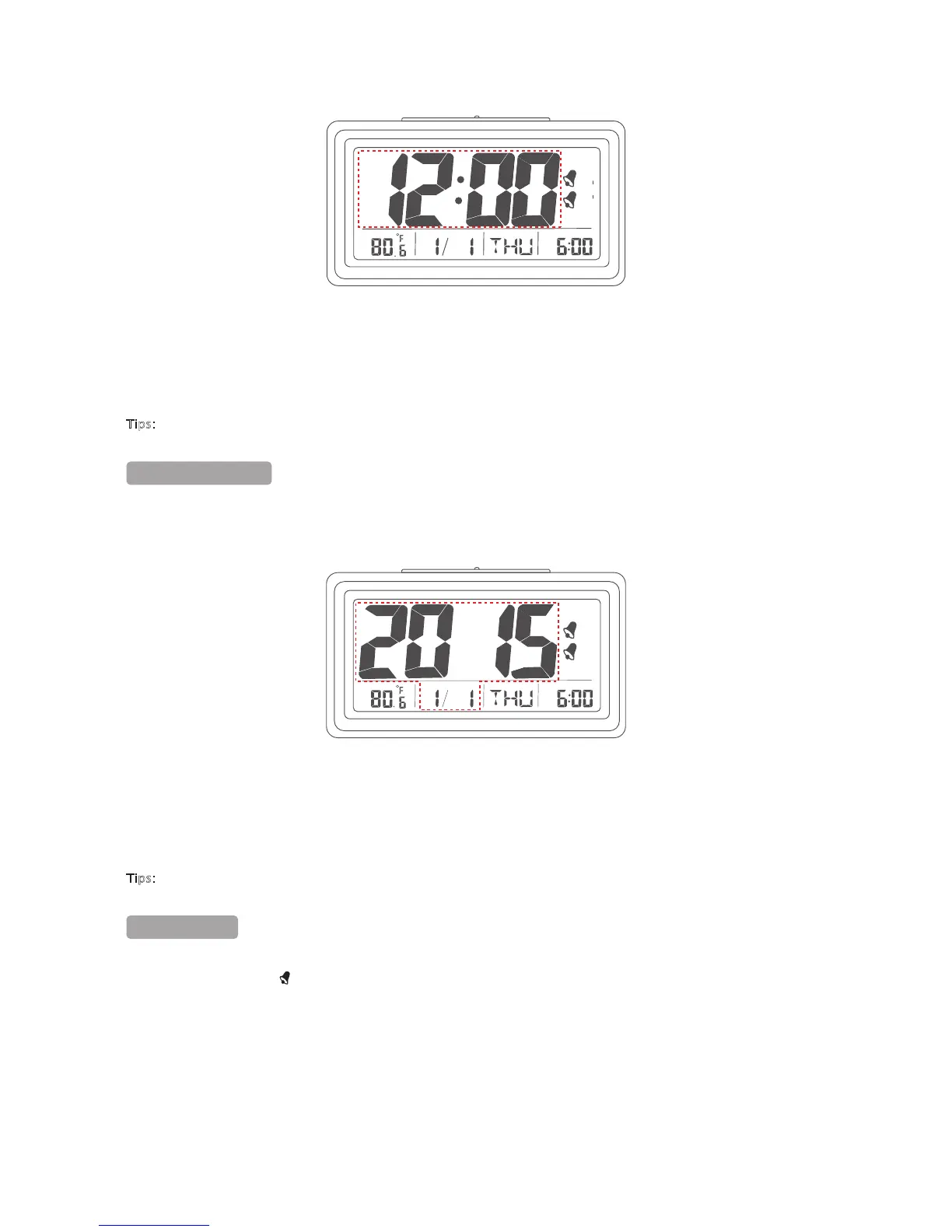
3. Set current time with HOUR and MIN buttons.
4. When the current time is displayed, toggle setting model switch to LOCK position. The current time display will
stop blinking.
Tips:
When you set the minute with MIN button, the seconds' timer re-sets to zero.
2/5
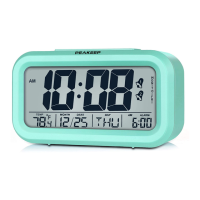
1. Toggle setting mode switch to DATE SET position.
2. The factory default date of 1/1/2015 starts to blink. Refer to the circled portion of “FIG 3”.
1
2
TEMP
MONTH
DATE
DAY
AM
ALARM
FIG 3
3. Set todayʼs date with MONTH, DATE and YEAR buttons.
4. When todayʼs date is displayed, toggle setting mode switch to LOCK position. The todayʼs date display will
stop blinking.
Tips:
You donʼt have to set the day of the week, it auto-matches with the date.
1. Toggle setting mode switch to AL.SET position.
2. The symbol of alarm 1 displays on the right of current time. The factory default alarm 1 time of AM 6:00 starts
to blink. Refer to the circled portion of “FIG 4”.
1


 To Next Page