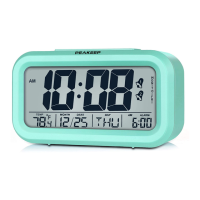
CLOCK MINUTE
Note:
1. Factory default date and time is 1/1/2018 12:00 AM.
2. If no button is activated within 10 seconds, clock will automatically revert to
the time keeping display.
3. When set the month/date/year, the day of week will match and display
automatically.
4. In non-set mode (clock time normal display mode), press and release the [SET]
button once to view the calendar date you set.
Set Alarm
Press and hold the [ALARM SET] button for 2 seconds to enter the alarm set
mode. The set order is “Alarm Hour” →“Alarm Minute”→Exit/Save. In alarm set
mode, the alarm symbol and alarm time will blink.
Setting Steps:
Step 1: Press and hold the [ALARM SET] button for 2 seconds until the Alarm Hour
digit flashes on the screen, means in alarm set mode, release your fingers. Press
and release the “+” or “-” button to adjust the “Alarm Hour”.
Step 2: Press and release the [ALARM SET] button once, the Alarm Minute digit will
flash on the screen, press and release the “+” or “-” button to adjust the “Alarm
Minute”.
Step 3: Press and release the [ALARM SET] button once again to exit and save the
settings.
Note:
1. If no button is activated within 10 seconds, clock will automatically revert to
the timekeeping display.
2. Alarm sound will last for 2 minutes if no action taken.
3. In non-set mode (clock time normal display mode), press and release the
[ALARM SET] button to view the alarm time.


 To Next Page
 Loading...