EasyManua.ls Logo

Peavey 900 - Page 6

Peavey 900
8 pages
Print Icon
To Next Page IconTo Next Page
To Previous Page IconTo Previous Page
Loading...
justec
to
track
the
900
VU
meter
with
a
constant
input
signal,
i.e..
set
the
900’s
meter
to
read
“0”
VU
at
the
same
level
as
the
external
equipment’s
VU
does.
With
equipment
that
has
LED
overload
indicators,
the900's
meter
should
be
set
to
zero
VU
at
the
point
where
the
LED
peak
overload
indicator
initially
lights
up.
If
the
equipment
being
fed
by
the
900
has
no
max¬
imum
level
indicator
you
should
refer
any
adjustment
of
VU
meters
to
a
properly
equipped
sound
technician
to
avoid
problems
in
matching
VU
readings
with
maximum
output
and/or
modulation.
You
should
be
aware
that
we
have
designed
the
900
Mixer
to
be
able
to
drive
power
amplifiers
with
VERY
low
input
sensitivities
of
2
volts
or
higher
Because
of
the
high
output
capability
of
the
900,
it
may
appear
that
the
900
is
excessively
noisy
when
plugged
into
power
amplifiers
with
high
input
sensitivity
such
as
the
Peavey
260
or
800
Boosters
which
require
only
%
volt
for
FULL
output.
The
extra
gain
designed
into
the
900
to
allow
use
with
the
less
sensitive
power
amps
should
NOT
be
interpreted
as
poor
design
but
as
ad¬
ditional
gain
capability.
It
is
possible
to
use
"high
gain”
power
amps
with
very
good
results
by
generally
using
less
channel
and
master
gain,
or
by
decreasing
the
power
amp’s
sensitivity
by
turning
down
the
power
amp’s
level
control
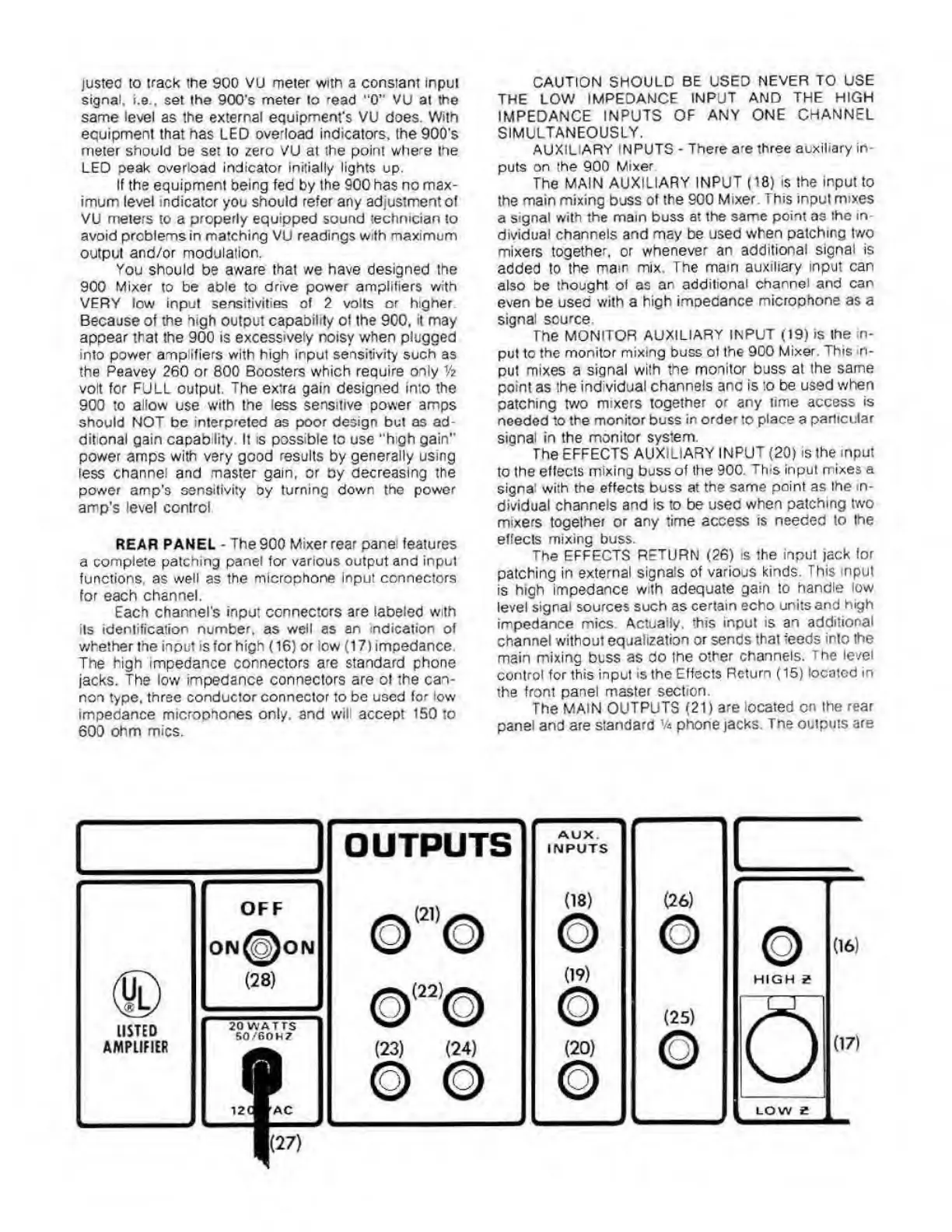
REAR
PANEL
-
The
900
Mixer
rear
pane
features
a
complete
patching
panel
for
various
output
and
input
functions,
as
well
as
the
microphone
input
connectors
for
each
channel.
Each
channel's
input
connecters
are
labeled
with
its
identification
number,
as
well
as
an
indication
of
whether
the
input
is
for
high
(16)
or
iow
(17)
impedance.
The
high
impedance
connectors
are
standard
phone
jacks.
The
low
impedance
connectors
are
of
the
can¬
non
type,
three
conductor
connector
to
be
used
for
low
impedance
microphones
only,
and
will
accept
150
to
600
ohm
mics.
CAUTION
SHOULD
BE
USED
NEVER
TO
USE
THE
LOW
IMPEDANCE
INPUT
AND
THE
HIGH
IMPEDANCE
INPUTS
OF
ANY
ONE
CHANNEL
SIMULTANEOUSLY.
AUXILIARY
INPUTS
-
There
are
three
auxiliary
in¬
puts
on
the
900
Mixer
The
MAIN
AUXILIARY
INPUT
(18)
is
the
input
to
the
main
mixing
buss
of
the
900
Mixer.
This
input
mixes
a
signal
with
the
mam
buss
at
the
same
point
as
the
in¬
dividual
channels
and
may
be
used
when
patching
two
mixers
together,
or
whenever
an
additional
signal
is
added
to
the
mam
mix.
The
mam
auxiliary
input
can
also
be
thought
of
as
an
additional
channel
and
can
even
be
used
with
a
high
impedance
microphone
as
a
signal
source.
The
MONITOR
AUXILIARY
INPUT
(19)
is
the
in¬
put
to
the
monitor
mixing
buss
of
the
900
Mixer.
This
in¬
put
mixes
a
signal
with
the
monitor
buss
at
the
same
point
as
the
individual
channels
and
is
to
be
used
when
patching
two
mixers
together
or
any
time
access
is
needed
to
the
monitor
buss
in
order
to
place
a
particular
signal
in
the
monitor
system.
The
EFFECTS
AUXILIARY
INPUT
(20)
is
the
input
to
the
effects
mixing
buss
of
Ihe
900.
This
input
mixes
a
signa
with
the
effects
buss
at
the
same
point
as
the
in¬
dividual
channels
and
is
to
be
used
when
patching
two
mixers
together
or
any
time
access
is
needed
to
the
effects
mixing
buss.
The
EFFECTS
RETURN
(26)
is
the
input
jack
for
patching
in
external
signals
of
various
kinds.
This
input
is
high
impedance
with
adequate
gain
to
handle
low
level
signal
sources
such
as
certain
echo
units
and
high
impedance
mics
Actually,
this
input
is
an
additional
channel
without
equalization
or
sends
that
feeds
into
the
main
mixing
buss
as
do
the
other
channels.
The
level
control
for
this
input
is
the
Effects
Return
(15)
located
in
the
front
panel
master
section.
The
MAIN
OUTPUTS
(21)
are
located
on
the
rear
panel
and
are
standard
V*
phone
jacks.
The
outputs
are

Related product manuals