EasyManua.ls Logo

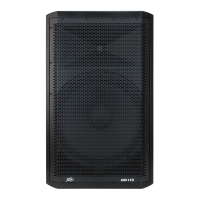
Peavey PV 115 D - User Manual

Peavey PV 115 D
28 pages
Print Icon
To Next Page IconTo Next Page
Loading...
www.peavey.com
PV
®
115 D
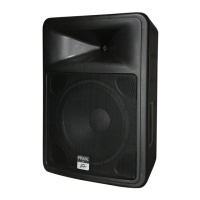
Class-D Powered Two-Way Sound Reinforcement Speaker System
Operating
Manual

Questions and Answers

  • C
    Carol FloresJul 31, 2025
    What to do if my Peavey Speaker System has no output?
    • S
      Sara FullerJul 31, 2025
      If your Peavey Speaker System PV[®]115D has no output, first, ensure the unit has AC power and is turned ON, verifying the Power/Clip LED is illuminated green. Next, confirm the ON/OFF switch is in the ON position and that the IEC power cord is fully engaged. Also, ensure the AC line cord is plugged into a working AC outlet and check the fuse. To test the signal, temporarily disconnect the cable running to the inputs and connect it to another device. If the issue persists, turn off the PV[®]115D and allow it to cool.
  • M
    michelle96Aug 6, 2025
    How to fix distorted sound on Peavey PV 115 D Speaker System?
    • K
      Kristie FaulknerAug 6, 2025
      If you're experiencing distorted or fuzzy sound from your Peavey Speaker System PV[®]115D, make sure the mixer isn't clipping or being overdriven. Ensure the level control on the PV[®]115D isn't set too low and that the input plugs are fully seated in the input jack on the rear panel. Verify that a power amp output hasn't been mistakenly plugged into the input jack. Check that the extension cord has sufficient current capacity. If you're using the Contour switch with external bass or high-frequency boost, switch the Contour button OFF and reduce the external EQ. Also, try turning the mixer levels down a bit.
  • C
    Carolyn BennettAug 12, 2025
    Why is my Peavey PV 115 D Speaker System humming?
    • D
      Denise ChapmanAug 12, 2025
      If you hear hum or buzz from your Peavey Speaker System PV[®]115D, try plugging it into a different AC outlet. Ensure that shielded cables are used for the signal to the PV[®]115D's inputs. Check that light dimmers aren't on the same circuit as the PV[®]115D, the mixer, or any source devices. You might need to turn the light dimmers fully ON or fully OFF to reduce the hum.
  • R
    Rebecca AndersonAug 18, 2025
    Why does my Peavey Speaker System have a hum or buzz?
    • D
      dcolemanAug 18, 2025
      A hum or buzz in your Peavey Speaker System can stem from several sources. Try plugging the speaker into a different AC outlet, as the issue could be AC outlet related. Using different AC power circuits for the mixer and speaker can also cause hum. Ensure that shielded cables are used for the signal input. Never remove or break off the third wire (ground plug) on the AC plug. If the hum is ground loop related, lifting the shield ground on a balanced cable at the speaker end only might help. Check any input changes carefully by first turning down the level control before plugging and unplugging cables or changing the grounding. Also, check that light dimmers aren't on the same circuit; if they are, try turning them fully ON or OFF.
  • J
    James PhillipsNov 23, 2025
    How to fix distorted or fuzzy sound on Peavey Speaker System?
    • M
      Miss Lisa WrightNov 23, 2025
      To address distorted or fuzzy sound on your Peavey Speaker System, first ensure that the mixer (signal source) isn't clipping or overdriven. Check that the level control on the speaker hasn't been set too low and that the input plugs are fully seated in the input jack on the rear panel. Make sure that a power amp output hasn't been mistakenly plugged into the input jack. If using an extension cord, ensure it has sufficient current capacity and isn't powering other devices. The speaker has a Contour switch to boost bass and treble at low playback levels. If excessive external bass or high-frequency boost has been added while the Contour switch is engaged, it could cause premature overload at high SPL. Try switching the Contour button OFF and reducing any external EQ to see if the distortion...

Summary

IMPORTANT SAFETY INSTRUCTIONS

Product Overview

Features

Lists key technical specifications and design elements of the speaker system.

Description

Describes the enclosure, portability features, driver protection, and overall build.

Applications

Outlines various uses beyond primary sound reinforcement, like PA, karaoke, etc.

Bottom Panel Controls and Connections

Voltage Selector Switch

Allows switching input voltage between 100-120VAC and 220-240VAC ranges.

IEC Power Cord Connection

Receptacle for the IEC line cord providing AC power to the unit.

Fuse Information

Details the AC power line fuse protection and replacement procedures.

On-Off Switch

Rocker switch that supplies AC power to the unit when switched ON.

Speaker Out Jack

Allows connecting a passive speaker or subwoofer to the internal amplifier.

Top Panel Controls and Indicators

Input Jack

Combo female XLR and 1/4" TRS connector for balanced or unbalanced input signal.

Level Control

Controls the gain (volume) of the input signal for the speaker system.

Contour Switch

Provides a mild boost at frequency extremes for low-level playback.

Link Out Jack

1/4" pre-level send for linking multiple units together or to a subwoofer.

Power;Clip LED

LED indicator for power status (GREEN) and amplifier clipping (RED).

Cautions and Signal Connection

General Cautions

Disconnect power before work, avoid overhead suspension, heat sink caution.

Connecting AC Power

Guidance on using quality extension cords and avoiding overloading.

Connecting a Signal

Details input jack types, cable recommendations, and connection best practices.

Level Control Adjustment

Explains how to adjust the level control for optimal input sensitivity and avoid clipping.

Advanced Usage Scenarios

Using External Speakers

Connects passive speakers (8-ohm minimum) to the internal amplifier.

Using Subwoofers

Details connection of passive or powered subwoofers for enhanced bass response.

Using Speaker Stands

Precautions for mounting the speaker on stands, ensuring stability and safety.

Troubleshooting

No Output Issues

Steps to diagnose and fix issues where no sound is produced.

Hum or Buzz Problems

Identifies causes and solutions for unwanted hum or buzz noise.

Distorted or Fuzzy Sound

Guides on resolving distorted or fuzzy audio output.

Care, Maintenance, and Specifications

Care and Maintenance

Guidelines for cleaning, avoiding heat/sunlight, and general product care.

Specifications

Comprehensive technical data including frequency response, power, dimensions, and weight.

Warranty Information

Limited Warranty Details

Outlines what the warranty covers, what it doesn't, and how to obtain service.

Optional Product Extended Warranty Registration

Form for registering the product to activate an extended warranty.

Peavey PV 115 D Specifications

General IconGeneral
Woofer Size15 inches
Tweeter Size1.4 inches
Sensitivity98 dB
Impedance8 Ohms
Enclosure MaterialPlywood
Power Handling (RMS)400 Watts
ConnectorsXLR, 1/4 inch TRS

Related product manuals