4 of 9
ISSUED: 07-25-11 SHEET #: 090-9205-5 11-30-12
D
D
E
E
A
A
A
A
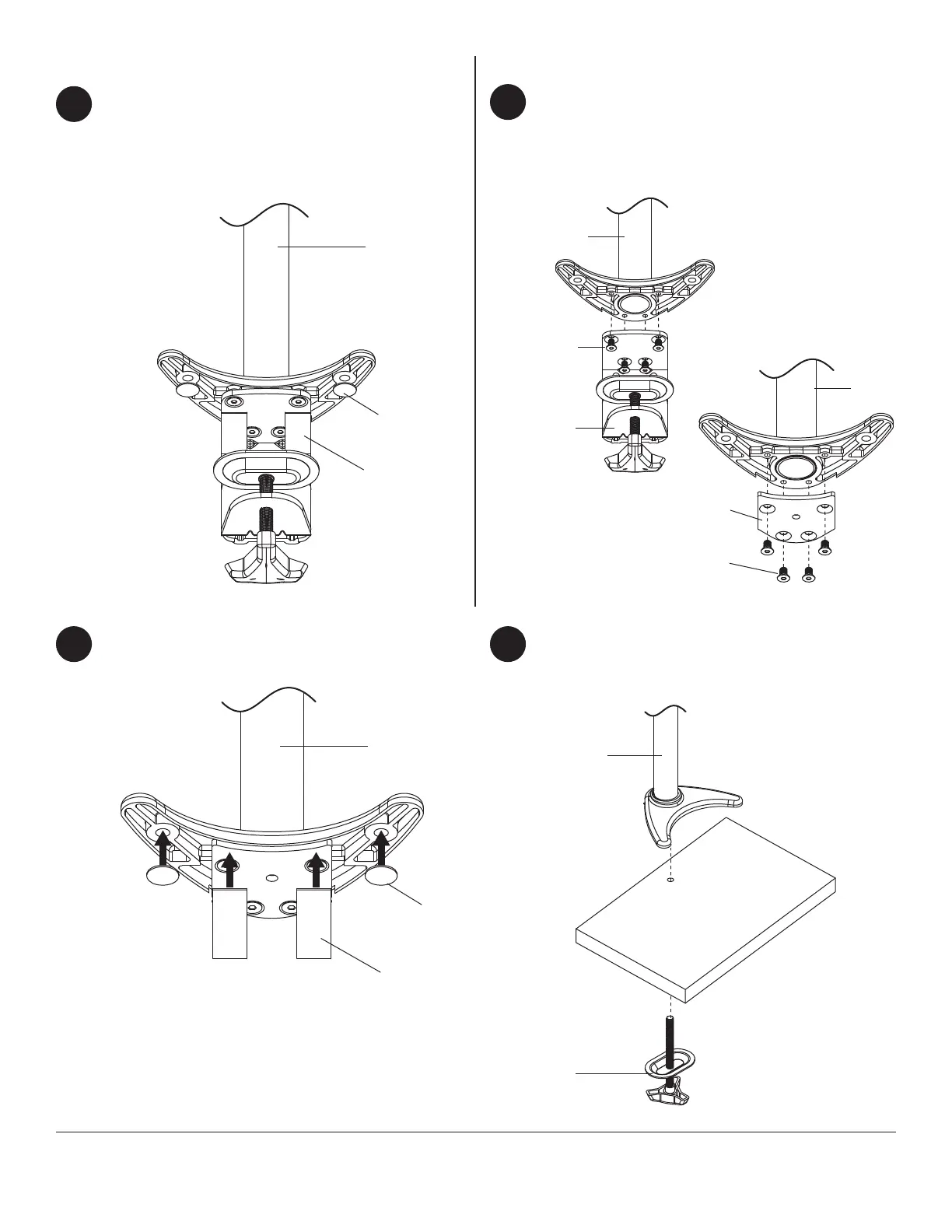
Apply four rubber pads (D, E) to bottom of column
assembly (A) as shown below. Attach column
assembly (A) to mounting surface with a maximum
thickness of 3".
Skip to step four.
1
Clamp Installation Method
Remove clamp assembly from column assembly
(A) as shown in fi gure 1.1. Remove mounting plate
from grommet assembly (C) and attach to column
assembly (A) with four M6 x 8mm screws using
4mm allen wrench (I) as shown in fi gure 1.2.
Apply four rubber pads (D, E) to bottom of column
assembly (A) as shown below.
1
2 3
Grommet Installation Method
fi g. 1.1
fi g. 1.2
M6 X 8MM
SCREWS
M6 X 8MM
SCREWS
CLAMP
ASSEMBLY
MOUNTING
PLATE
A
C
Drill a 3/8" (10mm) dia. hole through mounting
surface with a maximum thickness of 3". Place
column assembly (A) on mounting surface and
secure using grommet assembly (C).



 To Next Page