6 of 9
ISSUED: 07-25-11 SHEET #: 090-9205-5 11-30-12
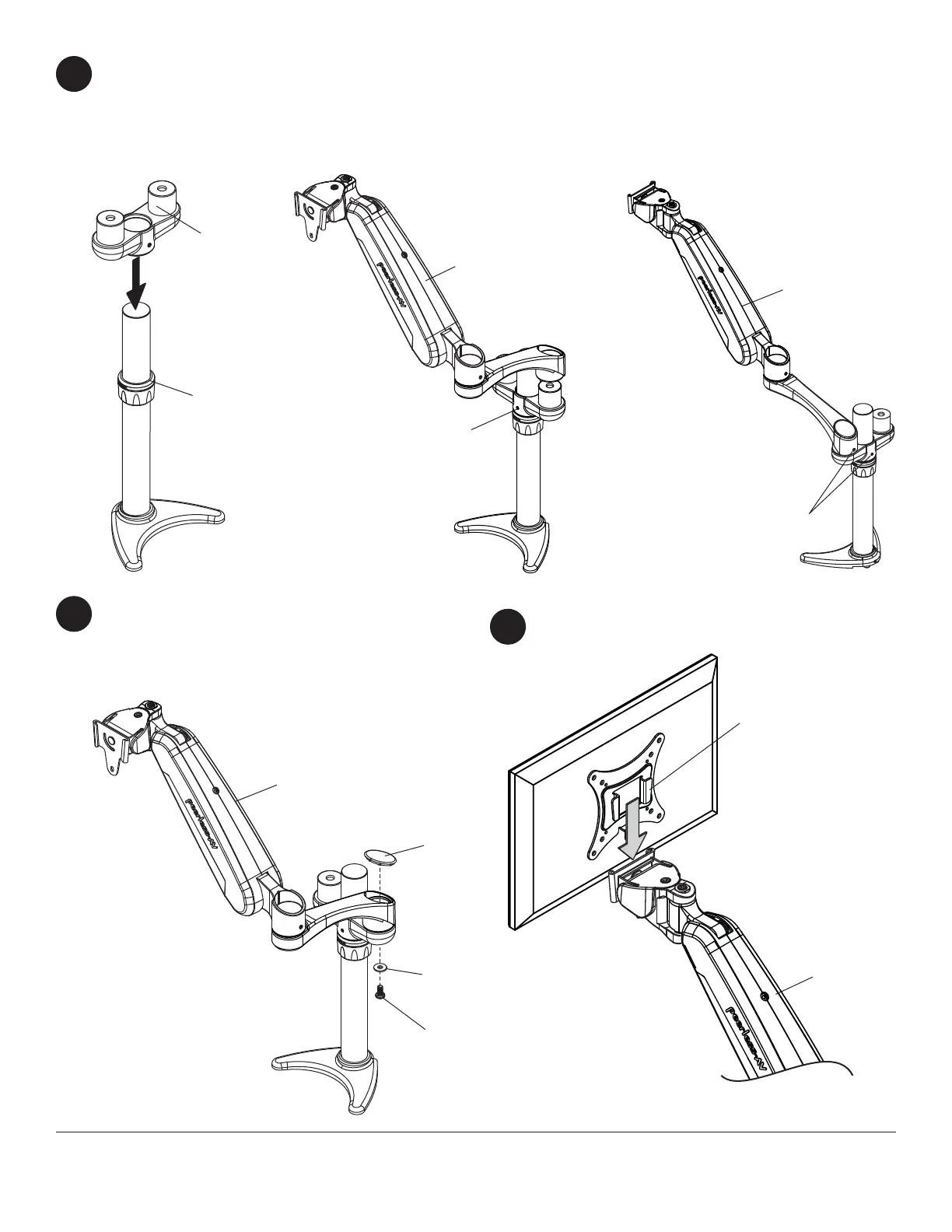
Insert dual arm support (P) onto column assembly (A) fl ush against lock collar as shown in fi gure 5.1. Loosen and
position lock collar to desired height and retighten.
Insert
arm assembly (B) onto dual arm support (P) as shown in fi gure 5.2.
Tighten set screws on dual arm support (P) and arm assembly (B) using 2.5mm allen wrench (J) as shown in fi gure
5.3.
Secure arm assembly (B) to dual arm support with
one cover (O), one M6 x 12mm phillips screw (M),
and one M6 plastic washer (N).
Repeat steps fi ve and six for second arm
assembly (B).
5
6
P
B
B
B
O
N
M
fi g. 5.1
fi g. 5.2 fi g. 5.3
LOCK
COLLAR
SET SCREW
SET SCREWS
B
ADAPTER PLATE
Hook adapter plate onto arm assembly (B).
7



 To Next Page