14
2018-08-10 #:180-9120-2 (2019-01-10)
Prepare The Display For Mounting
Install cords prior to mounting your display. Input panel may be obstructed once the display is
mounted.
A mounting solution is sold separately. Contact your Peerless-AV representative for an outdoor rated
mounting solution for your particular application.
For your safety, only install an outdoor-rated mount that is suitable for the application and supports
the weight of the display. When mounting a display outdoors, use proper environmentally rated
mounts to ensure longevity in harsh environments.
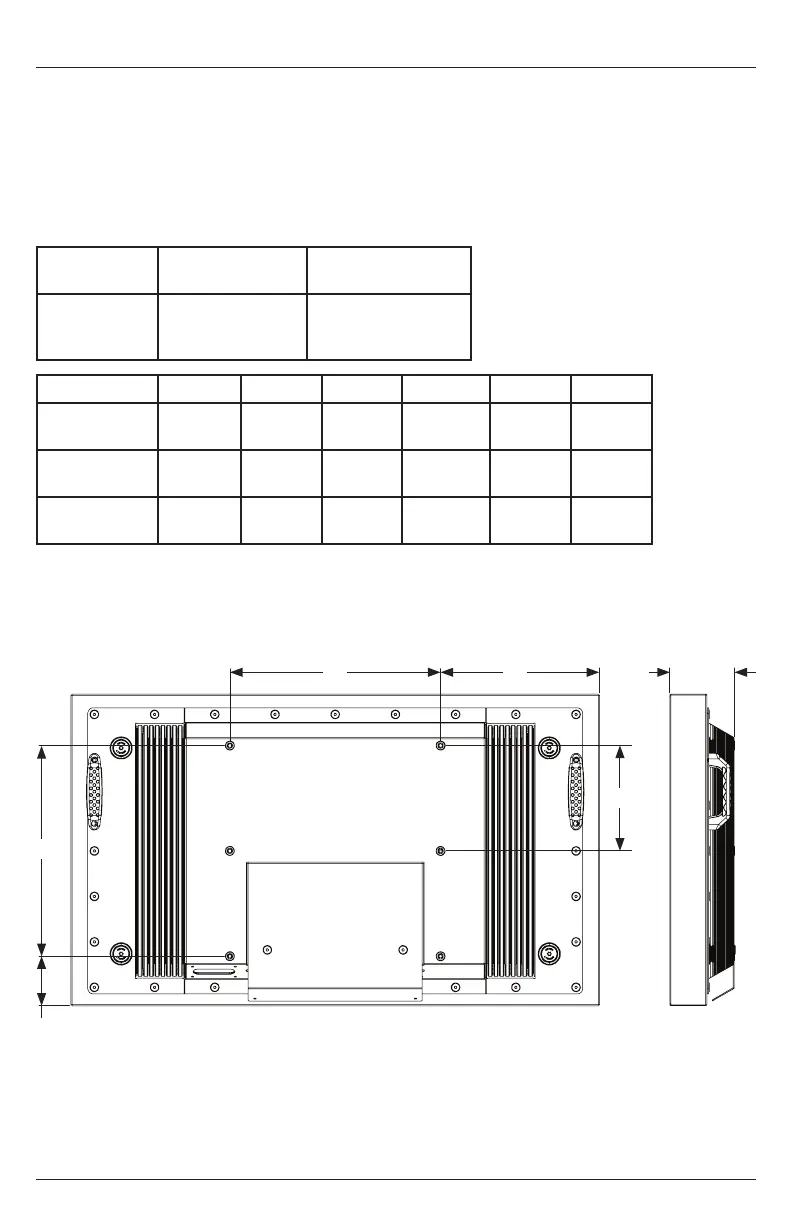
Examine the chart below to determine the mounting specications for your display:
B
F
D
Part
Mounting Hole
Pattern
Required Mounting
Screws
XHB432-EUK
XHB492-EUK
XHB552-EUK
400x200mm,
400x400mm
(4) M8 screws
(25mm long)
Part A B C D E F
XHB432-EUK
15.75"
(400mm)
15.75"
(400mm)
11.87"
(302mm)
3.77"
(96mm)
4.89"
(124mm)
7.87"
(200mm)
XHB492-EUK
15.75"
(400mm)
15.75"
(400mm)
14.49"
(368mm)
5.24"
(133mm)
3.92"
(100mm)
7.87"
(200mm)
XHB552-EUK
15.75"
(400mm)
15.75"
(400mm)
17.16"
(436mm)
6.74"
(171mm)
3.92"
(100mm)
7.87"
(200mm)
SIDE VIEW
A C E
REAR VIEW


 To Next Page