8 of 16
ISSUED: 02-05-09 SHEET #: 202-9346-1
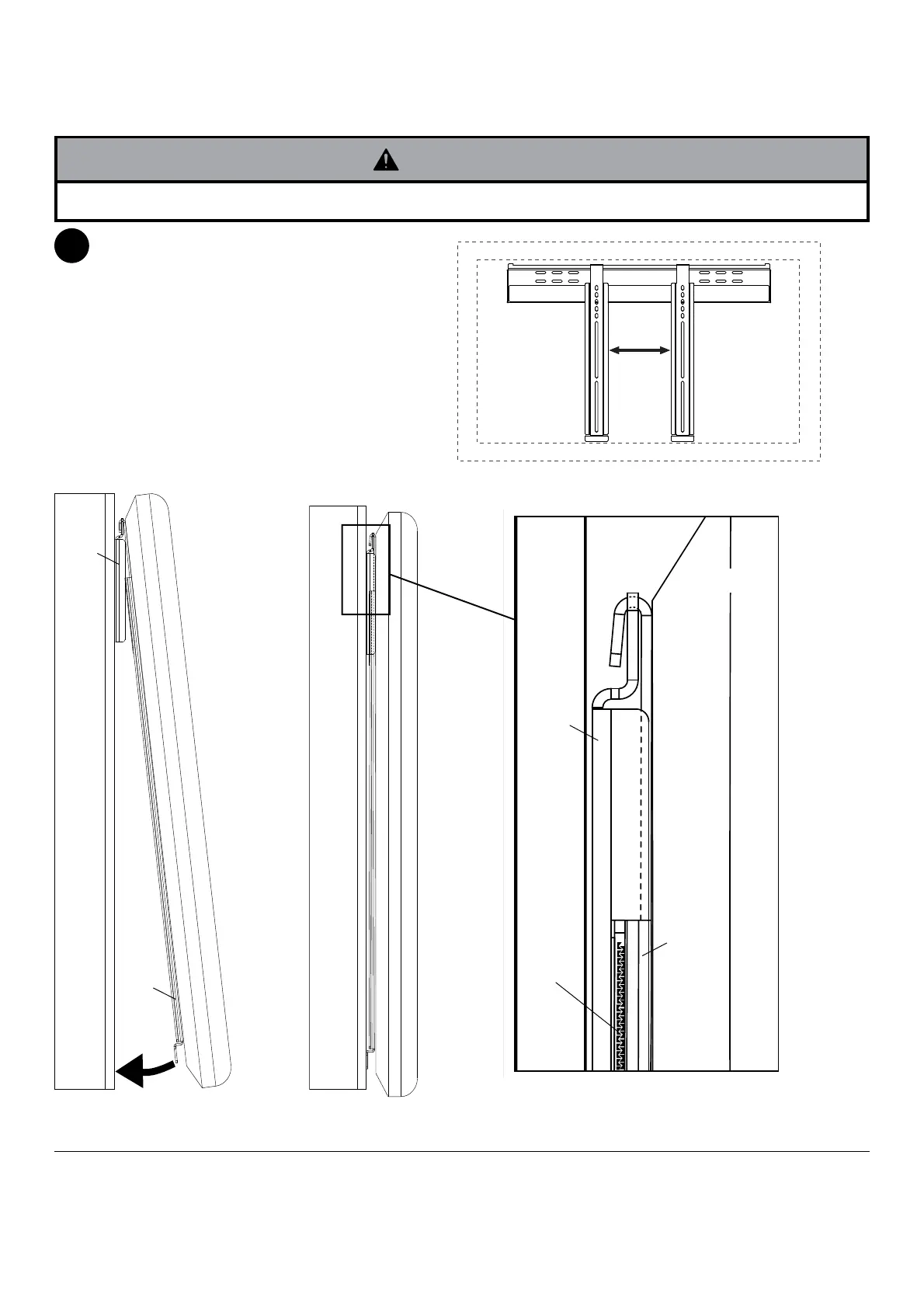
Guide hooks of adapter brackets (B) onto flange
of wall plate (A). Then slowly swing screen
toward wall as shown in fig. 3.1. Gently press on
screen to ensure velcro strips are engaged as
shown in detail 1.
To horizontally adjust screen, swing screen away
from mount to disengage velcro, and slide screen
along wall plate to desired position as shown in
fig 3.2. Then slowly swing screen toward wall to
re-engage velcro.
To remove screen from mount, swing screen
away from mount, and lift screen off of mount.
Mounting and Removing Flat Panel Screen
3
• Always use an assistant or mechanical lifting equipment to safely lift and position the flat panel screens.
WARNING
DETAIL 1
WALL
VELCRO
fig. 3.1
WALL WALL
SCREEN
A
B
A
B
fig. 3.2
© 2009, Peerless Industries, Inc. All rights reserved.
All other brand and product names are trademarks or registered trademarks of their respective owners.
Peerless Industries, Inc.
3215 W. North Ave.
Melrose Park, IL 60160
www.peerlessmounts.com



 To Next Page