3215 W. North Ave. • Melrose Park, IL 60160 • (800) 865-2112 or (708) 865-8870 • Fax: (708) 865-2941 • www.peerlessmounts.com
ISSUED: 01-11-08 SHEET #: 202-9271-2 02-22-08
R
This product is intended for use with UL
Listed products and must be installed by a
qualified professional installer.
Installation and Assembly:
Smartmount
®
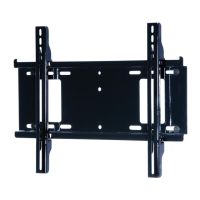
Universal Tilt Wall Mount for 37" to 60" LCD
and Plasma Flat Panel Screens
Features:
• Screen held only 2.6" from wall for a discreet installation
• Open wall plate design allows for additional wall access, increasing electrical access and cable management options
• Universal screen mounting brackets hook onto the wall plate for quick, easy, and safe installation
• Adjustable up to 15° of forward tilt and up to -5° backward tilt
• One-touch tilt for effortless adjustment
• Pre-tensioned universal tilt bracket allows for tilt angle adjustment in one easy motion.
• Easy grip handle locks the screens position into place
• Optional IncreLok feature offers fixed tilts at -5°, 0°, 5°, 10° and 15° increments
• Includes Sorted-For-You™ fastener pack for installation to wood studs, concrete and cinder block
• Optional horizontal adjustment of up to 8" (depending on screen model) for perfect screen placement
• Available in Black and Silver
Models: D-FPT2-320, D-FPT-320S,DFPT-420,
DFPT-420S, ST660, ST660-S, ST660P,
ST660P-S, RTFPT2-320, RTFPT2-320I,
RTFPT2-320S, RTFPT2-320SI
Maximum UL Load Capacity: 200 lb (91kg)

 Need help?

 To Next Page
 General