Notice
Note: Both machine body operation " " and remote control " "
are buttons of wind type;
Both machine body operation " " and remote control " "
are buttons of cool wind;
INSTRUCTIONS
CLEANING AND MAINTENANCE
Disconnect the power before cleaning the product. Clean after the product is shut down for two
minutes.
Prevent from using any abrasive tools and solvents that may damage the surface to clean up the
product. Detergent can be used in the cleaning, and then wiped clean with dried cloth in time.
Prevent from washing the machine body with water directly, and wash disassemble parts (wet
curtain parts) with a soft brush and then install them after they are cleaned and dried.
It is not allowed to take the product apart for any modification. It is recommended that this product
should be checked and cleaned regularly in order to extend its service life.
9
1
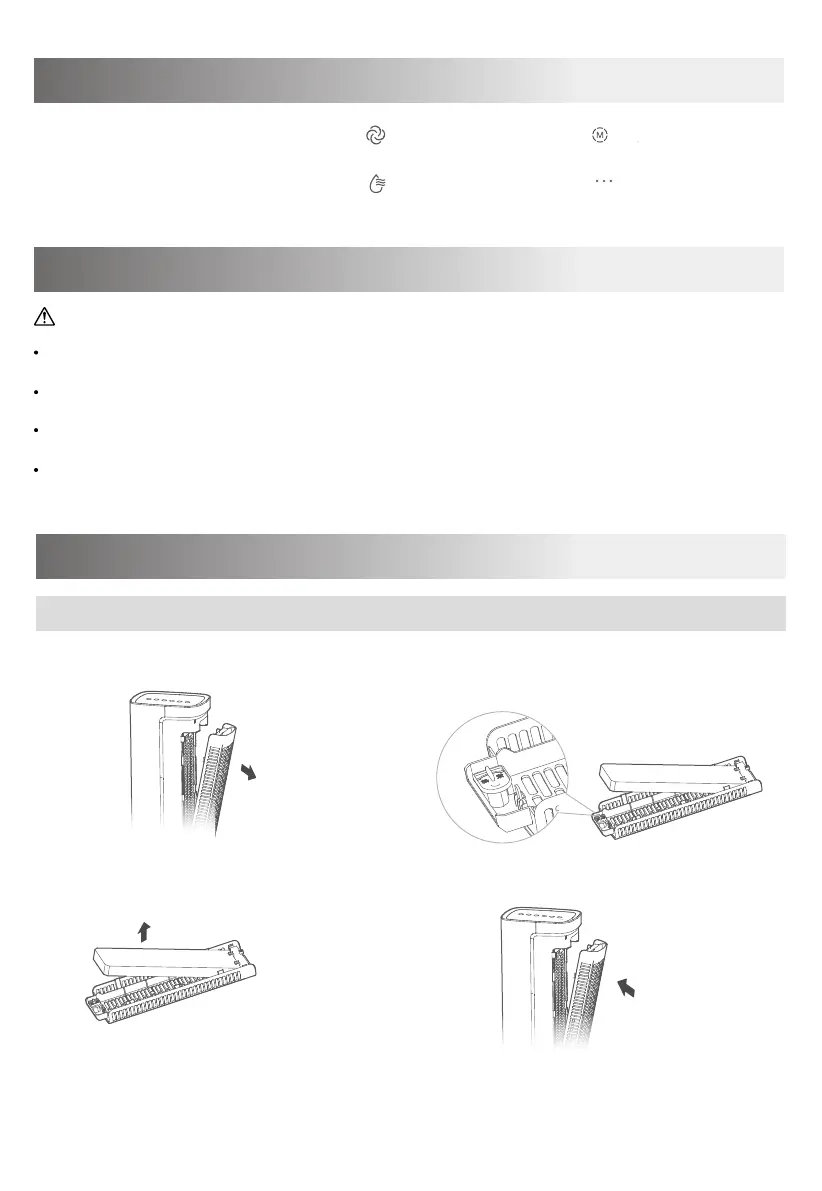
Remove the wet curtain support.
2
Rotate the bottom buckle at first, and
then remove the wet curtain.
4
Install wet curtain support.
Guidance on the disassembly and installation of wet curtain parts
CLEANING AND MAINTENANCE
3
Take out the wet curtain for cleaning.


 To Next Page