EasyManua.ls Logo

Pentair Rocean Reservoir - User Manual

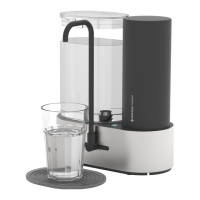
Pentair Rocean Reservoir
29 pages
Print Icon
To Next Page IconTo Next Page
Loading...
1
Let’s get started!
Question and Answer IconNeed help?

Do you have a question about the Pentair Rocean Reservoir and is the answer not in the manual?

Summary

First-time setup

Insert the power cord

Connects the power cord to the base and suggests using cord hooks for management.

Insert the spout

Firmly press the spout into the base until metal is hidden for a snug fit and leak prevention.

Insert the filter

Insert filter by pushing down and rotating clockwise, then place filter sleeve until it snaps.

Plug it in

Connect the power cord to an outlet; a flashing blue light indicates the machine is on.

Flush the filter

Fill the tank to max, move to sink edge, and flush to fill tank and dispense excess water.

Repeat flushing cycles

Tap button 4 times for auto-dispense or hold to flush until tank is empty.

Getting the most out of the Reservoir

Manual dispense

Press and hold the button to dispense water as needed.

Auto-dispense

Press button multiple times for pre-set water volumes: 12, 24, or 36 oz.

Smarter filter notifications

Blue light indicator

Indicates the filter does not need replacement.

Orange light indicator

Indicates 10% filter capacity remaining, time to order a replacement.

Red light indicator

Indicates it is time to replace the filter.

How to replace the filter

Remove tank & Enter filter replace mode

Remove water tank, press button 8 times to enter mode; LED blinks white.

Remove water & Remove filter

Press button 2 times to depressurize, then twist filter counter-clockwise to remove.

Flush the new filter

Refer to page 6 for instructions on flushing the new filter.

Troubleshooting & FAQ

Filter replacement frequency

Filters last 3-12 months, with notification lights indicating remaining capacity.

Cloudy water explanation

Normal for new filters; may be due to loose carbon or air bubbles.

Auto-dispense accuracy

Amounts are approximate; flow rate may decrease as filter nears end of life.

Spout sputtering water

Clear the spout externally if flow seems restricted.

Reservoir BPA free

Water tank and contacting components are made with BPA free materials.

Cleaning the Reservoir

Use a dry cloth; do not immerse the appliance. Only the water tank is dishwasher-safe.

Performance Data Sheet

Operating Parameters

Details system model, filter specifications, pressure, temperature, flow rate, and capacity.

Contaminant Reduction Information

System certification and contaminant reduction data according to NSF/ANSI standards.

Important Safeguards: Safe Operation & Use

Water safety warnings

Do not use unsafe water; use systems certified for cyst reduction on disinfected water.

Installation and usage notes

Comply with local laws, protect from freezing, and use only with cold water.

System maintenance and filter life

Maintain per recommendations; filter life is limited and indicated by taste, odor, or flow changes.

Summary

First-time setup

Insert the power cord

Connects the power cord to the base and suggests using cord hooks for management.

Insert the spout

Firmly press the spout into the base until metal is hidden for a snug fit and leak prevention.

Insert the filter

Insert filter by pushing down and rotating clockwise, then place filter sleeve until it snaps.

Plug it in

Connect the power cord to an outlet; a flashing blue light indicates the machine is on.

Flush the filter

Fill the tank to max, move to sink edge, and flush to fill tank and dispense excess water.

Repeat flushing cycles

Tap button 4 times for auto-dispense or hold to flush until tank is empty.

Getting the most out of the Reservoir

Manual dispense

Press and hold the button to dispense water as needed.

Auto-dispense

Press button multiple times for pre-set water volumes: 12, 24, or 36 oz.

Smarter filter notifications

Blue light indicator

Indicates the filter does not need replacement.

Orange light indicator

Indicates 10% filter capacity remaining, time to order a replacement.

Red light indicator

Indicates it is time to replace the filter.

How to replace the filter

Remove tank & Enter filter replace mode

Remove water tank, press button 8 times to enter mode; LED blinks white.

Remove water & Remove filter

Press button 2 times to depressurize, then twist filter counter-clockwise to remove.

Flush the new filter

Refer to page 6 for instructions on flushing the new filter.

Troubleshooting & FAQ

Filter replacement frequency

Filters last 3-12 months, with notification lights indicating remaining capacity.

Cloudy water explanation

Normal for new filters; may be due to loose carbon or air bubbles.

Auto-dispense accuracy

Amounts are approximate; flow rate may decrease as filter nears end of life.

Spout sputtering water

Clear the spout externally if flow seems restricted.

Reservoir BPA free

Water tank and contacting components are made with BPA free materials.

Cleaning the Reservoir

Use a dry cloth; do not immerse the appliance. Only the water tank is dishwasher-safe.

Performance Data Sheet

Operating Parameters

Details system model, filter specifications, pressure, temperature, flow rate, and capacity.

Contaminant Reduction Information

System certification and contaminant reduction data according to NSF/ANSI standards.

Important Safeguards: Safe Operation & Use

Water safety warnings

Do not use unsafe water; use systems certified for cyst reduction on disinfected water.

Installation and usage notes

Comply with local laws, protect from freezing, and use only with cold water.

System maintenance and filter life

Maintain per recommendations; filter life is limited and indicated by taste, odor, or flow changes.

Pentair Rocean Reservoir Specifications

General IconGeneral
BrandPentair
ModelRocean Reservoir
CategoryWater Filtration Systems
LanguageEnglish

Related product manuals