This appliance is not intended to be used by people (including children) with restricted physical,
sensory or mental capacities, or a lack of experience and/or knowledge, unless they are
supervised by, or receive instructions how to use the appliance from, a person responsible for
their safety. Children must be supervised in order to ensure that they do not play with the
appliance.
Package contents
After unpacking, immediately check that the contents are complete and that the equipment is
undamaged.
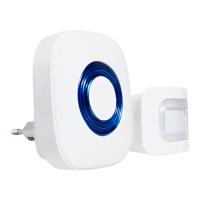
1 Wireless chime 1 Support 2 Wall plugs
1 Motion detector 2 Screws
Features and Equipment (see illustrations)
1 Wireless chime 6 Screw hole 10 Battery compartment cover
2 LED 7 Motion detector 11 On/Off switch
3 Volume button 8 Sensor lens 12 Connection for mains adapter
4A Chime selection button FORWARD 13 Fixation for support
4B Chime selection button BACK 14 Arrow marking
5 Support 9 LED 15 Battery compartment
Technical data
Motion detector FD2B:
Operating voltage: 3 V DC
Current draw: 30 µA (standby); 15 mA (operation)
Power supply: 2 x battery 1.5 V alkaline LR3 (AAA) or Micro USB adapter
5 V DC, min. 100 mA (all not supplied)
Detector: passive infrarot (PIR) with fresnel lens
PIR detection range (horizontal): approx. 5 m x 95° (max. 20°C, see fig. E)
ca. 9 m x 40° (vertical, see fig. F)
Transmission frequency: 433,920 MHz
Transmitter range: approx. 70 m (outdoors)
Coding: 16 Bit precoded (>65,000 possible codes)
Operating temperature: 0 °C to +40 °C
Case dimensions: approx. 85 x 54 x 35 mm
Weight: approx. 60 g (without batteries)
Wireless chime FD2Gv.2:
Operating voltage: 230 V AC, 50 Hz
Power consumption: max. 0.1 W (standby), max. 0.5 W (operation)
Radio reception: 433.92 MHz
Chime sounds: 24 chimes selectable
Chime sound level: max. 82 dB(A) at 0.3 m (4 levels selectable)
Flashing light: 4 x LED
Operating temperature: 0 °C to +40 °C
Case dimensions: approx. 80 x 87 x 28 mm (without plug)
Weight: approx. 86 g
Safety instructions
Danger!
!
Do not leave small children unsupervised with the appliance, batteries, packing material or
small parts. Otherwise there is a risk of fatal injury due to choking
!
The mains power supply for the receiver and if applicable for the adapter for the transmitter
must be 230 V AC and fused according to local regulations.
!
Do not expose the appliance to moisture. Otherwise there is a danger to life or risk of injury.
!
Do not damage any gas pipes, or electricity or telecommunication cables when fixing.
Otherwise there is a danger to life or risk of injury or damage.
!
Make sure that the batteries are not short-circuited, nor thrown into fire. They must also not
be recharged or opened. There is a danger of fatal injury due to explosion.
!
Leaking or damaged batteries can cause burning upon contact with the skin. Where this is
the case use suitable protective gloves.
Attention! Non-observance of the following instructions puts property at risk of damage.
!
Only operate the appliance with the approved types of batteries.
!
Avoid the appliance coming into contact with moisture.
!
If the equipment will not be used for a long time, remove the batteries.
Use
!
Insert the wireless chime [1] into a suitable mains socket (230 V ~
50 Hz).
!
Connect the USB plug of a 5 V DC USB mains adapter to the connection [12] on the motion
detector or insert two batteries into the motion detector as follows:
!
Press onto the arrow marking [14] on the battery compartment cover[10], and push the
cover to the side (in the direction of the arrow).
!
Insert two AA batteries into the battery compartment [15]. Mind the correct polarity (see
markings in the battery compartment).
!
Replace the battery compartment cover.
!
Switch the motion detector on by setting the ON/OFF switch [11] to I.
Note: When operated with a 5 V mains adapter, the movement detector is always on. To switch
it off, please disconnect the power.
Selecting the volume/chime
!
Repeatedly press the volume button [3] at the side of the wireless chime to select one of the
four volume levels.
To select another than the preset chime, proceed as follows:
!
Repeatedly press the chime selection buttons [4A] or [4B] to select one of the 24 chimes.
The second chime (after Ding Dong) is silent - only an optical signal is emitted.
!
Press and hold the volume button for about 5 seconds, until you hear a beep and the LEDs
flash quickly.
!
Trigger the motion detector by moving in front of it.
If this point is not heeded, property, life and health are endangered.
You have now successfully changed the melody. The chime confirms successful enrolment with
the desired melody.
Location / Notes about radio transmission
!
The motion detector can be placed on a horizontal surface or mounted on a wall or ceiling.
!
Position the motion detecor such that the movements to be detected will be across the
detector lens (see fig. C, D, E and F). Movement directly towards the lens will not be detected
quickly.
!
In order to detect movement within a room, install the motion detector horizontally (see fig.
C).
!
In order to detect movement through a doorway (curtain effect detection) install the detecor
vertically (see fig. D ).
!
Position the motion detector such that within the detection area of the lens there is no heat
source such as a radiator or ventilator! Heat from such objects can be registered by the
detector as movement from a heat emitting body.
!
Connect the wireless chime to a 230 V mains socket in within the reception range of the
motion detector. The range outdoors is approx. 50 m. The range is reduced by walls and
ceilings (especially those made of reinforced concrete). Do not place the motion detecor and
wireless chime on or in the vicinity of metal surfaces as these shield the radio signal.
!
Test the reliable functioning of the appliance in the desired location before installing it
permanently.
Note: Background interference and atmospheric conditions which affect the reception range
can change over time.
Installing the motion detector
If the motion detector is to be fixed permanently then:
!
Hold the support on the desired position and mark the screw hole [6] positions with a pencil.
!
On masonry, drill 5mm holes at the marked positions and insert the wall plugs. If the
support is to be mounted on a wooden surface then the drilling and wall plugs are not
necessary.
!
Fix the support using the two screws .
!
Slide the battery compartment cover onto the support until it locks.
!
Now slide the motion detector onto the battery compartment cover until it locks.
!
Adjust the motion detector as desired.
Enrolling additional motion detectors / doorbells to the
wireless chime
The sets FD25 can be combined, also with the wireless doorbell FD20. The set can be extended by
additional doorbells FD2K, motion detectors FD2B as well as wireless chimes FD2Gv.2. Up to 8
doorbells/motion detectors can be enrolled to a wireless chime, with individual chimes for an
easy differentiation. The number of wireless chimes per doorbell/motion detector is not limited,
however the radio range must be considered.
To enroll a doorbell or a motion detector to the wireless chime:
!
Chose the desired chime for the transmitter by repeatedly pressing the chime selection
buttons [4A] or [4B] at the wireless chime.
!
Press and hold the volume button [3] for approx. 5 s, until you hear a signalling sound and
the LEDs flash quickly.
!
Move in front of the motion detector or press the doorbell button.
The enrollment is confirmed by the selected chime and is now finished.
The chimes for individual motion detectors/doorbells can be changed subsequently as described
in the chapter "Selecting the volume/chime".
Deleting motion detectors/doorbells from the wireless chime
!
Press and hold the chime selection button FORWARD [4A] for approx. 5 s until you hear a
confirmation soun and the LEDs flash. All enrolled motion detectors/doorbells are now
deleted.
Changing the batteries
If the LED [9] lights red the batteries must be replaced.
!
Press on the arrow marking [14] on the battery compartment cover [10] and push this to the
side (in the direction of the arrow). Replace the batteries by two new AA batteries. Pay
attention to the markings in the battery compartment.
!
Replace the battery compartment cover.
Maintenance + cleaning
!
Check the proper condition and function regularly.
!
Use a soft, dry cloth to clean the surfaces of the appliance.
Simplified EU declaration of conformity
Hereby, INDEXA GmbH declares that the radio equipment type FD25 is in
compliance with Directive 2014/53/EU. The full text of the EU declaration of
conformity is available at the following internet address:
http://www.pentatech.de/de/downloads/cat_view/13-ce-erklaerungen.html.
Disposal
Do not dispose of packaging material, used batteries or products as household waste.
Please use your recycling system. Details are available from your local authority.


 To Next Page
 Loading...