9
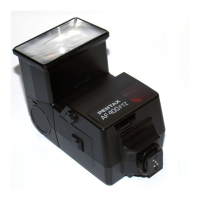
Mounting to Camera
Remove the hot shoe cover from the camera.
Attach the flash unit to the camera.
Turn the locking lever of the flash unit in the
direction opposite to that indicated by (FIX➝).
Slide the hot shoe foot of the flash unit into the
camera's hot shoe from the back of the
camera forward.
Turn the locking lever of the flash unit in the
direction indicated by (FIX➝) to lock it.
●
PENTAX digital single lens reflex cameras can
accept a shoe lock pin. When attaching the flash
unit, turn the locking lever in the (FIX
➝
) direction
and lock the flash unit to the camera with the shoe
lock pin. When releasing the flash unit, be sure to
do so after turning the locking lever in the
direction opposite to that indicated by (FIX
➝
) and
loosening the shoe lock pin. Otherwise, the hot
shoe will be damaged.
1
1
2
2
00_AF200FGZ.book Page 9 Tuesday, June 19, 2007 1:42 PM


 To Next Page
 Loading...