EasyManua.ls Logo

Pentax Espio - Page 25

Pentax Espio
48 pages
Print Icon
To Next Page IconTo Next Page
To Previous Page IconTo Previous Page
Loading...
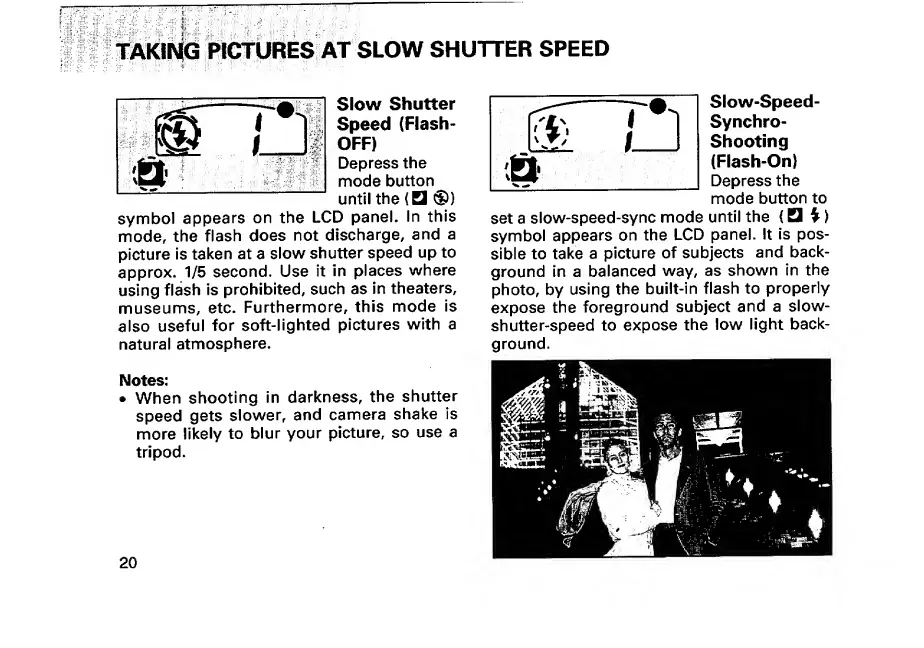
TAKING
PICTURES
AT
SLOW
SHUTTER
SPEED
Slow
Shutter
Speed
(Flash-
OFF)
Depress
the
mode
button
until
the
(
®)
symbol
appears
on
the
LCD
panel.
In
this
mode,
the
flash
does
not
discharge,
and
a
picture
is
taken
at
a
slow
shutter
speed
up
to
approx.
1/5
second.
Use
it
in
places
where
using
flash
is
prohibited,
such
as
in
theaters,
museums,
etc.
Furthermore,
this
mode
is
also
useful
for
soft-lighted
pictures
with
a
natural
atmosphere.
Slow-Speed-
Synchro-
Shooting
(Flash-On)
Depress
the
mode
button
to
set
a
slow-speed-sync
mode
until
the
{Q
^)
symbol
appears
on
the
LCD
panel.
It
is
pos¬
sible
to
take
a
picture
of
subjects
and
back¬
ground
in
a
balanced
way,
as
shown
in
the
photo,
by
using
the
built-in
flash
to
properly
expose
the
foreground
subject
and
a
slow-
shutter-speed
to
expose
the
low
light
back¬
ground.
Notes:
When
shooting
in
darkness,
the
shutter
speed
gets
slower,
and
camera
shake
is
more
likely
to
blur
your
picture,
so
use
a
tripod.
20

Other manuals for Pentax Espio

Related product manuals