EasyManua.ls Logo

Pentax IQZoom 80-E - How to Hold the Camera

Pentax IQZoom 80-E
44 pages
Print Icon
To Next Page IconTo Next Page
To Previous Page IconTo Previous Page
Loading...
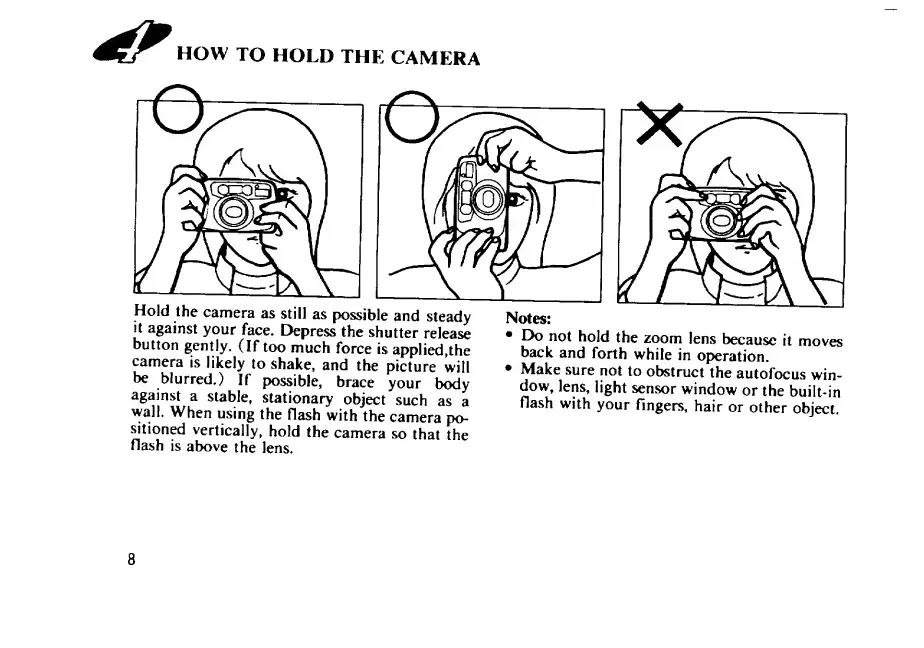
Hold
the
camera
as
still
as
possible
and
steady
it
against
your
face.
Depress
the
shutter
release
button
gently.
(If
too
much
force
is
applied,the
camera
is
likely
to
shake,
and
the
picture
will
be
blurred.)
If
possible,
brace
your
body
against
a
stable,
stationary
object
such
as
a
wall.
When
using
the
flash
with
the
camera
po¬
sition^
vertically,
hold
the
camera
so
that
the
flash
is
above
the
lens.
Notes:
Do
not
hold
the
zoom
lens
because
it
moves
back
and
forth
while
in
operation.
Make
sure
not
to
obstruct
the
autofocus
win¬
dow,
lens,
light
sensor
window
or
the
built-in
flash
with
your
fingers,
hair
or
other
object.
8

Related product manuals