EasyManua.ls Logo

Pentax IQZoom 80-E - How to Select Modes; Red-Eye Reduction Flash Mode

Pentax IQZoom 80-E
44 pages
Print Icon
To Next Page IconTo Next Page
To Previous Page IconTo Previous Page
Loading...
TAKING
BETTER
PHOTOGRAPHS
HOW
TO
SELECT
MODES
RED-EYE
REDUCTION
FLASH
MODE
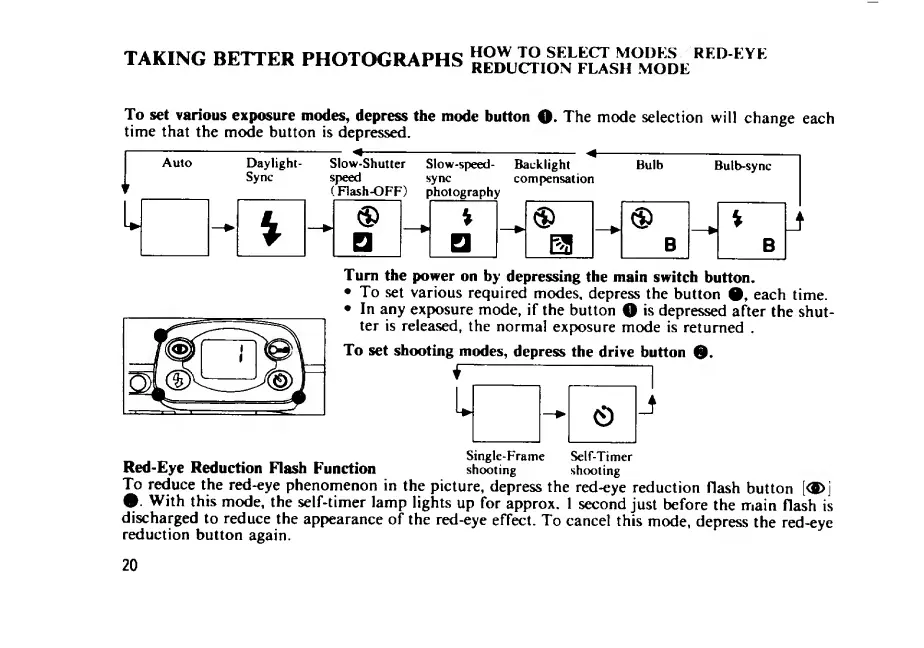
To
set
various
exposure
inodes,
depress
the
mode
button
O.
The
mode
selection
will
change
each
time
that
the
mode
button
is
depressed.
Turn
the
power
on
by
depressing
the
main
switch
button.
To
set
various
required
modes,
depress
the
button
each
time.
In
any
exposure
mode,
if
the
button
O
is
depressed
after
the
shut¬
ter
is
released,
the
normal
exposure
mode
is
returned
.
To
set
shooting
modes,
depress
the
drive
button
*
-1
J
e.
Single-Frame
Self-Timer
Red-Eye
Reduction
Flash
Function
shooting
shooting
To
reduce
the
red-eye
phenomenon
in
the
picture,
depress
the
red-eye
reduction
flash
button
[<S>\
With
this
mode,
the
self-timer
lamp
lights
up
for
approx.
1
second
just
before
the
main
flash
is
discharged
to
reduce
the
appearance
of
the
red-eye
effect.
To
cancel
this
mode,
depress
the
red-eye
reduction
button
again.
20

Related product manuals