EasyManua.ls Logo

Pentax IQZoom 80-E - Unloading Film

Pentax IQZoom 80-E
44 pages
Print Icon
To Next Page IconTo Next Page
To Previous Page IconTo Previous Page
Loading...
UNLOADING
FILM
(Remofe
die
film
from
the
camen
in
the
shade
or
by
using
your
body
to
(|ie
camera)
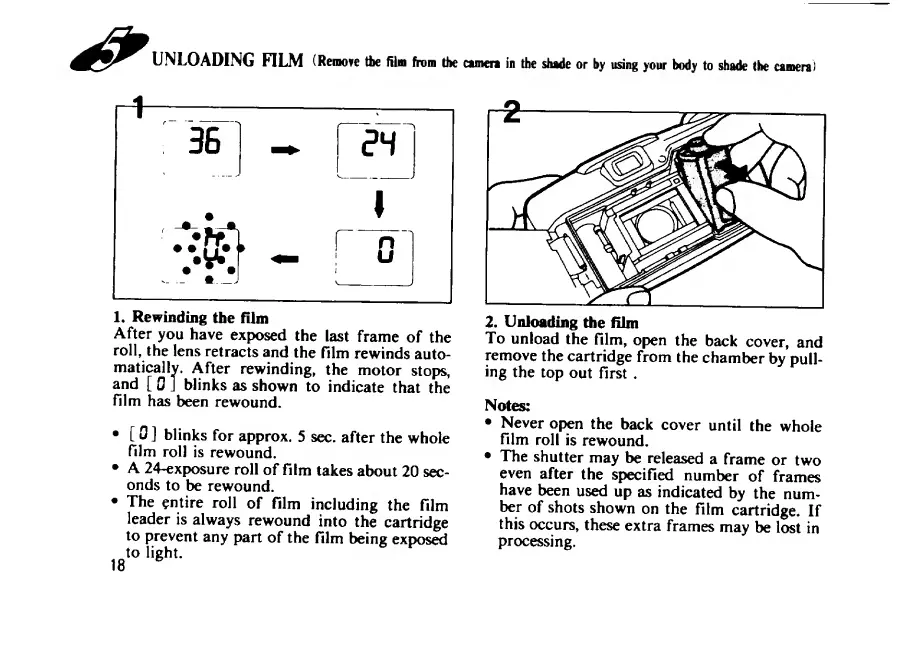
1.
Rewinding
the
film
After
you
have
exposed
the
last
frame
of
the
roll,
the
lens
retracts
and
the
film
rewinds
auto¬
matically.
After
rewinding,
the
motor
stops,
and
[
0
]
blinks
as
shown
to
indicate
that
the
film
has
been
rewound.
[
0
]
blinks
for
approx.
5
sec.
after
the
whole
film
roll
is
rewound.
A
24-exposure
roll
of
film
takes
about
20
sec¬
onds
to
be
rewound.
The
entire
roll
of
film
including
the
film
leader
is
always
rewound
into
the
cartridge
to
prevent
any
part
of
the
film
being
exposed
to
light.
18
^
2.
Unloading
the
film
To
unload
the
film,
open
the
back
cover,
and
remove
the
cartridge
from
the
chamber
by
pull¬
ing
the
top
out
first
.
Notes:
Never
open
the
back
cover
until
the
whole
film
roll
is
rewound,
The
shutter
may
be
released
a
frame
or
two
even
after
the
specified
number
of
frames
have
been
used
up
as
indicated
by
the
num¬
ber
of
shots
shown
on
the
film
cartridge.
If
this
occurs,
these
extra
frames
may
be
lost
in
processing.

Related product manuals