EasyManua.ls Logo

Pentax IQZoom 80-E - Correcting the Date

Pentax IQZoom 80-E
44 pages
Print Icon
To Next Page IconTo Next Page
To Previous Page IconTo Previous Page
Loading...
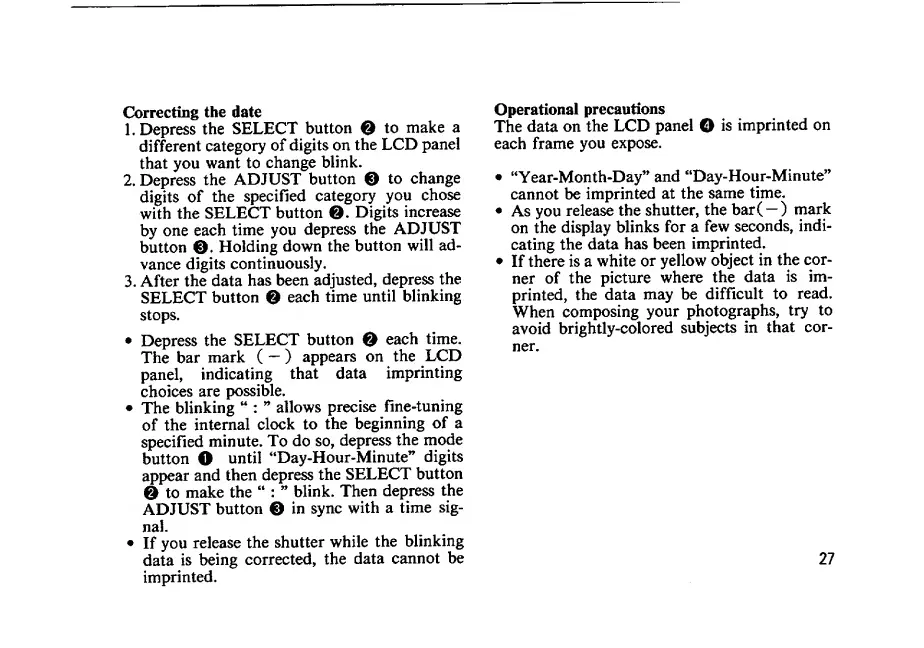
Correcting
the
date
1.
Depress
the
SELECT
button
Q
to
make
a
different
category
of
digits
on
the
LCD
panel
that
you
want
to
change
blink.
2.
Depress
the
ADJUST
button
0
to
change
digits
of
the
specified
category
you
chose
with
the
SELECT
button
©.
Digits
increase
by
one
each
time
you
depress
the
ADJUST
button
0
.
Holding
down
the
button
will
ad¬
vance
digits
continuously,
3.
After
the
data
has
been
adjusted,
depress
the
SELECT
button
0
each
time
until
blinking
stops.
Depress
the
SELECT
button
©
each
time.
The
bar
mark
(
)
appears
on
the
LCD
panel,
indicating
that
data
imprinting
choices
are
possible.
The
blinking
:
’’
allows
precise
fine-tuning
of
the
internal
clock
to
the
beginning
of
a
specified
minute.
To
do
so,
depress
the
mode
button
O
until
“Day-Hour-Minute”
digits
appear
and
then
depress
the
SELECT
button
0
to
make
the
:
blink.
Then
depress
the
ADJUST
button
0
in
sync
with
a
time
sig-
nal.
If
you
release
the
shutter
while
the
blinking
data
is
being
corrected,
the
data
cannot
be
imprinted.
Operational
precautions
The
data
on
the
LCD
panel
O
is
imprinted
on
each
frame
you
expose.
“Year-Month-Day”
and
“Day-Hour-Minute”
cannot
be
imprinted
at
the
same
time.
As
you
release
the
shutter,
the
bar(
—)
mark
on
the
display
blinks
for
a
few
seconds,
indi¬
cating
the
data
has
been
imprinted.
If
there
is
a
white
or
yellow
object
in
the
cor¬
ner
of
the
picture
where
the
data
is
im¬
printed,
the
data
may
be
difficult
to
read.
When
composing
your
photographs,
try
to
avoid
brightly-colored
subjects
in
that
cor¬
ner.
27

Related product manuals