EasyManua.ls Logo

Pentax IQZoom - Page 11

Pentax IQZoom
40 pages
Print Icon
To Next Page IconTo Next Page
To Previous Page IconTo Previous Page
Loading...
5
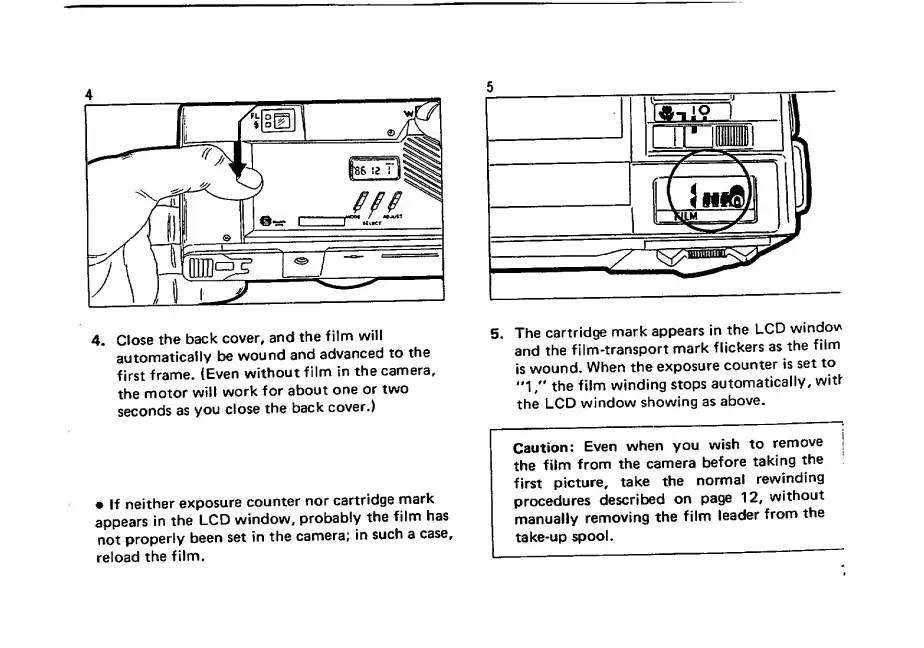
4.
Close
the
back
cover,
and
the
film
will
automaticaily
be
wound
and
advanced
to
the
first
frame.
(Even
without
film
in
the
camera,
the
motor
will
work
for
about
one
or
two
seconds
as
you
close
the
back
cover.)
If
neither
exposure
counter
nor
cartridge
mark
appears
in
the
LCD
window,
probably
the
film
has
not
properly
been
set
in
the
camera;
in
such
a
case,
reload
the
film.
5,
The
cartridge
mark
appears
in
the
LCD
windo\A
and
the
film-transport
mark
flickers
as
the
film
is
wound.
When
the
exposure
counter
is
set
to
"1/'
the
film
winding
stops
automatically,
witf
the
LCD
window
showing
as
above.
Caution:
Even
when
you
wish
to
remove
the
film
from
the
camera
before
taking
the
first
picture,
take
the
normal
rewinding
procedures
described
on
page
12,
without
manually
removing
the
film
leader
from
the
take-up
spool.

Related product manuals