EasyManua.ls Logo

Pentax IQZoom - Self-Timer

Pentax IQZoom
40 pages
Print Icon
To Next Page IconTo Next Page
To Previous Page IconTo Previous Page
Loading...
SELF-TIMER
1
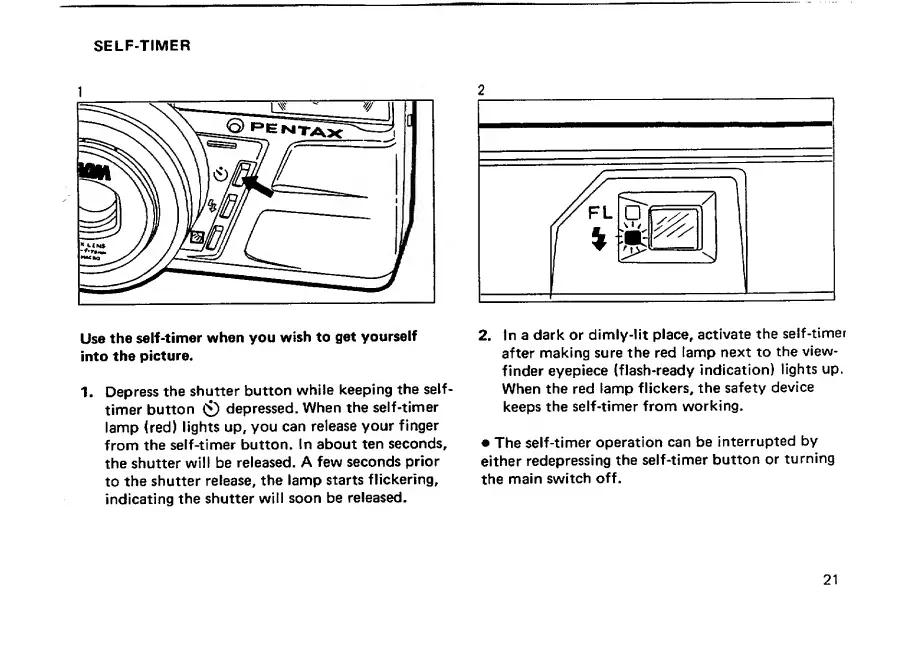
Use
the
self-timer
when
you
wish
to
get
yourself
into
the
picture.
1.
Depress
the
shutter
button
while
keeping
the
self-
timer
button
0
depressed.
When
the
self-timer
lamp
(red)
lights
up,
you
can
release
your
finger
from
the
self-timer
button.
In
about
ten
seconds,
the
shutter
will
be
released.
A
few
seconds
prior
to
the
shutter
release,
the
lamp
starts
flickering,
indicating
the
shutter
will
soon
be
released.
2.
In
a
dark
or
dimly-lit
place,
activate
the
self-timer
after
making
sure
the
red
lamp
next
to
the
view¬
finder
eyepiece
(flash-ready
indication)
lights
up.
When
the
red
lamp
flickers,
the
safety
device
keeps
the
self-timer
from
working.
The
self-timer
operation
can
be
interrupted
by
either
redepressing
the
self-timer
button
or
turning
the
main
switch
off.
21

Related product manuals