EasyManua.ls Logo

Pentax LX - Using the Waist-Level Finder; FC-1 Action Eyepiece Operation; FF-1 Waist-Level Finder Operation

Pentax LX
6 pages
Print Icon
To Next Page IconTo Next Page
To Previous Page IconTo Previous Page
Loading...
4
tf-fF+r* 5
Bo7
4
c- 7D'y
t fi9
>x
lryU
<Ell:Et
*t" T,>=)274
C-zFC-l
It)
r^
|
V \)vA:l:k'!Lq<
*U *3_"
.72>=>74X.-^O*l+
6El
7
4
e-
^*Yt&t.|.
+tdE3_
6
t
7 4
V.\)v 1.,
EL+EEtaxt
-rZ
l-
v\)vtlt5.r)
tq"
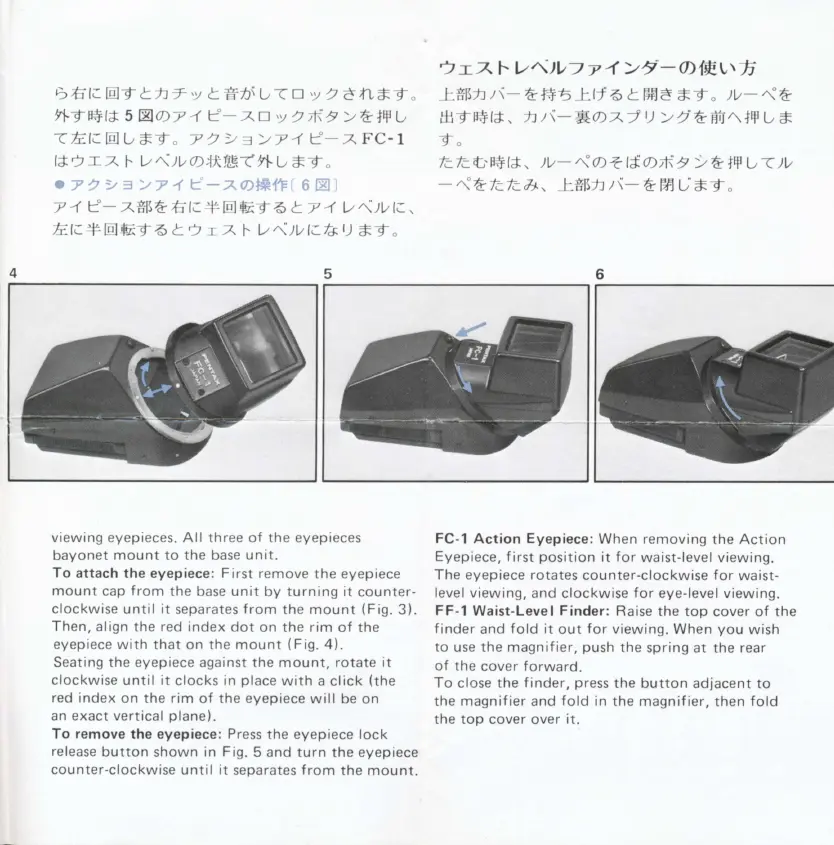
viewing eyepieces. All three of the eyepieces
bayonet
mount
to the base
unit.
To attach
the eyepiece: First remove
the eyepiece
mount
cap
f
rom
the base unit
by turning it
counter-
clockwise
until it
separates
f rom
the mount
(Fig.
3).
Then,
align the red index
dot
on the
rim
of the
eyepiece with that on the mount
(Fig.
4).
Seating the
eyepiece
against the mount,
rotate it
clockwise until it
clocks
in
place
with a
click
(the
red
index
on the
rim
of the
eyepiece
will
be on
an exact vertical
plane).
To
remove
the
eyepiece:
Press
the eyepiece lock
release
button
shown
in
Fig.
5 and turn
the
eyepiece
counter-clockwise
until it
separates
f
rom
the mount.
i
;r7t-
V^)V)
T
4
>t
-o)tfr.vtfi
L*l\J:t\-&t*6LU6
tFf,A
*-{"
)v-<&
,HtB+l*,
h
)i-Soz
J
U
>
t t+ffi.\JF
t,
*
"f"
-
"i
A
tctclt,
t*Fi
t \-
&
fAL; *t
"
FC-1
Action Eyepiece:
When removing
the Action
Eyepiece, f
irst
position
it
for
waist-level viewing.
The eyepiece rotates
counter-clockwise for
waist-
level viewing,
and
clockwise
for
eye-level
viewing.
FF-l
Waist-Level
Finder:
Raise
the top cover of the
f
inder
and
fold it
out
for
viewing. When
you
wish
to use the magnif
ier,
push
the
spring at
the
rear
of the
cover forward.
To
close the
f inder,
press
the
button adjacent to
the magnif ier
and
fold
in the
magnif
ier,
then
fold
the top cover
over
it.
5

Other manuals for Pentax LX

Related product manuals