iiiiiiiiiiiiiiiiiiiiiiiiiiiiiiil
iiiiiiiiiiiiiiiiiiiiiiiiiiiiiiii
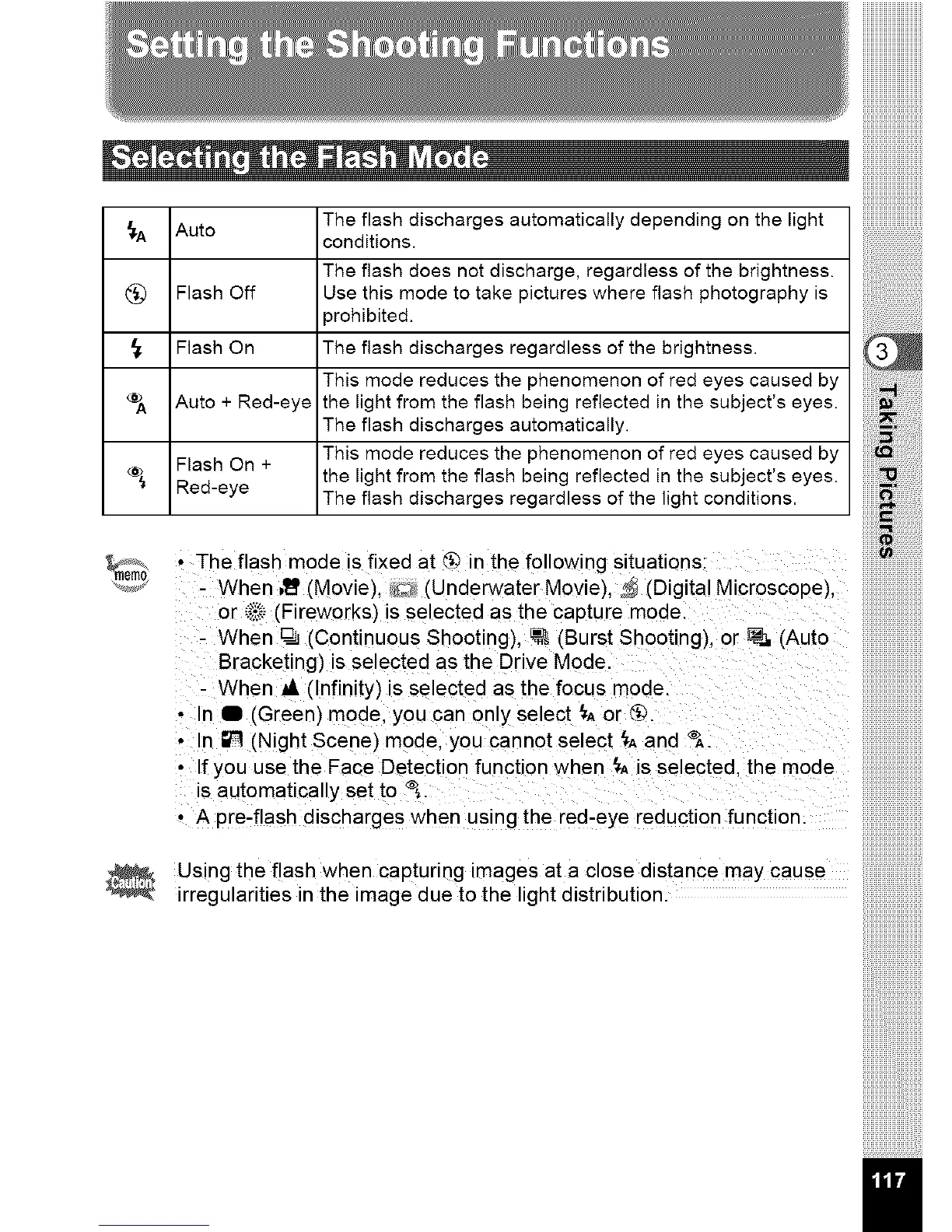
The flash discharges automatically depending on the light
_-A Auto
conditions.
The flash does not discharge, regardless of the brightness.
(_ Flash Off Use this mode to take pictures where flash photography is
3rohibited.
Flash On The flash discharges regardless of the brightness.
This mode reduces the phenomenon of red eyes caused by
Auto + Red-eye the light from the flash being reflected in the subject's eyes.
The flash discharges automatically.
Flash On + This mode reduces the phenomenon of red eyes caused by
the light from the flash being reflected in the subject's eyes.
Red-eye The flash discharges regardless of the light conditions.
!!!!!!!!! iiiiiiiiiiiiiiiiiiiiiiiiiiiiii!iiiiiii!i
• The flash mode is fixed at @ in the following situations:
- When ,_' (Movie), _ (Underwater Movie), _ (Digital Microscope}.
or _._ (Fireworks) is selected as the capture mode.
- When @J(Continuous Shooting), _ (Burst Shooting), or _ (Auto
Bracketing) is selected as the Drive Mode
- When al, (Infinity) is selected as the focus mode.
• In I (Green) mode, you can only select {. or @.
• In _ (Night Scene) mode, you cannot select {. and _.
• If you use the Face Detection function when _, is selected, the mode
is automatically set to <%.
• A pre-flash discharges when using the red-eye reduction function.
Using the flash when capturing images at a close distance may cause
irregularities in the image due to the light distribution.



 To Next Page
 Loading...








