EasyManua.ls Logo

Pentax PC35AF-M - PC35 AF-M Date Features; Data Recording System Overview

Pentax PC35AF-M
36 pages
Print Icon
To Next Page IconTo Next Page
To Previous Page IconTo Previous Page
Loading...
DC55/F-MDHTE
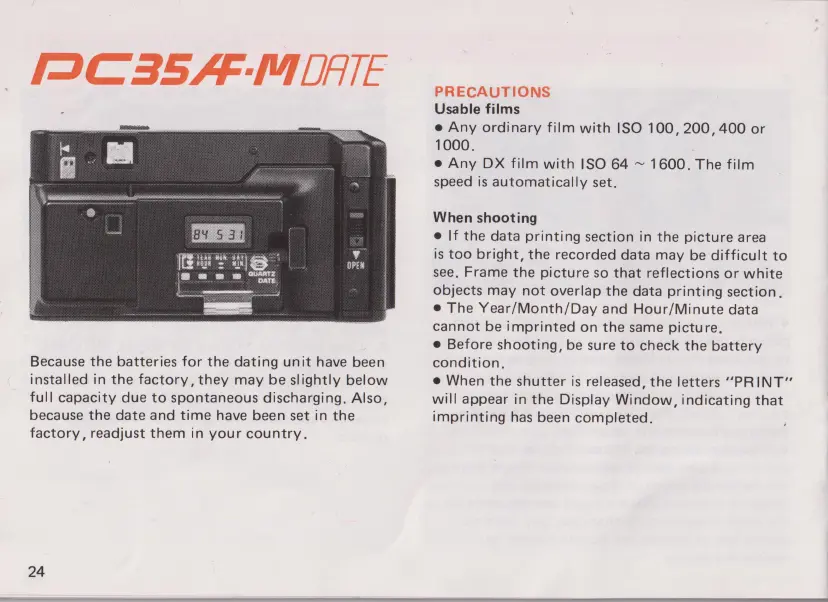
Because
the
batteries
for
the
dating
unit
have
been
installed
in
the
factory,
they
may
be
slightly
below
full
capacity
due
to
spontaneous
discharging.
Also,
because
the
date and time
have
been
set
in
the
factory,
readjust
them
in
your
country.
24
PRECAUTIONS
Usable
films
0
Any
ordinary
film
with
ISO
100, 200,
400
or
1000.
,
0
Any
DX
film
with
ISO
64
~
1600.
The
film
speed
is
automatically set.
When
shooting
0
If
the
data
printing
section
in
the
picture
area
is
too
bright,
the
recorded
data
may
be
difficult
to
see.
Frame
the
picture
so
that
reflections
or
white
objects
may
not
overlap
the
data
printing
section.
0
The
Year/Month/Day
and
Hour/Minute
data
cannot
be
imprinted
on
the
same
picture.
0
Before
shooting,
be
sure
to
check
the
battery
condition.
0
When
the
shutter
is
released,
the
letters
"PRINT"
will
appear
in
the
Display
Window,
indicating
that
imprinting
has
been
completed.

Other manuals for Pentax PC35AF-M

Related product manuals