Pepco Web-Programmable Thermostat Homeowner’s Manual 3
PERS1123B—Pepco-Generic IT900 Thermostat Manual
(Version 2 Thermostat with New Screen Shots)
Piece: Manual
Quantity: 000,000
Size: sssss
Colors: ccccc
Finishing: ffffffffff
Mail: mmmmmmm
Program Specic Checklist Name: Date:
☐ Phone Number _________ _________
☐ URL _________ _________
☐ Program Details _________ _________
GRAPHIC
DESIGNER
☐ SPELL CHECK
CREATIVE
DIRECTOR
PROOFREADER COPY
SUPERVISOR
COPYWRITER CREATIVE SERVICES
MANAGER
ACCOUNT
MANAGER
PERS1123B
Pepco-Generic IT900 Thermostat Manual (Version 2 Thermostat with New Screen Shots)
Job Opened: November 20, 2012
Requested In-Home Date: December 10, 2012
Latest Revision: November 20, 2013
Approved: __________________
Step 1: Getting Started
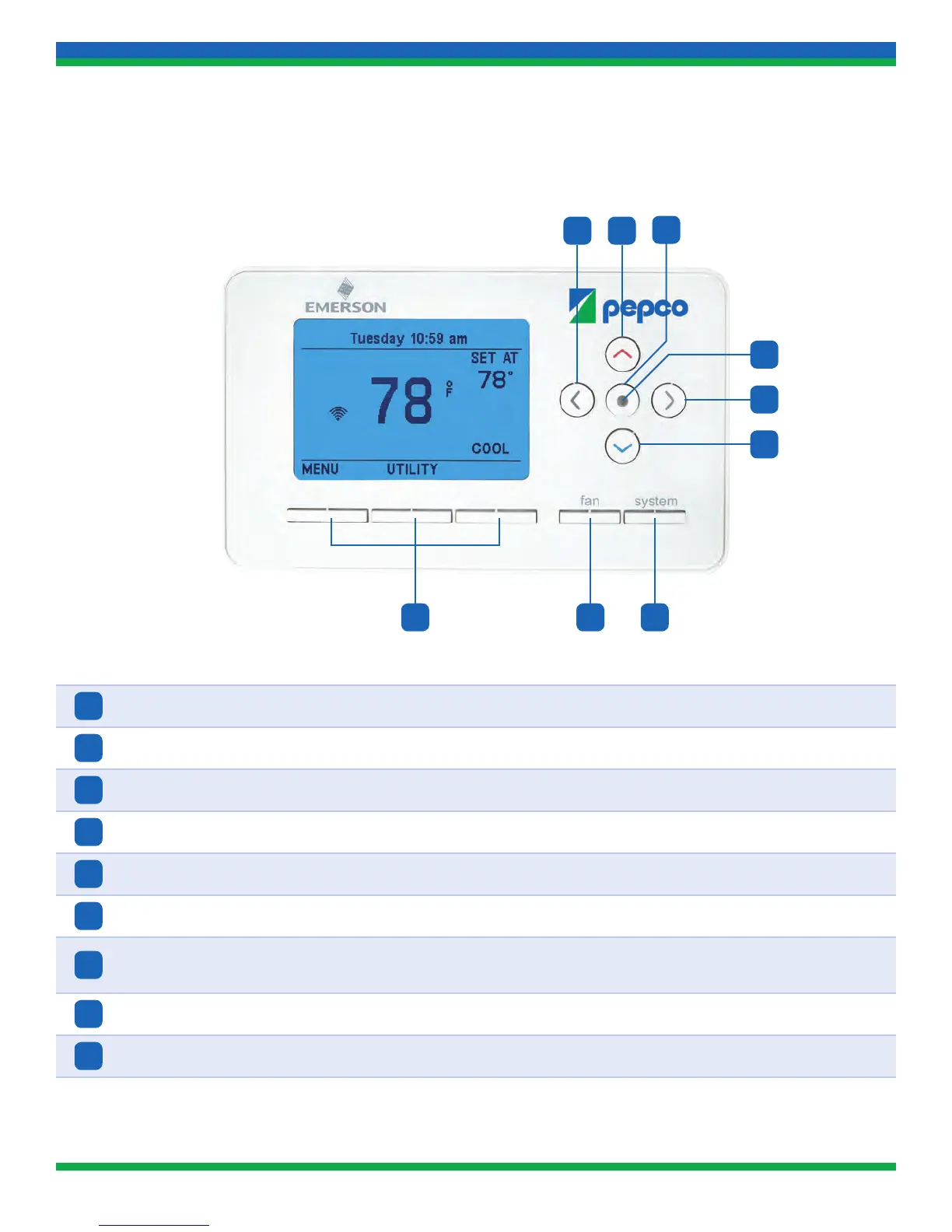
A. Thermostat Buttons and Indicators
1
Left Arrow Navigates menu items
2
Up Arrow Raises temperature setpoint and changes selected menu item
3
Action Button Selects action of selected menu item
4
LED Light Indicates status of pending, active, or overridden conservation periods
5
Right Arrow Navigates menu items
6
Down Arrow Lowers temperature setpoint and changes selected menu item
7
SYSTEM Button
Changes system selection (OFF, COOL, HEAT, AUX [displayed on heat pump
units only])
8
FAN Button Changes fan setting (Auto/On)
9
Soft Keys Performs action listed on display above the button
9 78
5
6
4
1 2
3
13_PERS1123B_IT900_v2_TSTAT_MANUAL.indd 3 11/20/13 3:34 PM


 To Next Page