Post 2011 DCT
1 Switch off electricity supply.
2 Remove cash box.
3 Unlock front cover and lift upwards allowing lower part of cover to
come towards you. Pull cover forwards and away from wall bracket and
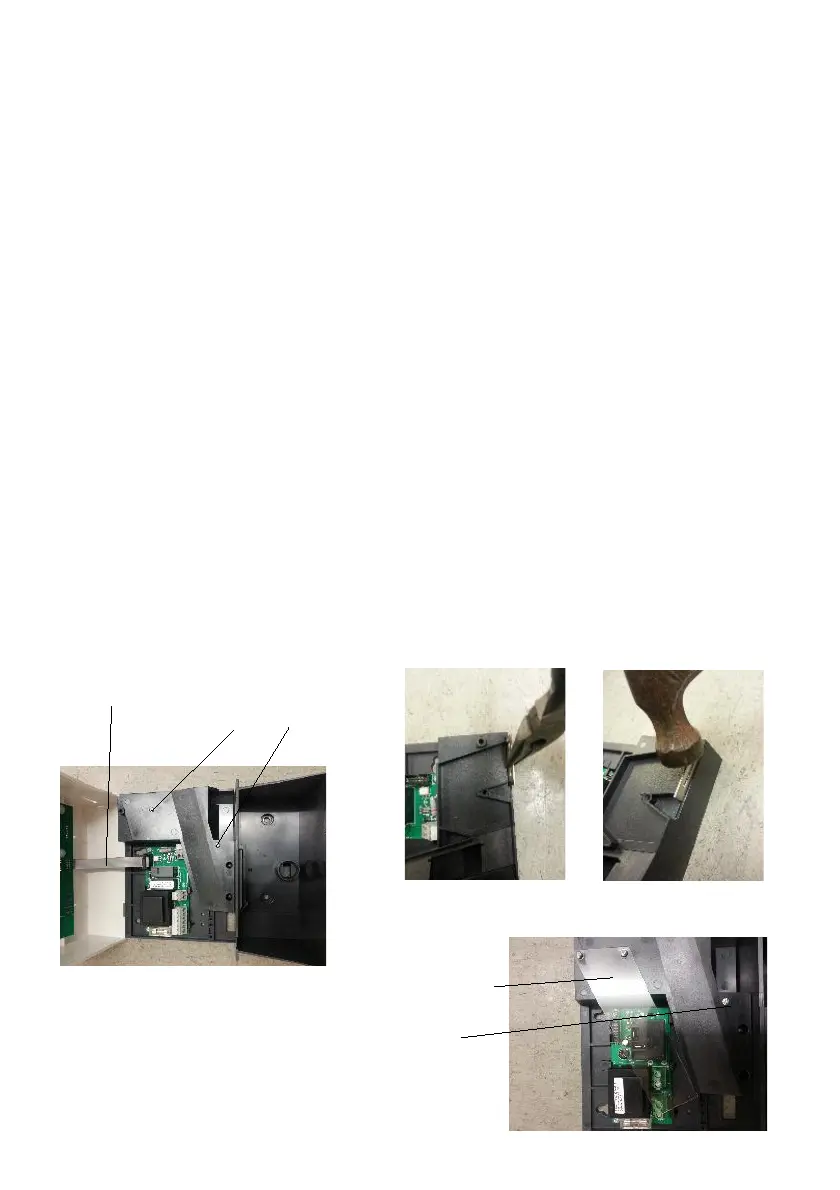
disconnect lead from the power supply board (PSU). See Figure 5.
4 Remove two screws from insulation plate and remaining screw
holding runway cover and put to one side (Figure 8).
5 Remove old coin entry slot and discard.
6 Insert new coin entry plate into wall bracket slot (Figure 6) and tap
securely into place (Figure 7).
7 Check runway hasn’t moved and then replace runway cover and
insulation plate.
8 Reconnect PSU lead (Figure 5) and refit and lock front cover.
9 Replace cash box and switch on electricity supply.
PSU lead Remove screws from
runway cover
Figure 5
Figure 6 Figure 7
Figure 5 Insulation plate & screws
Runway fixing screw
Figure 8


 To Next Page