The PerfectPrime AQ380 Multi IAQ Monitor is a versatile air quality meter designed to measure and display CO2, PM2.5, PM10, humidity, and temperature. It is ideal for monitoring indoor air quality in various environments.
Function Description:
The AQ380 provides real-time measurements of CO2, PM2.5, PM10, temperature, and humidity. It also offers functions for displaying maximum, minimum, and average values. The device includes an auto-power on/off feature, and adjustable calibration for CO2, temperature, and humidity. It features a red backlight alarm for CO2, PM2.5, and PM10, which activates when measured values exceed predefined settings. The meter supports both manual and auto-recording of data logs, with a capacity for 20 logs. Key sound assistance is provided to confirm operations. An "OL" indication signifies an overload condition.
Important Technical Specifications:
General:
- Dimensions: 150x65x22mm (L x W x H)
- Weight: 190 g
- Display Size: 52mm (L) x 40mm (W)
- Operating Temperature and Humidity: 0°C ~ +50°C, <80%RH (no condensation)
- Storage Temperature and Humidity: 0°C ~ +60°C, <70%RH (no condensation)
- Sampling Time: 2.5 seconds (5 types, 0.5 seconds for each)
- Auto-recording Time Interval Settings: 5 seconds, 10 seconds, 5 minutes, 10 minutes, 20 minutes, 30 minutes, 60 minutes. Default is 5 seconds.
- CO2/PM2.5/PM10 Red Backlight Alarm Setting Function (Default Values):
- CO2: 1000PPM
- PM2.5: 35µg/m³
- PM10: 75µg/m³
- Operating Altitude: Up to 2000M
- Operating Environment: Indoor use; Pollution degree 2
- EMC: EN61326-1:CISPR 11:Group 1, Class B (Equipment for use in all establishments other than domestic; RF energy generated is needed for internal functioning)
Power:
- Battery: 3.7V 2000mAh rechargeable lithium battery
- Transformer for Charging: 1A/5V
- Battery Life: Approximately 6 hours of continuous use
- External Power Supply: 5V micro USB interface. When connected, auto-power off is disabled, and the white backlight is always on.
CO2 Sensor (Non-Dispersion Infrared - NDIR):
- Measuring Range: 400 to 9999ppm
- Accuracy: ±70ppm ±3% of readings (400-2000ppm)
- Resolution: ±1ppm
- Reaction Time: 90% during about 2 minutes
PM2.5 Sensor (Laser Particulate Matter Sensor):
- Measuring Range: 0-500 µg/m³
- Accuracy: ±8µg (for <=50µg/m³); ±10% of reading value (for >50µg/m³)
- Resolution: 1
- Reaction Time: <10 seconds
PM10 Sensor (Laser Particulate Matter Sensor):
- Measuring Range: 0-500 µg/m³
- Accuracy: ±10µg (for <=50µg/m³); ±15% of reading value (for >50µg/m³)
- Resolution: 1
- Reaction Time: <10 seconds
Temperature Sensor (Bandgap Temperature Sensor):
- Measuring Range: -10°C~50°C / 14°F~122°F
- Accuracy: ±1.0°C/±1.8°F (Non-charging and 30 minutes after charging)
- Resolution: 0.1°C / 0.1°F (0~35°C / 32°F~95°F); 1°C/1°F (Above 100°C /°F or below -10°C/°F)
- Reaction Time: About 1 second
- Ambient Temperature Range for Accurate Measure: 18°C (64°F) ~ 28°C (82°F)
Humidity Sensor (Capacitive Humidity Sensor):
- Measuring Range: 1-99%
- Accuracy: ±5.0%RH (10~90%); ±8.0%RH (<10%, >90%) no condensation, at 25°C
- Resolution: 0.1%
- Reaction Time: About 4 seconds
Usage Features:
- Power On/Off: Press the power button to turn the device on or off.
- Auto Power Off: To disable or resume auto power off, press and hold the power button for more than 2 seconds. When activated, the indicator will appear, and the device will automatically turn off after 30 minutes.
- Backlight Mode: Press the right-side button to turn the backlight on or off. The backlight automatically turns off after 15 seconds. This button is invalid when the red backlight for alarm is on.
- MAX/MIN/AVG Function: Press the "MAX MIN" button to enter this function. "MAX" will be shown, displaying the maximum value. Repeatedly press the "MAX MIN" button to cycle through MIN/AVG/MAX MIN/MAX functions and update the displayed value. When "MAX MIN" is selected, it displays the current measured value.
- Manual Record (REC): Press the "REC LOG" button to save one data log. "REC" and the log number will appear on the LCD for one second. The log number increases by 1 with each press, up to a maximum of 20 logs. "FULL" appears when the maximum is reached.
- Auto-Recording (LOG): Press and hold the "REC LOG" button for more than 2 seconds to start auto-recording. "LOG" appears on the LCD. If power is insufficient, auto-recording will stop, and the battery indicator will appear. "FULL" appears when the maximum log number (20) is reached. Press and hold the "REC LOG" button again for more than 2 seconds to exit auto-recording.
- Read Recorded Data: Press the "R-M" button to enter memory-reading mode. "R-M" and the log number will appear for one second, then the record is displayed. Use the "R-M" (up) or "REC LOG" (down) buttons to navigate through recorded data. Press and hold the "R-M" button to exit this mode.
- °C or °F Unit Selection: While the device is off, press and hold the "R-M" button, then press the power button to turn it on. After the software version appears, release the "R-M" button. Repeat this step to switch between units.
- Clear Memory: While the device is off, press and hold the "MAX MIN" button, then press the power button to turn it on. After "---" and the software version appear, release the "MAX MIN" button to clear the memory.
- Key Sound On/Off: The key sound is on by default. While the device is off, press and hold the "REC LOG" button, then press the power button. After the software version appears, release the "REC LOG" button. The sound icon will disappear, indicating the key sound is off. Repeat to turn it back on.
- Resume Factory Settings: While the device is off, press and hold the right-side button, then press the power button. After the software version appears, release the right-side button to restore factory settings and clear memory. This sets auto-shutdown to OFF, key sound to On, calibration value to 0, and CO2 Abc to OFF.
- Function Settings (SET 1-8): Press the right-side button for more than 2 seconds to enter setting mode. Repeatedly press the right-side button to navigate through settings 1 to 8.
- SET 1 (Time Interval Setting): Select 5, 10 seconds, 5, 10, 20, 30, or 60 minutes using the "R-M" (up) or "REC LOG" (down) buttons. Default is 5 seconds.
- SET 2 (CO2 Alarm Setting): Use "MAX MIN" to move the flashing digit, and "R-M" (up) or "REC LOG" (down) to adjust the CO2 value.
- SET 3 (PM2.5 Alarm Setting): Similar to CO2 alarm setting.
- SET 4 (PM10 Alarm Setting): Similar to CO2 alarm setting.
- SET 5 (CO2 Abc Self-Calibration Mode - Factory Use Only): This setting is for factory calibration and should not be changed by the user.
- SET 6 (CO2 Manual Calibration): Use "MAX MIN" to move the flashing digit, and "R-M" (up) or "REC LOG" (down) to adjust the CO2 value.
- SET 7 (Temperature Calibration): Similar to CO2 manual calibration.
- SET 8 (Humidity Calibration): Similar to CO2 manual calibration. After setting, press the right-side button again to return to measurement mode.
Maintenance Features:
- Battery Low Indication: The battery indicator shows the battery level. When the battery-low indicator appears, the device needs to be charged. The power will turn off after 5 seconds if not charged. During charging, the battery indicator will sequentially vary from right to left. When fully charged, the indicator will remain solid.
- Cleaning: Use a soft cloth (e.g., glasses cloth) to clean the meter when dirty. Do not use chemicals or other solvents.
- Repair: If the meter malfunctions, it should only be sent to authorized service suppliers or returned to the original factory for maintenance.
- Environmental Caution: Do not operate in environments with flammable gas or humid conditions.
- High Humidity Environment: If the meter is used in a high-humidity environment, place it in a low-humidity environment for 24 hours after use to ensure proper function.
- Product Disposal: The device and its accessories should be collected separately and disposed of correctly to avoid environmental pollution. Do not throw it away directly.

 Need help?
 General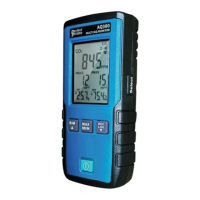

 To Next Page