The PerfectPrime TC0304 is a 4-channel digital datalogger thermometer designed for precise temperature measurement using K-type thermocouples. It adheres to the National Bureau of Standards and IEC584 temperature/voltage tables for K-type thermocouples, ensuring accurate readings. The device facilitates bi-directional communication with a PC via an RS232 interface, allowing for data transfer and advanced control.
Function Description
The TC0304 serves as a versatile temperature measurement tool, capable of simultaneously monitoring up to four distinct K-type thermocouple inputs. Its primary function is to provide real-time temperature readings in both Celsius (°C) and Fahrenheit (°F) scales, offering flexibility for various applications. The device's datalogging capabilities allow users to record and store temperature data over time, which can then be downloaded and analyzed using dedicated software. This makes it suitable for applications requiring continuous monitoring and historical data analysis.
Usage Features
The TC0304 is designed with user-friendly features to enhance its operational ease and versatility:
- Power-Up and Backlight Control: The device is powered on or off using a dedicated button. A momentary press of this button also controls the backlight, improving visibility in low-light conditions. To power off the device completely, the button must be pressed and held for 3 seconds.
- Thermocouple Connection: For temperature measurement, K-type thermocouples are simply plugged into the designated input connectors (T1 to T4). The device automatically recognizes the connected sensors.
- Temperature Scale Selection: Users can easily switch between Celsius (°C) and Fahrenheit (°F) temperature scales by pressing the "°C/°F" button, allowing for measurements in the preferred unit.
- Data-Hold Operation: The "HOLD" button enables users to freeze the current reading on the display. This is particularly useful for noting down specific measurements without the display changing. Pressing the "HOLD" button again releases the held data. While in Data-Hold mode, certain functions like "REL," "MAX MIN," "T1-T2," and "°C/°F" are temporarily disabled, indicated by two continuous beeps if attempted.
- T1-T2 Operation: This feature allows the device to display the temperature difference between the T1 and T2 inputs. When the "T1-T2" button is pressed, "1-2" appears on the upper right side of the LCD, and the temperature difference is shown on the right-hand side display.
- Relative Operation (AREL): By pressing the "AREL" button, the meter memorizes the current reading. Subsequent readings are then displayed as the difference relative to this memorized value. This is useful for observing temperature changes from a specific baseline. Pressing "AREL" again exits this mode. Similar to Data-Hold, the "°C/°F" button is disabled in relative operation mode, with two continuous beeps if pressed.
- MAX/MIN Operation: The "MAX MIN" button activates a mode where the device continuously tracks and stores the maximum and minimum temperature values encountered since entering the mode.
- When the "MAX" symbol is displayed, the screen shows the maximum recorded temperature.
- Pressing "MAX MIN" again switches to displaying the minimum recorded temperature, indicated by the "MIN" symbol.
- A third press of "MAX MIN" causes both "MAX" and "MIN" symbols to blink, indicating that the displayed temperature is the current reading, while the maximum and minimum values are continuously updated in memory.
- Users can cycle through these display modes by repeatedly pressing "MAX MIN."
- In "MAX MIN" mode, the "°C/°F" and "AREL" buttons are disabled, again with two continuous beeps if pressed.
- To exit the MAX/MIN mode, the "MAX MIN" button must be pressed and held for two seconds.
- Auto Power Off: By default, the device is configured with an auto power-off function, which shuts down the meter after 30 minutes of inactivity (no key operations or RS232 communication). This conserves battery life.
- Disabling Auto Power Off: The auto power-off feature can be disabled by pressing and holding the "HOLD" button while powering on the meter. Two successive beeps confirm that auto power off is disabled, and the auto power-off symbol will not appear on the display.
- Digital Output: The device features a digital output with a 9600bps N 81 serial interface. The RX (receive) port is a 5V normal high input, and the TX (transmit) port is a 5V normal high output, facilitating data communication with external systems.
- Software Integration: The TC0304 is designed to work with dedicated setup software. This software, compatible with Windows XP/Vista/7/8/10, allows for real-time data graphing, saving live data, and loading/saving logged data from the device to a computer. The software automatically connects to the device upon loading, displaying temperature values on an on-screen representation of the thermometer.
Maintenance Features
The TC0304 includes features and considerations for maintaining its accuracy and functionality:
- Offset Calibration: The device provides offset calibration screws (VR1, VR2, VR3, VR4) for fine-tuning its accuracy at specific temperature points (0°C, 190°C, 1000°C, and 1900°F). Performing offset calibration, particularly with thermal-stabilized ice water through VR1, is recommended for optimal calibration results.
- Low Battery Indication: A low battery symbol will appear on the LCD when the battery voltage falls below the required level for proper operation. This alerts the user to replace the 9-volt battery, ensuring continuous and reliable performance.
- Probe Compatibility: The device is designed for use with K-type thermocouples. The manual specifically mentions the TP-K01 Bead probe, suitable for general condition measurements, especially in complex and hard-to-reach areas. Users should refer to the probe's accuracy specifications for additional details, as the basic accuracy of the thermometer does not include probe error.

 Need help?
 General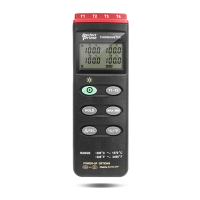

 To Next Page