5/32 in.(4mm)
Small Allen Key
Step 6
07
08
05
F
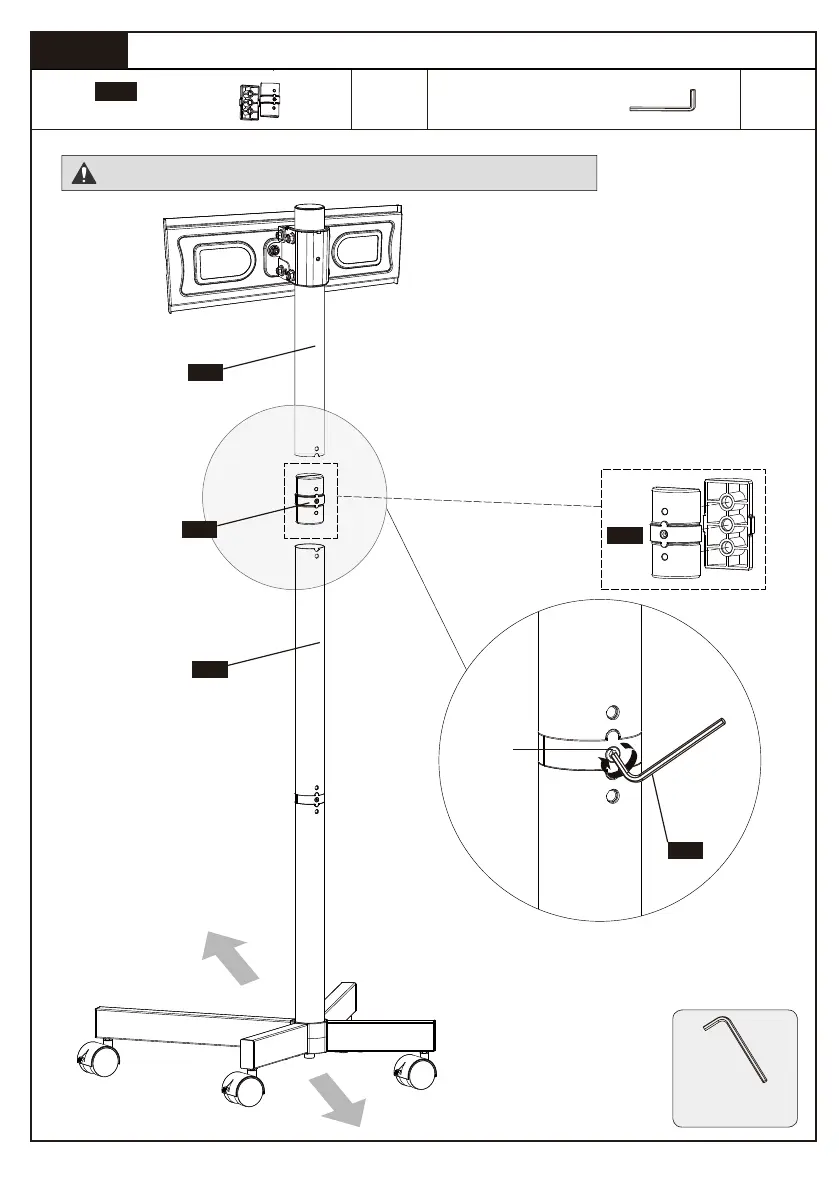
Secure the Upper Pole [08] to the Middle Pole [05]
Front Side
Back Side
Note: Make sure the TV plate faces the front side of the TV cart.
6-1. Conenet the two parts of pole
connector [07].
6-2. Insert the assembled pole
connector [07] to the middle pole [05].
6-3. Insert the upper pole [08] to the
assembled pole connector [07].
6-4.Tighten the preassembled
setscrew [T] to secure the two poles
[05] and [08].
07
T
Note: The convex grooves on the pole
connector [07] should be aligned with
the grooves on the upper pole [08]
and middle pole [05].
x1 x1
Pole Connector
07
5/32 In.(4mm)
Small Allen Key
F
7
Small Allen Key


 To Next Page