Need help?
Do you have a question about the Perlegear PGTVMC06 and is the answer not in the manual?
Warning about crushing injuries from tip over and methods to prevent it.
Guidance on verifying TV VESA pattern compatibility with the cart before installation.
Lists the tools needed but not included with the product.
Details all components provided with the TV cart.
Lists hardware for assembling the TV cart and attaching brackets to the TV.
Instructions for securing base tubes to the connector using bolts and Allen key.
Attaching castors to the short and long square tubes using a wrench.
Securing the lower pole to the tube connector with bolt, washer, and Allen key.
Connecting middle pole to lower pole via pole connector and setscrew.
Sliding and securing the upper pole to the TV plate using bolts and nuts.
Attaching upper pole to middle pole via pole connector and setscrew.
Securing cable clips to the connecting parts of the poles using bolts and Allen key.
Details on various bolts, washers, and spacers for TV bracket attachment.
Guidance on using spacers and selecting the correct bolts for TV mounting.
Specific instructions for attaching brackets to flat or round back TVs.
Specific instructions for TVs with bumps or inset holes using spacers.
Instructions for hanging the TV with brackets onto the TV plate and adjusting height.
Instructions for inserting and tightening safety locks to secure the TV to the plate.
Securing the shelf to the pole using connecting plate, bolts, and Allen key.
Instructions for adjusting and securing the TV's tilt angle.
Instructions for leveling the TV and securing it in place.
Guidance on managing and organizing cables on the TV cart.
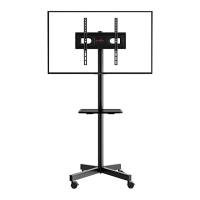
This document provides comprehensive instructions for assembling and using the Perlegear TV Cart, model PGTVMC06. It is designed to offer a portable and adjustable solution for mounting televisions, suitable for various environments such as homes, offices, or educational institutions. The cart's design emphasizes stability, adjustability, and ease of use, ensuring a secure and convenient viewing experience.
The primary function of this device is to provide a mobile stand for televisions, allowing users to easily move their display to different locations as needed. This mobility is facilitated by four castor wheels, which are designed for smooth movement and can be locked to secure the cart in place. The cart supports a wide range of TV sizes and VESA patterns, making it a versatile option for many modern televisions. Its robust construction aims to ensure the safety and stability of the mounted TV.
One of the key usage features of the Perlegear TV Cart is its adjustable height. The main pole structure, composed of a lower pole, middle pole, and upper pole, allows for significant vertical adjustment of the TV plate. This enables users to set the TV at an optimal viewing height, whether for seated audiences or standing presentations. The instruction manual details a step-by-step process for connecting these pole segments, ensuring a secure and stable vertical structure. The pole connectors are designed with convex grooves that must be aligned with corresponding grooves on the poles to ensure proper assembly and stability.
Another significant feature is the TV tilt adjustment. The TV plate, to which the TV brackets are attached, can be tilted to achieve the desired viewing angle. This is particularly useful for reducing glare or optimizing visibility from different positions in a room. The tilt mechanism involves loosening and tightening specific nuts, allowing for smooth and precise angle adjustments. This flexibility enhances the viewing experience by accommodating various environmental conditions and user preferences.
The cart also includes a shelf, which is a practical addition for holding media devices, remote controls, or other accessories. This shelf can be secured to the main pole at a desired height, providing convenient storage space directly beneath the TV. The installation of the shelf involves a connecting plate and bolts, ensuring it is firmly attached to the pole structure. This feature adds to the cart's utility, making it a complete solution for TV display and accessory management.
Cable management is another thoughtful feature incorporated into the design. The cart comes with cable clips that can be attached to the poles. These clips help organize and conceal TV and power cables, preventing clutter and enhancing the overall aesthetic of the setup. Proper cable management also contributes to safety by reducing the risk of tripping hazards.
The assembly process is designed to be straightforward, with clear instructions and labeled parts. The manual provides detailed diagrams and step-by-step guidance for each stage of assembly, from building the base to securing the TV and making final adjustments. Tools needed for assembly, such as a Phillips screwdriver and Allen keys, are specified, although not included with the product. The inclusion of various bolt sizes and spacers ensures compatibility with a wide range of TV models and mounting configurations, addressing potential challenges like curved TV backs or recessed mounting holes.
Safety is a paramount concern, and the manual includes an "Important Safety Information" section and a "Tip over Warning." Users are advised to read all instructions carefully, check for undamaged components, and contact customer service if any issues arise. The tip-over warning specifically highlights the risk of serious injuries from tip-overs and advises against allowing children to climb or hang on the cart. It also suggests using tip-over restraints or anchoring the stand to a wall, although it notes that these measures may only reduce, not eliminate, the risk.
Before installation, users are instructed to check the VESA pattern of their TV to ensure compatibility with the cart. The manual provides a range of supported VESA dimensions and explicitly states that the cart is not compatible with TVs outside these ranges. This pre-installation check helps prevent compatibility issues and ensures a successful setup.
The TV mounting brackets themselves are designed to be height-adjustable, offering three different height choices for hanging the TV on the TV plate. This allows users to fine-tune the vertical position of their TV even after it's mounted. Once the TV is hung, safety locks are inserted into upward-facing hooks on the TV bracket and tightened to secure the TV firmly to the TV plate, preventing accidental dislodgement.
Maintenance features are primarily focused on ensuring the longevity and safe operation of the cart. While not explicitly detailed as a separate section, the assembly instructions implicitly guide users on proper installation techniques that contribute to long-term stability. For instance, tightening bolts securely, aligning grooves correctly, and ensuring adequate thread engagement for TV bolts are all critical for the cart's structural integrity. The recommendation to verify adequate thread engagement for TV bolts (at least 5 turns) is a key maintenance-related instruction to prevent the TV from becoming loose or falling.
The manual also provides troubleshooting advice for TV bolt selection and spacer usage. It explains that if a bolt is too short, it will not hold the TV, and if it's too long, it could damage the TV. Various options for using spacers in multi-layer configurations are presented to address different TV back designs, such as flat, round, or those with "bumps" or inset holes. This detailed guidance helps users overcome common mounting challenges, ensuring a secure and correct installation.
In summary, the Perlegear TV Cart is a functional and adaptable device designed to enhance the TV viewing experience through mobility, adjustability, and integrated accessory management. Its robust construction, coupled with clear assembly instructions and safety guidelines, aims to provide a reliable and user-friendly solution for displaying televisions in various settings. The emphasis on proper assembly and compatibility checks serves as a foundational aspect of its maintenance, ensuring safe and effective long-term use.
 General
| Product Name | Perlegear PGTVMC06 |
|---|---|
| Category | Racks & Stands |
| Type | Full Motion TV Wall Mount |
| Tilt Range | -5° to +15° |
| Material | Steel |
| Finish | Powder Coated |
| Installation | Wall mounted |

 To Next Page