1450mm
1400mm
1500mm
1500mm
1450mm
1400mm
1500mm
1450mm
1400mm
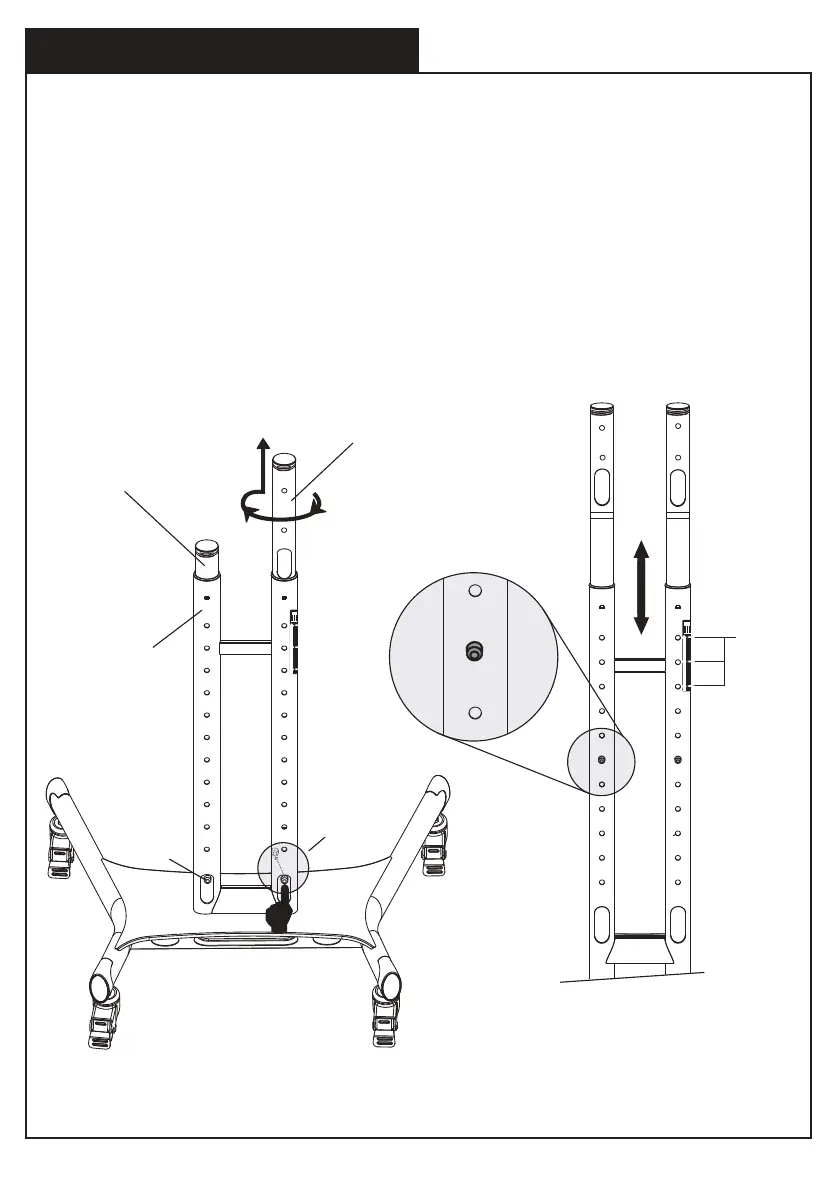
3. Adjust the Height of the Post
Step 1.
Step 2.
Repeat step 1 for left post.
Left upper post
Left lower post
Spring
plunger
Depress
Figure 1 Figure 2
Right upper post
Use thumb or finger to depress spring plunger ball of the right upper post located
at the cable hole, then twist and pull upper post upward to your desired height.
As shown in fig-1, twist upper post toward the plunger holes direction and engage
the spring ball into the plunger hole to fix the post inplace as shown in fig-2.
01 02 03 04 05 06 07 08 09 10 11 12
13 14 15 16 17 18 19 20 21 22 23 24
25 26 27 28 29 30 31 32 33 34 35 36
37 38 39 40 41 42 43 44 45 46 47 48
49 50 51 52 53 54 55 56 57 58 59 60


 To Next Page