22
EN
Mode
OK
T Set
ON
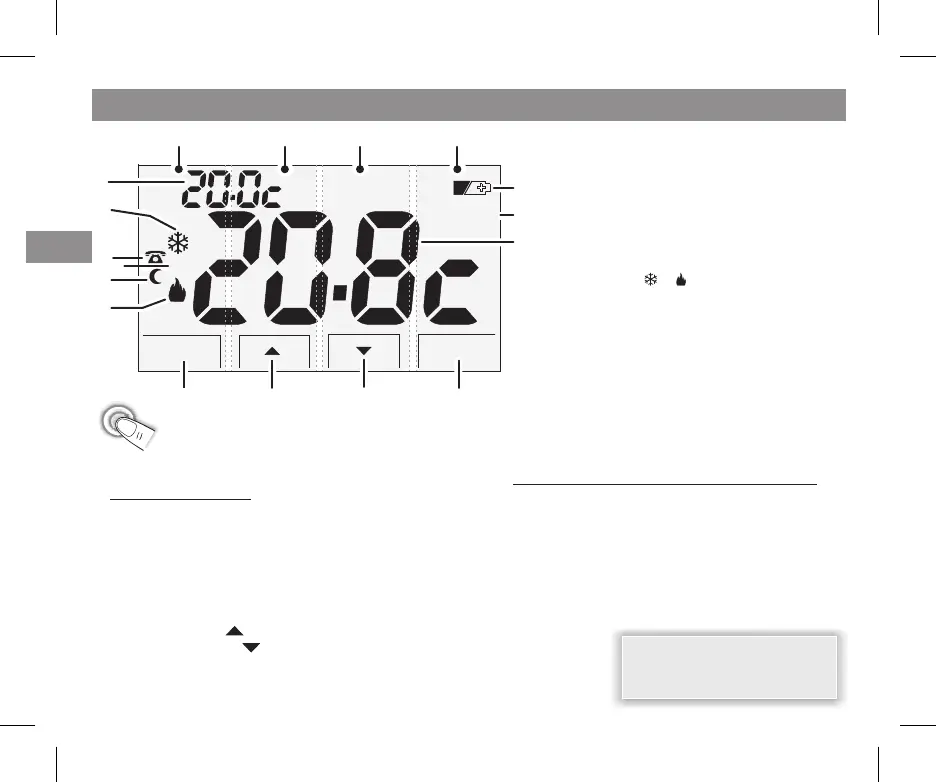
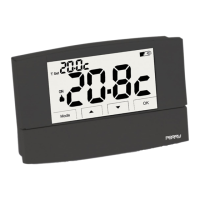
2 - DISPLAY LEGEND AND KEY FUNCTIONS (touch screen)
BC
D
E
1. COMFORT or REDUCTION or ANTI-FREEZE
Temperature setting
mode (cooling)
Activation of the device connected to the
thermostat via the telephone programmer
(optional)
Connected device indicator depending on
( with the or symbol blinking)
Night-time Reduction mode (energy saving)
mode (heating)
Room Temperature field
Backlit display
Low battery indicator
2.
3.
SUMMER
ON
WINTER
4.
5.
6.
7.
8.
9.
with a time setting
upon the first touch anywhere on the touch screen,
the display will light up, showing the keys for 5 seconds.
7
A. s
C.
D.
E.
- operation mode with COMFORT temperature: WINTER (heating) or SUMMER (cooling)
- operation mode with REDUCTION temperature NIGHT-TIME Winter or Summer
- thermostat OFF mode
: accesses the PROGRAMMABLE FUNCTIONS menu
( ) increases the value of a setting
( ) decreases the value of a setting
:
: confirms the operation
: exits the PROGRAMMABLE FUNCTIONS menu
kept pressed (4 sec): for the "Installer" settings
marker
marker
marker
- pressed briefly
- kept pressed (4 sec)
UP Button
DOWN Button
OK Button
ensitive areas
The touch screen has 4 areas (markers) which are sensitive to touch.
. After 5 seconds, press the key or relative area to change settings
Upon first touch anywhere on the touch screen, the
display keys will light up (note: with each touch of a key or
related area, you reactivate a time-out of 5 seconds).
B. Mode .Button marker
pressed repeatedly for the "User" settings:
6
5
Note: more particular button
functions are described in the
specific paragraphs.
3
2
4
8
1
9
A A A A
TOUCH SCREEN:


 To Next Page