31
EN
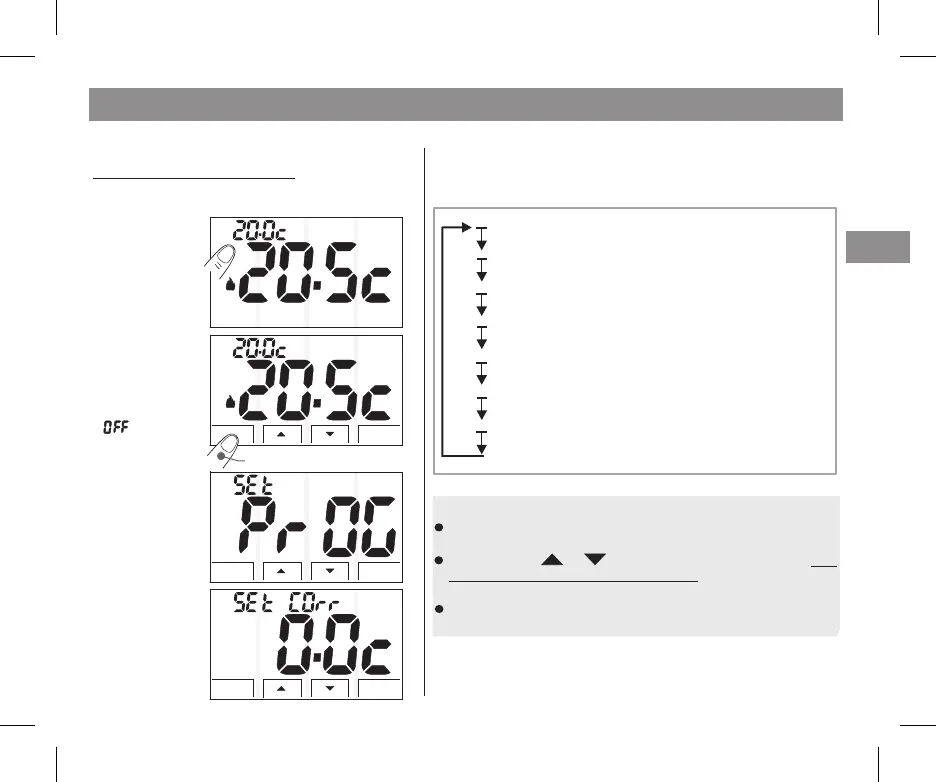
The thermostat
screen will now
display the
temperature
reading correction.
After accessing the programming menu (paragraph 5.1), the
following parameters/functions can be set and/or modified
(described in the same order in the following paragraphs):
Press any area on
the touch screen
display (to see keys)
USING KEYS INSIDE THE PROG. MENU:
- Mode
-
- To exit from programming keep the
"OK" key pressed for 4 seconds.
Quickly press the “ ” key to pass from one function to
the next.
press the key or modify the desired parameter
and pass on to the
next function.
and confirm changes,
and
save it by briefly pressing the keyOK
note: 60 seconds (time-out) after the last key (marker) is pressed within the
programming menu, the thermostat will return to normal operation (if you do
not want to save changes, do not confirm with the OK key).
you cannot access
thermostat programming
in mode.
Mode
OK
T Set
T Set
5 - PROGRAMMABLE FUNCTIONS
5.1 - ACCESS TO THE PROGRAMS
SET PROG
appears on the
display for a few
moments.
Keep the
button pressed
for 4 sec.
Mode
keep pressed for 4 sec
...(Par. 5.2)Correction of the detected room temperature
Blocking the maximum temperature settings
Blocking the minimum temperature settings
Selecting the temperature adjustment method:
ON/OFF DIFFERENTIAL or PROPORTIONAL
(OFFSET)
(Winter)......(Par. 5.3)
(Summer)....(Par. 5.3)
...........(Par. 5.5)
.........(Par. 5.6)
....(Par. 5.7)
............(Par. 5.8)
Hysteresis setting
Cycle duration setting
Adjusting or excluding the anti-freeze protection
(for Thermal differential).....................
(for Modulating proportional)...........
.
Mode
OK
Mode
OK
It is recommended to give access to the programs
since a change in
some settings can compromise the proper
functioning of the system.
to the installer or expert users


 To Next Page