2. Automatic Tuning
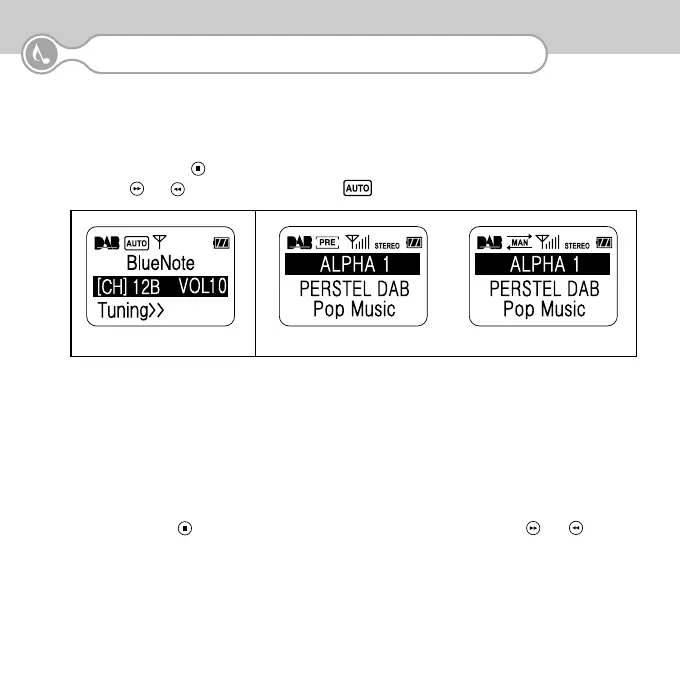
Automatic tuning enables you to scan for available DAB channels in your area. You should extend the
antenna fully before this operation.
①
Press the Confirm ( ) button until the second line of the display is highlighted
②
Press ( ) or ( ) for more than 2 seconds untill appears in the tuning icon.
6
3.DAB OPERATION
③
The unit will scan the DAB channels up or down and will stop on the first channel found with radio services.
④
To scan for another channel, repeat steps
①
and
②.
⑤
If no services are found the scan will stop when the unit has attempted to tune all the channels.
Details of all DAB services available and the coverage in your area are available on the internet at:
http://www.digitalradionow.com. See Appendix 1 for the UK channel allocation.
3. To change to receive another ensemble
Press the Confirm ( ) button until the second line of the display is highlighted. Use the ( ) or ( ) button to
move the channel up or down. You need to allow about 3 seconds on a channel to give BlueNote time to acquire
and decode the signal.
<Automatic Tuning Mode>
<Tuned - Back to Normal Mode>


 To Next Page