1
ENGLISH
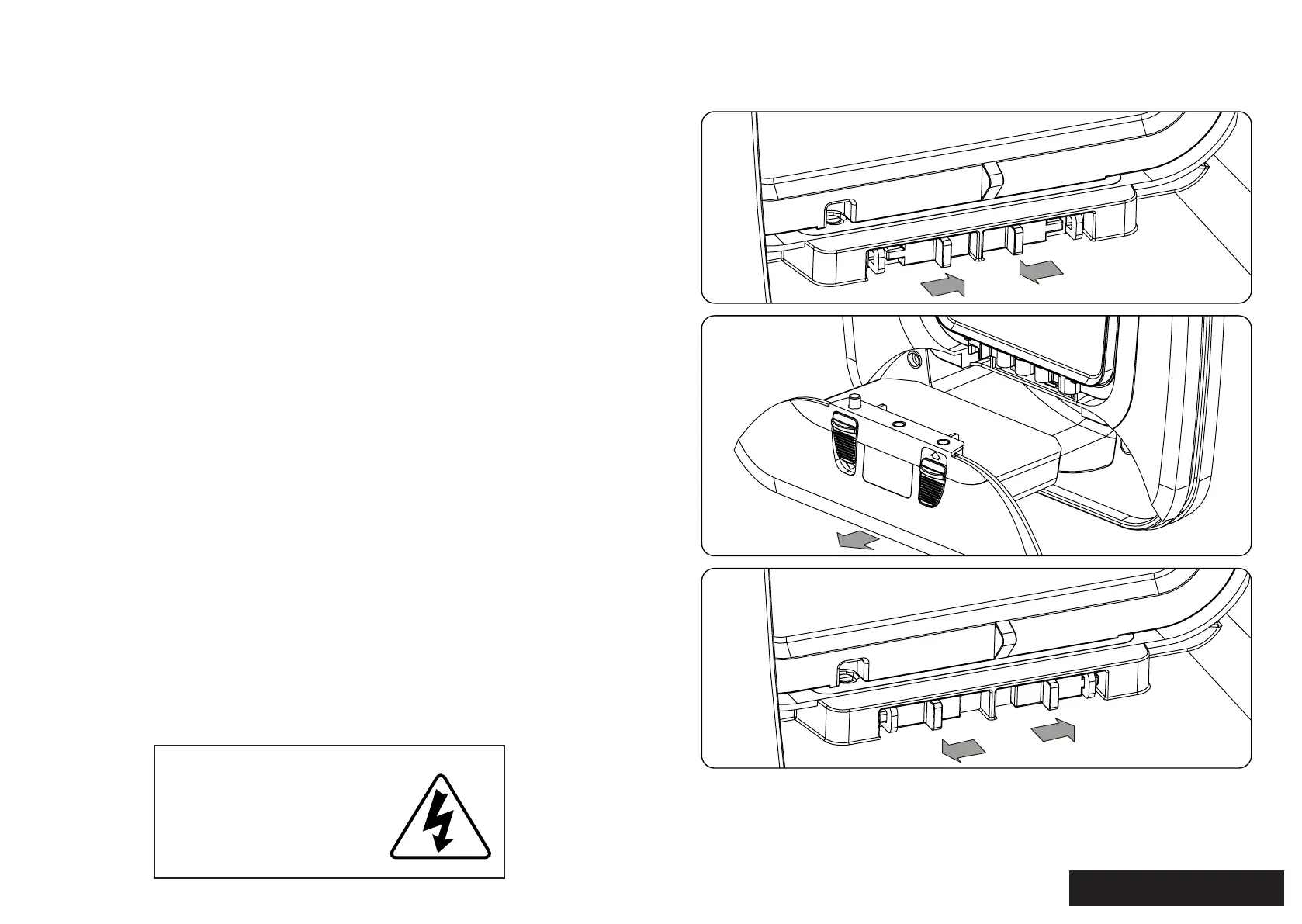
1. CARTRIDGE REMOVAL
CONTENTS
Remove the
cartridge by pulling
out of the frame
2.
Unlock the cartridge by sliding the locks
inwards
1.
Insert the new cartridge and make sure you lock
it in sliding the locks outwards
3.
1. CARTRIDGE REMOVAL .....................................................................................1
2. ELECTRICAL INTERFERENCE .......................................................................... 2
3. INSERTING BATTERIES ......................................................................................2
4. OPTION FOR CONNECTING TO POWER ....................................................3
5. TURNING ON/OFF ..............................................................................................3
6. PAIRING COLLAR TAGS .....................................................................................4
8. FITTING COLLAR TAG TO YOUR PET ...........................................................4
9. REPLACING COLLAR TAG BATTERIES .........................................................4
10. LOW BATTERY INDICATOR ...........................................................................4
11. REPLACING THE DOOR FLAP ......................................................................5
12. TROUBLESHOOTING .......................................................................................5
13. MAINTENANCE .................................................................................................5
Adaptor:
Voltage: 3V - 300mA
DC connector 0.7mm ID (negave),
2.35mm OD (posive)
ADAPTOR SPECIFICATIONS


 To Next Page