10
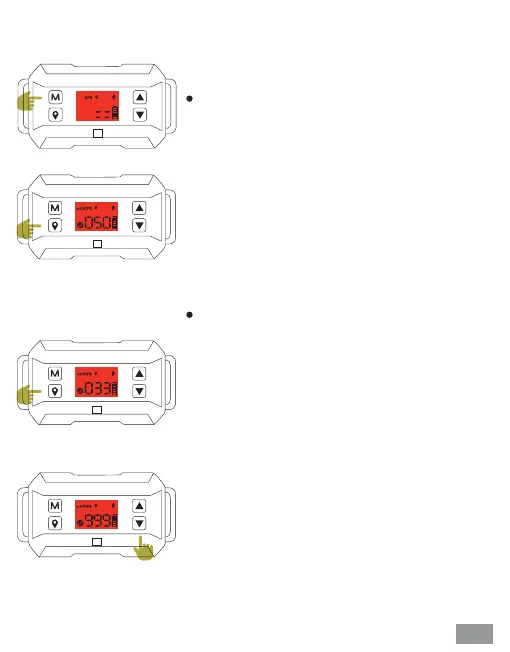
❹ Automatic memory function
❺ Safe radius distance setting
The product automatically saves the last
center point and safety radius distance upon
startup. If the training location is changed,
please reset it according to Step 3.
(Note: To ensure optimal accuracy, it is
recommended to reset the center point and
safety radius distance every 5 days).
After the successful positioning of the center
point in Step 3, please click the positioning
button again, and the distance icon along with
the distance number will start flashing on the
screen. Then, press the up or down button to
adjust the desired safe radius distance
between 33 to 999 yards. The distance will be
automatically confirmed after 5 seconds.
However, if you do not want to wait, you can
click the positioning button to confirm it
instantly.
The minimum radius distance is 33 yards,
and the maximum radius distance is 999
yards (1 yard = 0.9144 meters)
The length of the adjustment increases by 1
yard if you press the button quickly, and by
10 yards if you long-press the button for
more than 3 seconds.


 To Next Page