3.Relevant Description
4. 3 training modes: static stimulation/ vibration/ tone. 0-3
Adjustable Intensity Levels for Tone; 0-8 Adjustable Intensity
Levels for Vibration;0-16 Adjustable Intensity Levels for
Static Stimulation. If the level set 0, the mode is inhibited.
5. IPX6 Waterproof Receiver Collar and IPX5 Waterproof
Transmitter.
6. Maximum remote range up to 600m in the open area
without any interference.
7. Train up to 2 dogs with one remote transmitter (separately
purchase additional receiver)
8. Rechargeable collar and transmitter.
08
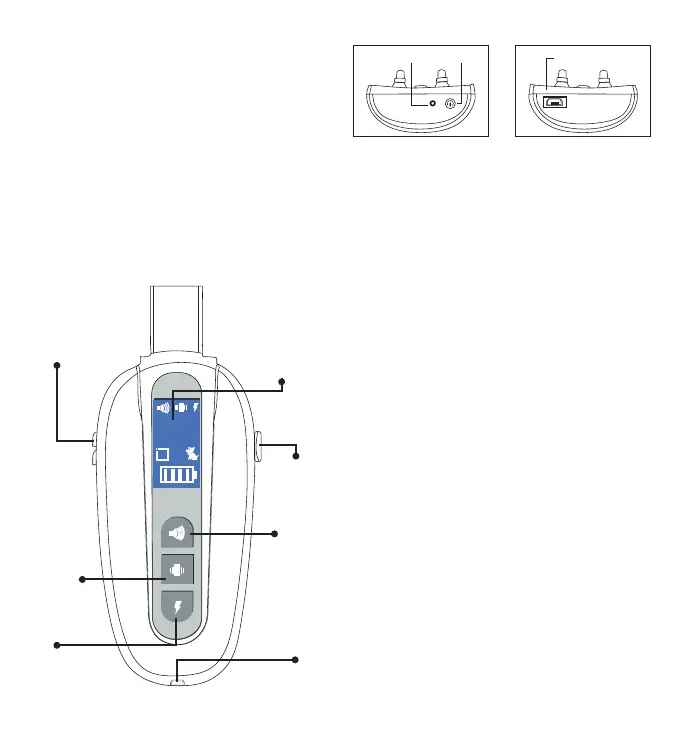
A B
A
B
Static
Stimulation
Button
Intensity Up/
down Button
Vibration
Button
Tone
Button
Charging
port
Channel
Button
LCD Screen
❶Transmitter description
switchIndicator light
Charging port
①.LCD Screen:
The LCD Screen will display different modes of the collar
and the different channels for two collar receivers as well
as battery indication.
Channel A/B will be desplayed on the screen
②.Static Stimulation Button: Pressing the “Static Stimulation”
button,the receiver will emit static stimulation. If set level 0 ,
NO stimulation
③.Vibration Button: Pressing the “Vibration” button, the receiver
will vibrate. If set level 0, NO vibration
④.Beep Button: Pressing the “Beep” button, the receiver will
emit beep sound. If set level 0, NO beep
⑤.Intensity Up/down Buttons: Selects intensity level of beep,
vibration and static Stimulation.
⑥.Channel Button: Pressing this “A B”button will shift channel
between the first and second collar receiver.
⑦.Charging port: Insert charging cable into charging port to
charge the Transmitter.
⑧. Turn on/off the Receiver:Turn on/off the receiver by press
the “Power” button one time.
⑨. Micro USB port: Insert charging cable into Micro USB port
to charge the receiver.
1. Charge the remote transmitter
1) Connect the charger cable to the charging port.
2) Plug the charger into a standard outlet.
3)The icon of battery will flash.
4) Charge the transmitter for about two hour for the first charge
or until the icon of battery stops flashing.
4.How to Use It
Note: Please charge before using the product!
❷Receiver description
-3- -4-



 To Next Page